

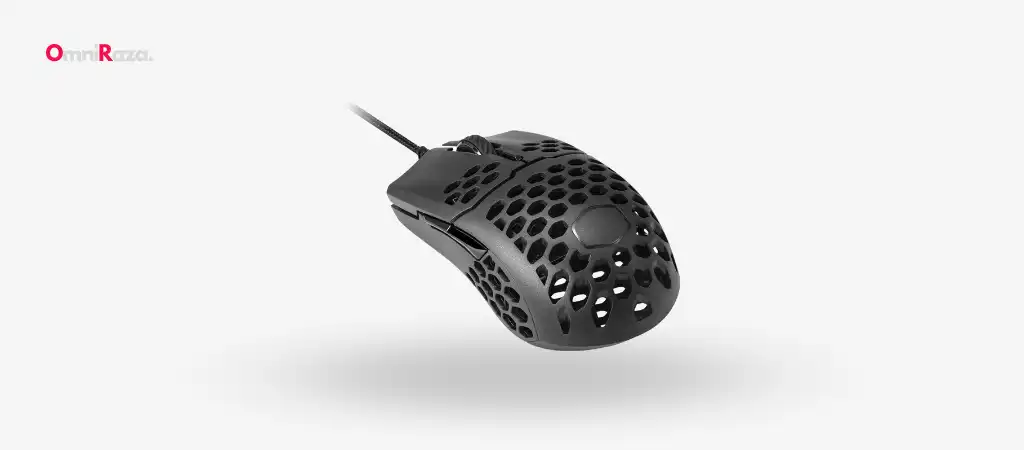
The world of gaming peripherals is filled with a plethora of options, each promising to enhance your gaming experience. Among these, the Cooler Master MM710 Mouse has managed to stand out, not just for its innovative design but also for the high performance it promises to deliver.
In this comprehensive review, we’ll delve into every aspect of this lightweight option, examining its key features, specifications, pros and cons, and overall performance as the Best Budget Gaming Mouse. By the end, you’ll have a clear understanding of whether this mouse is the right fit for your gaming needs.

Key Features
-
Lightweight Honeycomb Shell
The Cooler Master MM710 Mouse features a unique honeycomb shell design, engineered to be both durable and ultra-lightweight. This design significantly reduces the overall weight of the mouse to just 53 grams, allowing for extended gaming sessions without causing fatigue.
-
Ultralight Ultraweave Cable
The mouse comes equipped with an innovative ultra-weave cable that reduces both the weight and cable drag. This means you can enjoy seamless swipes across your mouse pad without any hindrance, providing a more fluid and responsive gaming experience.
-
High-Performance Optical Sensor
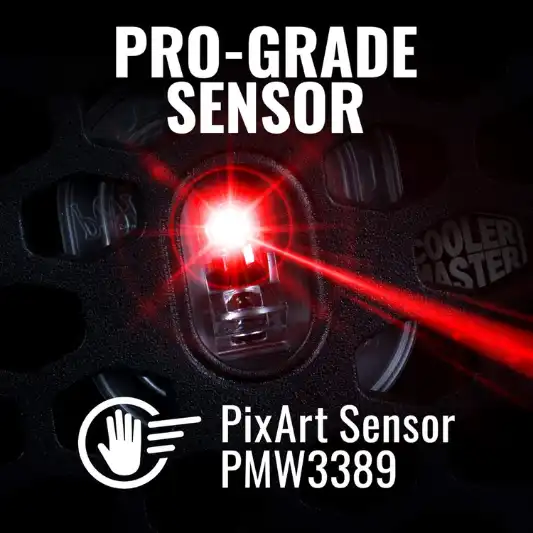
At the core of the Cooler Master MM710 Mouse is the Pixart 3389 optical sensor, which is adjustable up to 16,000 DPI. This high-grade sensor offers superior precision, control, and accuracy, making it ideal for competitive gaming.
-
Superior Mouse Feet
The mouse is fitted with PTFE feet that provide a smooth, low-friction glide, ensuring consistent performance on any surface. These mouse feet are designed to withstand rigorous use, making them perfect for high-paced gaming.
-
Ergonomic Ambidextrous Shape
The Cooler Master MM710 Mouse is optimized for right-handed gamers but features an ambidextrous shape, making it comfortable for a wide range of hand sizes and grips. The inclusion of two extra buttons adds to its versatility, offering additional customization for gamers.
-
High-Quality Omron Switches
The left and right-click buttons on the MM710 are equipped with Omron switches, known for their durability and accuracy. These switches are graded for up to 20 million presses, ensuring that your mouse remains responsive even after prolonged use.
-
Additional PTFE Feet
Cooler Master includes an extra set of PTFE feet with the MM710, ensuring that you can maintain peak performance even after the original feet have worn out.
Specifications
| Feature | Details |
|---|---|
| Brand | Cooler Master |
| Model Number | MM-710-KKOL1 |
| Item Weight | 1.9 ounces (53 grams) |
| Product Dimensions | 4.59 x 2.46 x 1.51 inches |
| Color | Black Matte |
| Power Source | Corded Electric |
| Connectivity Technology | USB |
| Special Feature | Lightweight honeycomb shell |
| Movement Detection Technology | Optical |
| Sensor | Pixart 3389 |
| DPI Range | Adjustable up to 16,000 DPI |
| Switches | Omron, rated for 20 million clicks |
| Mouse Feet | PTFE, low-friction, extra set included |
| Lift-off Distance | Less than 2mm |
| Hand Orientation | Right-handed, ambidextrous design |
| Cable Type | Ultra-weave |
| Manufacturer | Cooler Master |
| Date First Available | June 14, 2019 |
Pros and Cons
Pros
- Extremely lightweight at just 53 grams.
- Honeycomb shell design is both durable and reduces weight.
- High-performance Pixart 3389 optical sensor with up to 16,000 DPI.
- PTFE mouse feet offer smooth and consistent glide.
- Ergonomic and ambidextrous shape for versatile comfort.
- Omron switches provide up to 20 million clicks.
- Ultra-weave cable minimizes cable drag.
Cons
- Lack of RGB lighting may be a drawback for some gamers.
- Ambidextrous design might not be ideal for those with large hands.
- Limited button options compared to other gaming mice.
In-Depth Analysis
Design and Build Quality
The Cooler Master MM710 Mouse is a testament to the adage that less is more. With a minimalist design philosophy, this mouse is devoid of any unnecessary frills. The honeycomb shell not only gives the mouse a unique look but also plays a crucial role in reducing the overall weight. At just 53 grams, the MM710 is one of the lightest gaming mice on the market, making it an excellent choice for gamers who prioritize speed and agility.
The build quality is impressive, with the honeycomb shell offering a sturdy and durable feel. Despite the perforated design, the shell feels solid and well-constructed, capable of withstanding the rigors of intense gaming sessions. The matte black finish adds a touch of elegance, making it a sleek addition to any gaming setup.
Performance and Precision
Performance-wise, the Cooler Master MM710 Mouse does not disappoint. The Pixart 3389 optical sensor is a top-tier component, offering an adjustable DPI range up to 16,000. This allows for fine-tuning the mouse sensitivity to suit your gaming style, whether you prefer high-speed flick shots or slow, deliberate movements.
The PTFE feet provide a smooth and consistent glide across various surfaces, ensuring that the mouse movements are translated accurately on-screen. The ultra-weave cable is another standout feature, virtually eliminating cable drag and allowing for unhindered movement. This makes the MM710 an excellent choice for FPS games where quick, precise movements can make all the difference.
Comfort and Ergonomics
Comfort is a key consideration when choosing a gaming mouse, and the Cooler Master MM710 Mouse delivers on this front as well. The ambidextrous shape is optimized for right-handed users but is comfortable for a wide range of hand sizes and grip styles. Whether you prefer a claw grip, palm grip, or fingertip grip, the MM710 offers a comfortable experience.
The lightweight design also contributes to the overall comfort, reducing the strain on your wrist during extended gaming sessions. The inclusion of two extra buttons adds a layer of customization, allowing you to map additional commands for quick access during gameplay.
Durability and Longevity
Durability is another area where the Cooler Master MM710 Mouse excels. The Omron switches used in the left and right-click buttons are graded for up to 20 million presses, ensuring that the mouse remains responsive and reliable even after prolonged use. The high-quality materials used in the construction of the mouse, combined with the extra set of PTFE feet included in the package, ensure that the MM710 is built to last.



Conclusion
The Cooler Master MM710 Mouse is an exceptional gaming mouse that excels in performance, comfort, and durability. Its ultra-lightweight design, coupled with a high-performance optical sensor, makes it a standout choice for gamers who demand quick, precise movements during gameplay. While it may lack some of the flashy features like RGB lighting that other gaming mice offer, it more than makes up for it with its focus on functionality and performance.
If you’re in the market for a gaming mouse that prioritizes speed, accuracy, and comfort, the Cooler Master MM710 Mouse should be at the top of your list. Its minimalist design, combined with top-tier components, ensures that it will not only meet but exceed the expectations of even the most demanding gamers.
You Might Be Interested In
- How Does GPU Processing Work?
- How Do I Turn On Mouse Pairing Mode?
- Which Mouse Is Better Glorious Model O Or Model D?
- What Is The Main Difference Between RAM and ROM?
- TENMOS T12 Wireless Gaming Mouse Review
Highly Recommended – ⭐⭐⭐⭐⭐
Ready to elevate your gaming experience? The Cooler Master MM710 Mouse is the perfect companion for gamers who value precision, speed, and comfort. Don’t let your current mouse hold you back—upgrade to the MM710 today and experience the difference that an ultra-lightweight, high-performance gaming mouse can make. Click [here] to purchase the Cooler Master MM710 Mouse now and take your gaming to the next level!
Comparison of the Cooler Master MM710 Mouse with Similar Products
To help you make an informed decision, we’ve compared the Cooler Master MM710 Mouse with other popular lightweight gaming mice. This comparison focuses on key features, performance metrics, and design elements that are crucial for gamers.
Comparison Table
| Feature | Cooler Master MM710 | Razer Viper Mini | Glorious Model O | SteelSeries Rival 3 |
|---|---|---|---|---|
| Weight | 53 grams | 61.7 grams | 67 grams | 77 grams |
| Sensor | Pixart 3389 | Razer Optical Sensor | Pixart 3360 | TrueMove Core |
| DPI Range | Up to 16,000 DPI | Up to 16,000 DPI | Up to 16,000 DPI | Up to 8,500 DPI |
| Cable | Ultra-weave | Speedflex Cable | Ascended Cord | Flexible Rubber Cable |
| Mouse Feet | PTFE, extra set included | 100% PTFE, no extra feet | G-Skates (optional) | PTFE, non-replaceable |
| Shape | Ambidextrous, ergonomic for right-handed | Ergonomic, ambidextrous | Ambidextrous, ergonomic | Ergonomic, right-handed |
| Switches | Omron, rated for 20 million clicks | Razer Optical Switches | Omron, rated for 20 million clicks | SteelSeries, rated for 60 million clicks |
| RGB Lighting | No | Yes, customizable | No | Yes, customizable |
| Lift-off Distance | Less than 2mm | Adjustable, low | Adjustable, low | Adjustable, low |
| Price Range | Mid-range | Mid-range | Mid-range | Budget-friendly |
| Target Users | Competitive gamers | Esports players, general use | Competitive gamers | Budget-conscious gamers |
Detailed Comparison
1. Weight and Build
- Cooler Master MM710: Weighing just 53 grams, the MM710 is one of the lightest gaming mice available, thanks to its honeycomb shell. This design helps reduce fatigue and allows for swift, precise movements.
- Razer Viper Mini: At 61.7 grams, the Viper Mini is slightly heavier than the MM710 but still considered lightweight. Its design focuses on speed and precision.
- Glorious Model O: Weighing 67 grams, the Model O is a bit heavier compared to the MM710 but still falls into the lightweight category. It features a honeycomb design similar to the MM710.
- SteelSeries Rival 3: At 77 grams, the Rival 3 is heavier than the other mice on this list. It is designed to offer a more solid feel, which might be preferred by some users.
2. Sensor and DPI Range
- Cooler Master MM710: Equipped with the Pixart 3389 sensor, it supports up to 16,000 DPI, providing high precision and responsiveness.
- Razer Viper Mini: Features the Razer Optical Sensor, also adjustable up to 16,000 DPI. This sensor is designed to offer high accuracy with zero debounce time.
- Glorious Model O: Utilizes the Pixart 3360 sensor, offering a DPI range up to 16,000, similar to the MM710 and Viper Mini, ensuring precise tracking.
- SteelSeries Rival 3: Uses the TrueMove Core sensor with a lower maximum DPI of 8,500. While sufficient for most gaming needs, it might not offer the same level of precision as the other sensors.
3. Cable
- Cooler Master MM710: Features an ultra-weave cable that reduces drag and enhances movement fluidity, mimicking the feel of a wireless mouse.
- Razer Viper Mini: Comes with a Speedflex cable designed to be flexible and minimize drag, which is beneficial for rapid movements.
- Glorious Model O: Includes an Ascended Cord, known for its lightweight and flexible design, reducing cable drag effectively.
- SteelSeries Rival 3: Has a flexible rubber cable that is less advanced compared to the ultra-weave or Speedflex cables but still offers decent performance.
4. Mouse Feet
- Cooler Master MM710: Equipped with PTFE feet, offering a smooth glide and low friction. The inclusion of an extra set ensures longevity.
- Razer Viper Mini: Features 100% PTFE feet, known for their excellent glide quality. It does not include additional feet.
- Glorious Model O: Uses G-Skates, which are designed for smooth and consistent gliding. Additional feet can be purchased separately.
- SteelSeries Rival 3: Comes with PTFE feet that offer smooth movement but are non-replaceable, which may impact long-term performance.
5. Shape and Ergonomics
- Cooler Master MM710: The ambidextrous design is optimized for right-handed users but comfortable for a variety of grips.
- Razer Viper Mini: Ergonomic and ambidextrous, suitable for both left and right-handed users.
- Glorious Model O: Also features an ambidextrous design, with an ergonomic shape catering to various grip styles.
- SteelSeries Rival 3: Ergonomically designed for right-handed users, which might not be as comfortable for left-handed gamers.
6. Switches
- Cooler Master MM710: Features Omron switches rated for up to 20 million clicks, ensuring long-lasting durability.
- Razer Viper Mini: Uses Razer Optical Switches, known for their fast actuation and long lifespan.
- Glorious Model O: Equipped with Omron switches, also rated for up to 20 million clicks, similar to the MM710.
- SteelSeries Rival 3: Uses SteelSeries switches rated for up to 60 million clicks, offering exceptional durability.
7. RGB Lighting
- Cooler Master MM710: Lacks RGB lighting, focusing purely on performance and functionality.
- Razer Viper Mini: Features customizable RGB lighting, allowing users to personalize their gaming setup.
- Glorious Model O: Does not include RGB lighting, aligning with a minimalist design approach.
- SteelSeries Rival 3: Features customizable RGB lighting, adding aesthetic appeal to its functionality.
8. Price Range
- Cooler Master MM710: Positioned in the mid-range category, offering a good balance between performance and cost.
- Razer Viper Mini: Also falls into the mid-range price category, with features appealing to competitive gamers.
- Glorious Model O: Priced similarly to the MM710 and Viper Mini, providing competitive features for its cost.
- SteelSeries Rival 3: More budget-friendly, making it an attractive option for gamers seeking value without compromising too much on performance.
FAQs
What makes the Cooler Master MM710 Mouse stand out from other gaming mice?
The Cooler Master MM710 Mouse stands out primarily due to its ultra-lightweight design, thanks to the honeycomb shell. Weighing in at just 53 grams, it is one of the lightest gaming mice on the market. This design reduces fatigue during long gaming sessions, allowing for faster and more precise movements.
Additionally, the inclusion of a high-performance Pixart 3389 optical sensor with up to 16,000 DPI and the ultra-weave cable further enhances its performance and usability.
Is the Cooler Master MM710 Mouse suitable for all types of games?
Yes, the Cooler Master MM710 Mouse is versatile enough to be used for various gaming genres. Its high DPI sensor and lightweight design make it particularly well-suited for fast-paced games like first-person shooters (FPS) where quick, precise movements are crucial. However, its ergonomic design and extra buttons also make it a good choice for real-time strategy (RTS) games, MOBAs, and even casual gaming.
How does the ultra-weave cable improve the gaming experience?
The ultra-weave cable is designed to be both lightweight and flexible, significantly reducing the cable drag that can often impede mouse movement. This allows for smoother, more responsive gameplay, as the mouse moves freely without the cable pulling or getting caught on the edge of your desk or mouse pad. The ultra-weave cable mimics the feel of a wireless mouse while maintaining the reliability and consistency of a wired connection.
Can the Cooler Master MM710 Mouse be used by left-handed gamers?
While the Cooler Master MM710 Mouse features an ambidextrous shape, it is optimized for right-handed use, particularly with the placement of the extra buttons. Left-handed gamers can use the mouse, but they might find the button placement less convenient. Cooler Master does offer other models that are specifically designed for left-handed users if that is a critical factor in your decision.
How does the Cooler Master MM710 Mouse compare to other lightweight gaming mice?
The Cooler Master MM710 Mouse is one of the lightest gaming mice available, making it a strong contender in the lightweight gaming mouse category. Its unique honeycomb shell design, combined with the high-performance Pixart 3389 sensor and ultra-weave cable, gives it an edge over many competitors. While some gamers may miss features like RGB lighting, the MM710’s focus on performance and comfort makes it an excellent choice for serious gamers looking for a lightweight, high-precision mouse.
