

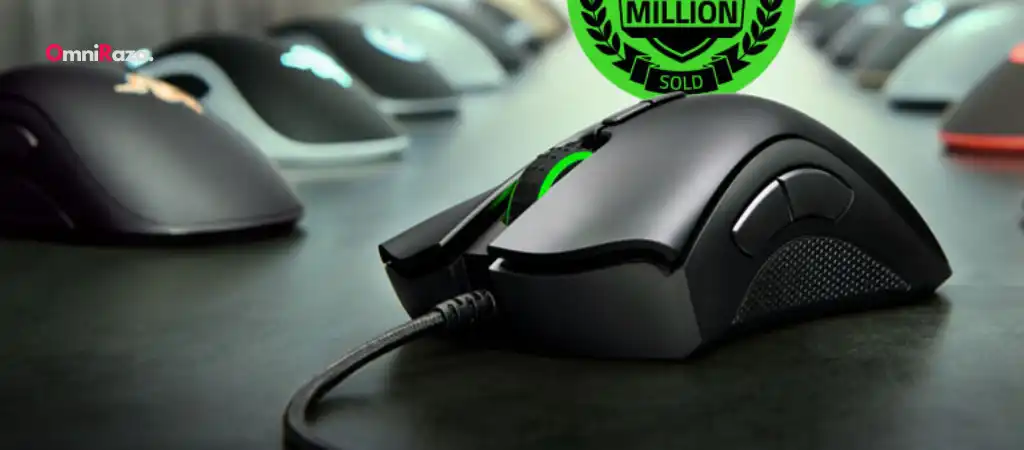
When it comes to gaming peripherals, especially gaming mice, the Razer DeathAdder Essential is often regarded as a reliable and high-performing choice. But, as with any piece of technology, one of the most critical questions for potential buyers is: What is the lifespan of the Razer DeathAdder Essential?
This guide will explore the factors influencing the longevity of the Best Budget Gaming Mouse, typical lifespan based on user experiences, and tips on extending the life of your Razer DeathAdder Essential.
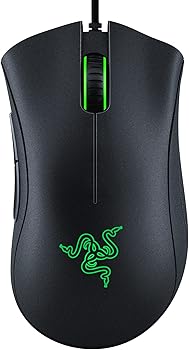
Razer DeathAdder Essential
The Razer DeathAdder Essential is a widely popular gaming mouse that has made a significant impact on the gaming community. Known for its ergonomic design, responsive performance, and durability, it’s a staple for both casual and professional gamers. The DeathAdder series has been around for over a decade, evolving with each new iteration. The Essential model is a more budget-friendly version, providing essential features without the frills, making it accessible to a broader audience.
Key Features
-
Ergonomic Design
The Razer DeathAdder Essential is renowned for its comfortable shape, which fits naturally in the hand, reducing strain during extended gaming sessions.
-
High-Precision Sensor
Equipped with a 6400 DPI optical sensor, it offers precise and responsive tracking, which is crucial for competitive gaming.
-
Durable Mechanical Switches
Razer has equipped the DeathAdder Essential with mechanical switches that are rated for up to 10 million clicks, ensuring a long-lasting performance.
-
Rubberized Side Grips
These provide better control and handling, reducing the chances of slippage during intense gaming moments.
Factors Influencing the Lifespan of the Razer DeathAdder Essential
Build Quality
The lifespan of the Razer DeathAdder Essential is significantly influenced by its build quality. Razer is known for producing durable products, and the DeathAdder Essential is no exception. The mouse is constructed with high-quality plastic, reinforced by mechanical switches designed to withstand millions of clicks. However, like any electronic device, the durability of individual components such as the buttons, scroll wheel, and sensor can vary, affecting the overall lifespan.
Usage Patterns
How you use the Razer DeathAdder Essential greatly impacts its lifespan. Heavy gaming sessions, especially those involving rapid clicks and extensive movements, can wear out the mouse faster. On the other hand, moderate use, such as casual gaming or general computer work, typically results in a longer lifespan. Users who are mindful of how they handle the mouse, such as avoiding excessive force or aggressive movements, may see their device last longer.
Environmental Conditions
Environmental factors, such as dust, humidity, and temperature, can also affect the lifespan of the Razer DeathAdder Essential. Dust accumulation inside the mouse can interfere with the sensor or buttons, leading to performance issues or malfunction. Similarly, exposure to high humidity or extreme temperatures can degrade the materials over time. Keeping the mouse in a clean, dry, and temperate environment can help prolong its life.
Maintenance and Care
Proper maintenance and care are crucial in extending the lifespan of the Razer DeathAdder Essential. Regular cleaning to remove dust and debris, careful handling to avoid dropping or knocking the mouse, and storing it in a safe place when not in use can prevent premature wear and tear. Additionally, using a good-quality mouse pad can reduce friction on the mouse feet, further enhancing its durability.
Manufacturer Specifications
Razer advertises the DeathAdder Essential with a lifespan of up to 10 million clicks. This figure is based on the durability of the mechanical switches used in the mouse. While this specification provides a general idea of what to expect, real-world conditions often differ, and actual lifespan can vary depending on usage patterns and environmental factors.
Typical Lifespan Based on User Experiences
User Reports and Reviews
The real-world lifespan of the Razer DeathAdder Essential can vary widely, with some users reporting that their mouse has lasted several years, while others have experienced issues within a few months. On average, most users report a lifespan of 2 to 3 years under regular use. Heavy gamers who put the mouse through rigorous daily use might see a shorter lifespan, while casual users could extend this to 4 or 5 years.
Common Issues Leading to Reduced Lifespan
Some of the most commonly reported issues that can shorten the lifespan of the Razer DeathAdder Essential include:
-
Double-Clicking Problem
One of the most frequent complaints is the double-clicking issue, where a single click is registered as a double click. This problem often arises due to wear on the mechanical switches and can be a sign that the mouse is nearing the end of its lifespan.
-
Scroll Wheel Malfunction
Another common issue is with the scroll wheel, which may stop working correctly or become unresponsive over time. This issue is typically due to the wear and tear of the internal mechanisms.
-
Cable Fraying
The cable, especially where it connects to the mouse, is prone to fraying with extensive use, leading to connectivity issues or complete failure.
Warranty and Customer Support
Razer offers a limited warranty on the DeathAdder Essential, typically covering defects in materials and workmanship for a period of one to two years, depending on the region and retailer. However, this warranty does not cover wear and tear from regular use. Understanding the terms of the warranty can help manage expectations regarding the lifespan of the Razer DeathAdder Essential and provide options for repair or replacement if issues arise within the warranty period.
Tips to Extend the Lifespan of the Razer DeathAdder Essential
Regular Cleaning
Regularly cleaning your Razer DeathAdder Essential is one of the simplest yet most effective ways to extend its lifespan. Dust and debris can accumulate in the crevices of the mouse, including the sensor and buttons. Using compressed air to blow out dust and a microfiber cloth to wipe down the surface can prevent buildup that could otherwise interfere with performance.
Avoiding Excessive Force
While the Razer DeathAdder Essential is built to withstand intense gaming, it’s essential to avoid excessive force, especially when clicking or scrolling. Heavy-handed use can wear out the mechanical switches and internal components more quickly. Being mindful of how you interact with the mouse can help prolong its life.
Using a Quality Mouse Pad
A good-quality mouse pad can reduce the friction between the mouse feet and the surface, preventing unnecessary wear. A smooth, clean mouse pad ensures that the sensor functions optimally and that the mouse feet do not wear down prematurely, both of which contribute to a longer lifespan for the Razer DeathAdder Essential.
Proper Storage
When not in use, store the Razer DeathAdder Essential in a safe place where it won’t be accidentally knocked off the desk or exposed to dust and moisture. If you travel frequently, consider investing in a protective case to prevent damage during transit.
Software Updates
Razer frequently releases firmware updates for its devices. Keeping the software up to date ensures that the mouse performs at its best and can help address any software-related issues that could affect the lifespan of the Razer DeathAdder Essential. Regularly checking for and installing updates via Razer Synapse or the official Razer website is recommended.
Cable Management
Proper cable management is crucial to prevent the cable from becoming kinked, frayed, or damaged. Use cable clips or ties to keep the cable organized and avoid sharp bends, which can weaken the internal wires over time. If possible, consider a mouse bungee to prevent the cable from dragging or catching on your desk.
You Might Be Interested In
- TeckNet Pro Gaming Mouse Review
- What Is The Difference Between MM710 and MM711 Lite?
- How Can I Let ChatGPT See My Computer?
- How Do I Get 400 Dpi On My Corsair Harpoon?
- What Is The Function Of Tecknet Mouse?
Conclusion
The lifespan of the Razer DeathAdder Essential is influenced by various factors, including build quality, usage patterns, environmental conditions, and maintenance practices. While Razer advertises the mouse with a lifespan of up to 10 million clicks, real-world use suggests an average lifespan of 2 to 3 years for regular gamers, with potential for longer use in less demanding scenarios.
By understanding the factors that affect its lifespan and following best practices for maintenance and care, users can maximize the longevity of their Razer DeathAdder Essential, ensuring it remains a reliable tool for gaming or everyday use. Whether you’re a casual gamer or a competitive player, taking the time to care for your mouse can pay off in the long run, allowing you to enjoy its performance for years to come.
FAQs about Lifespan Of The Razer Deathadder Essential?
What is the typical lifespan of the Razer DeathAdder Essential?
The typical lifespan of the Razer DeathAdder Essential varies depending on how it is used and maintained. On average, users report that the mouse lasts between 2 to 3 years under regular use, such as daily gaming or work tasks.
Heavy gamers, who put the mouse through intense, frequent use, might experience a shorter lifespan, while those who use it less intensively can potentially extend its life to 4 or even 5 years. The key factors influencing this lifespan include the build quality, usage patterns, environmental conditions, and how well the mouse is maintained.
How can I extend the lifespan of my Razer DeathAdder Essential?
To extend the lifespan of the Razer DeathAdder Essential, you should follow these best practices:
- Regular Cleaning: Keep the mouse clean by regularly removing dust and debris, especially from the sensor, buttons, and scroll wheel.
- Avoid Excessive Force: Handle the mouse gently, avoiding excessive pressure on the buttons and scroll wheel.
- Use a Quality Mouse Pad: A smooth, clean mouse pad can reduce wear on the mouse feet and ensure optimal sensor performance.
- Proper Storage: Store the mouse in a safe, dry place when not in use to avoid damage from environmental factors.
- Cable Management: Ensure the cable is properly managed to prevent fraying or internal damage, and consider using a mouse bungee to keep the cable secure.
By following these steps, you can significantly prolong the usability and performance of your Razer DeathAdder Essential.
What are common issues that might shorten the lifespan of the Razer DeathAdder Essential?
Several common issues can potentially shorten the lifespan of the Razer DeathAdder Essential:
- Double-Clicking Issue: A common problem where a single click is registered as a double click, usually due to wear on the mechanical switches.
- Scroll Wheel Malfunction: Over time, the scroll wheel might become unresponsive or malfunction due to wear on the internal components.
- Cable Fraying: The cable can wear out, particularly where it connects to the mouse, leading to connectivity issues or complete failure.
- Sensor Problems: Accumulation of dust or dirt on the sensor can cause tracking issues, which may affect the mouse’s performance.
Addressing these issues promptly, such as by cleaning the mouse or using proper cable management, can help mitigate their impact on the lifespan of the device.
Does Razer’s warranty cover the lifespan of the DeathAdder Essential?
Razer offers a limited warranty on the DeathAdder Essential, which typically covers defects in materials and workmanship for a period of one to two years, depending on the region and retailer. However, this warranty does not cover normal wear and tear resulting from regular use.
For example, issues like the double-clicking problem or cable fraying, which may arise after extended use, are usually not covered under the warranty. Understanding the terms of the warranty can help you manage expectations regarding the lifespan of the Razer DeathAdder Essential and determine whether you are eligible for repair or replacement within the warranty period.
How many clicks is the Razer DeathAdder Essential rated for, and how does this affect its lifespan?
The Razer DeathAdder Essential is rated for up to 10 million clicks, according to the manufacturer’s specifications. This rating provides a general estimate of the durability of the mouse’s mechanical switches, which are a crucial component of its overall lifespan. In practical terms, how quickly a user reaches this limit depends on their usage patterns.
For example, a heavy gamer who clicks thousands of times per day may reach the 10 million click limit more quickly than a casual user. While this rating offers a benchmark for longevity, the actual lifespan of the Razer DeathAdder Essential will also depend on other factors, such as how well the mouse is maintained and the conditions in which it is used.
