

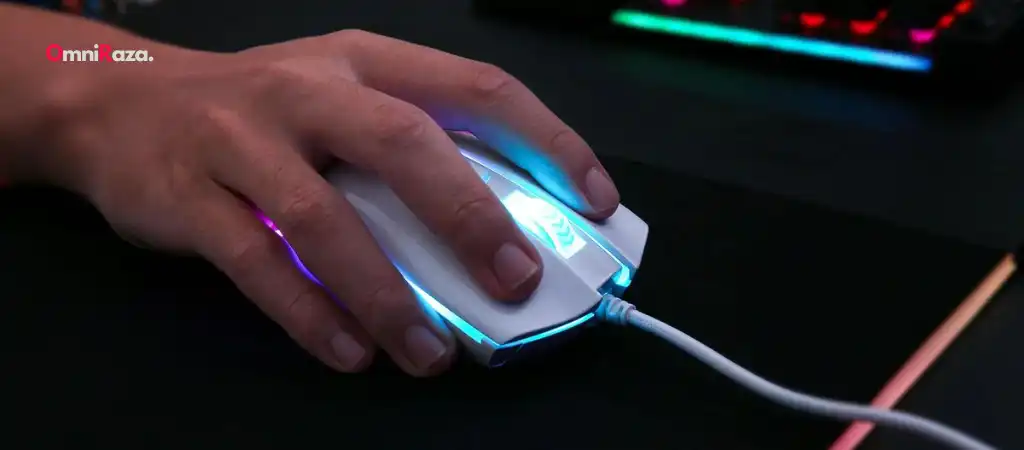
The Redragon M711 Cobra gaming mouse has gained popularity due to its affordability, features, and performance, making it a favorite among budget-conscious gamers. As with any piece of hardware, potential buyers often wonder about the durability and lifespan of the Redragon M711. Understanding the lifespan of the Redragon M711 is crucial to make an informed purchasing decision.
This guide delves into various factors that influence the lifespan of the Redragon M711, tips to extend its longevity, and comparisons with similar products, including the Best Budget Gaming Mouse.
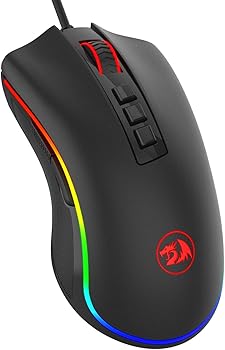
What Is the Redragon M711 Cobra?
Before diving into the lifespan of the Redragon M711, it’s essential to understand the brand behind it. Redragon is known for producing gaming peripherals that balance cost-effectiveness with performance. They have a reputation for offering durable products at affordable prices, appealing primarily to gamers who do not want to spend a fortune on high-end equipment.
Key Features of the Redragon M711
The Redragon M711 Cobra is a gaming mouse designed with various features that make it a solid choice for gamers:
-
DPI Adjustment
The M711 offers DPI settings up to 10,000, making it versatile for different gaming needs.
-
RGB Lighting
The mouse includes customizable RGB lighting with several modes, appealing to gamers who appreciate aesthetics.
-
Ergonomic Design
Designed to fit comfortably in the hand, the Redragon M711 allows prolonged use without discomfort.
-
Build Quality
The mouse is constructed using durable materials, including reinforced plastic and high-quality switches.
Target Audience
The Redragon M711 is aimed primarily at casual to intermediate gamers. Its features cater to those who need a reliable gaming mouse without breaking the bank. However, the question remains—how long can users expect this mouse to last?
Lifespan of the Redragon M711
Factors Influencing the Lifespan of the Redragon M711
The lifespan of the Redragon M711 depends on several factors, which include but are not limited to:
1. Usage Patterns
The lifespan of the Redragon M711 is significantly influenced by how frequently and intensively it is used. Gamers who use the mouse for several hours daily will likely experience more wear and tear compared to occasional users.
2. Build Quality and Materials
The materials used in the construction of the Redragon M711 directly impact its durability. The mouse uses durable plastic and reinforced components to withstand regular use, which generally supports a longer lifespan.
3. Switch Durability
One of the most critical components affecting the lifespan of a gaming mouse is the durability of its switches. The Redragon M711 uses mechanical switches rated for millions of clicks. On average, switches of this type are expected to last between 10 to 20 million clicks, though this can vary based on usage.
4. Environmental Factors
The environment in which the Redragon M711 is used also plays a role. Dust, moisture, and extreme temperatures can adversely affect the mouse’s components, reducing its lifespan.
Estimated Lifespan of the Redragon M711
Based on the factors mentioned, the lifespan of the Redragon M711 can vary widely. On average, users can expect the mouse to last between two to four years with moderate use. Heavy users may notice a decline in performance or durability after about 18 to 24 months, especially if the mouse is subject to extensive gaming sessions daily.
How to Extend the Lifespan of the Redragon M711
While the Redragon M711 is built to last, there are several steps users can take to extend its lifespan:
1. Proper Handling
One of the simplest ways to prolong the lifespan of the Redragon M711 is by handling it with care. Avoid dropping the mouse or subjecting it to physical stress, as this can damage its internal components.
2. Regular Cleaning
Dust and debris can accumulate inside the mouse, affecting its performance. Regular cleaning, especially around the scroll wheel and buttons, can prevent malfunctions and extend the lifespan of the Redragon M711.
3. Using a Mouse Pad
A high-quality mouse pad not only improves the accuracy of your movements but also reduces wear on the mouse’s feet and sensors, contributing to a longer lifespan.
4. Firmware Updates
Redragon occasionally releases firmware updates that can improve the performance and longevity of their products. Keeping the firmware up to date ensures that the mouse operates efficiently throughout its lifespan.
5. Avoid Excessive Force
While the Redragon M711 is built to be durable, applying excessive force to the buttons or scroll wheel can cause premature wear. Using the mouse gently, especially during intense gaming sessions, can help in maintaining its condition over time.
Comparison with Similar Products
Redragon M711 vs. Logitech G203
The Logitech G203 is another budget-friendly gaming mouse. While it offers similar features, including DPI customization and RGB lighting, the Redragon M711 is known for its better durability, particularly in its build quality. However, Logitech has a slight edge in terms of software support and switch quality.
Redragon M711 vs. Razer DeathAdder Essential
The Razer DeathAdder Essential is a more expensive option with a focus on ergonomics and high-quality sensors. While the DeathAdder is generally more durable, the Redragon M711 offers a similar experience at a fraction of the price. Both mice have a comparable lifespan, but the DeathAdder might last longer under heavy usage.
Redragon M711 vs. SteelSeries Rival 3
The SteelSeries Rival 3 is another competitor in the same price range. It features high durability, particularly in its switches and sensor. The Rival 3 may outlast the Redragon M711 in some cases, but the M711 offers more customization options, making it a better choice for some gamers.
User Experiences and Reviews
Positive Feedback
Many users have praised the Redragon M711 for its value for money. The mouse’s durability, coupled with its customizable features, has made it a favorite among budget-conscious gamers. Reviews often highlight its solid build quality and comfortable design, contributing to its overall longevity.
Negative Feedback
However, some users have reported issues with the mouse after extended use. Common complaints include double-clicking issues, scroll wheel malfunction, and the RGB lighting failing. While these issues are not widespread, they do indicate that the lifespan of the Redragon M711 can vary based on individual units and usage.
Real-World Lifespan Data
Based on user reports and reviews, the average lifespan of the Redragon M711 aligns with the estimated range of two to four years. Some users have experienced longer lifespans, especially when using the mouse in less demanding environments, while others have faced issues earlier.
Is the Redragon M711 Worth It?
Given its price point and feature set, the Redragon M711 offers excellent value for money. While its lifespan may not match that of premium gaming mice, it provides a reasonable durability level for its cost. For casual gamers or those on a budget, the M711 is a worthy investment that can last several years with proper care.
Pros of the Redragon M711
-
Affordable
The price makes it accessible to a wide range of gamers.
-
Customizable
The DPI settings and RGB lighting offer a level of personalization typically found in more expensive models.
-
Ergonomic Design
Comfortable for extended use, reducing the strain during long gaming sessions.
-
Durable Build
Reinforced materials and high-quality switches ensure the mouse can withstand regular use.
Cons of the Redragon M711
-
Potential for Early Wear
Some users have reported issues such as double-clicking or malfunctioning buttons after extensive use.
-
Limited Software Support
While functional, the software for the Redragon M711 is not as advanced as that of other brands like Logitech or Razer.
-
Variable Lifespan
The actual lifespan can vary based on individual units and usage patterns.
You Might Be Interested In
- How Do I Get 400 Dpi On My Corsair Harpoon?
- What Is The Lowest Dpi For Corsair Harpoon?
- UHURU Wireless Gaming Mouse Review
- How Heavy Is The Steelseries Rival 3 Wireless Mouse?
- What Is Graphics Processing Unit?
Conclusion
The lifespan of the Redragon M711 is influenced by several factors, including usage, build quality, and environmental conditions. On average, users can expect the mouse to last between two to four years with moderate use. However, with proper care, such as regular cleaning, gentle handling, and using a mouse pad, it is possible to extend the lifespan of the Redragon M711 even further.
Compared to its competitors, the Redragon M711 offers a solid balance of affordability and durability, making it a compelling choice for gamers who need a reliable mouse without a hefty price tag. While it may not last as long as some high-end models, its performance and features ensure that it remains a popular choice in the budget gaming market.
In conclusion, the lifespan of the Redragon M711, when well-maintained, can meet the needs of most gamers, providing good value for money and a reliable gaming experience. The Redragon M711 is an excellent investment for those who need a durable, feature-rich mouse without spending a fortune.
FAQs about the lifespan of the Redragon M711
How long does the Redragon M711 typically last?
The lifespan of the Redragon M711 generally ranges between two to four years, depending on usage patterns and maintenance. For moderate users who take care of their mouse, it can easily last closer to the upper end of this range. However, heavy users, especially those who engage in long, intense gaming sessions daily, may experience wear and tear sooner, potentially seeing issues like double-clicking or scroll wheel malfunctions after 18 to 24 months. Regular cleaning and proper handling can help extend the lifespan of the Redragon M711.
What factors can affect the lifespan of the Redragon M711?
Several factors can influence the lifespan of the Redragon M711, including:
- Usage Frequency and Intensity: The more frequently and intensely the mouse is used, the faster it may wear out. Gamers who use the mouse for extended periods may experience issues sooner than occasional users.
- Build Quality: The Redragon M711 is built with durable materials, including reinforced plastic and mechanical switches. These components contribute to a longer lifespan, but the specific durability can vary between individual units.
- Environmental Conditions: Exposure to dust, moisture, and extreme temperatures can negatively impact the mouse’s components, leading to a reduced lifespan.
- Maintenance Practices: Regular cleaning and careful handling play a crucial role in extending the mouse’s lifespan. Neglecting these practices can result in premature wear or malfunctions.
Are there any common issues that could shorten the lifespan of the Redragon M711?
Yes, some users have reported common issues that could potentially shorten the lifespan of the Redragon M711. These include:
- Double-Clicking: Over time, the mechanical switches in the mouse may wear out, leading to unintended double-clicks. This issue is common in many gaming mice and can develop after extended use.
- Scroll Wheel Malfunction: The scroll wheel may begin to malfunction, either by failing to register scrolls correctly or by becoming stuck. This issue can arise from accumulated debris or wear on the internal components.
- RGB Lighting Failure: Some users have reported that the RGB lighting on the mouse may dim or stop working altogether after a certain period.
These issues, while not universally experienced, highlight the importance of proper maintenance and handling to maximize the lifespan of the Redragon M711.
How can I extend the lifespan of my Redragon M711?
There are several steps you can take to extend the lifespan of the Redragon M711:
- Regular Cleaning: Dust and dirt can accumulate inside the mouse, leading to malfunctions. Regularly clean the mouse, especially around the buttons and scroll wheel, using compressed air or a soft brush.
- Gentle Handling: Avoid dropping the mouse or applying excessive force to the buttons and scroll wheel. Treating the mouse gently can prevent unnecessary wear and tear.
- Use a Quality Mouse Pad: A good mouse pad reduces friction and wear on the mouse feet, contributing to a longer lifespan. It also protects the sensor from dirt and scratches.
- Firmware Updates: Redragon may release firmware updates to improve the mouse’s performance and longevity. Keeping your firmware up to date ensures the mouse operates at its best.
- Avoid Extreme Environments: Keep the mouse away from dust, moisture, and extreme temperatures. These environmental factors can damage the internal components and shorten the mouse’s lifespan.
How does the Redragon M711 compare to other gaming mice in terms of lifespan?
When comparing the Redragon M711 to other gaming mice in the same price range, it generally holds up well in terms of lifespan. For instance:
- Logitech G203: Both the Redragon M711 and Logitech G203 are budget-friendly options. While the G203 might have slightly better switch quality, the M711 offers similar durability and more customization options, such as RGB lighting and DPI adjustments.
- Razer DeathAdder Essential: The Razer DeathAdder Essential is more expensive and slightly more durable, but the Redragon M711 offers a comparable experience at a lower cost. The lifespan of both mice is similar, though the DeathAdder may last slightly longer under heavy use.
- SteelSeries Rival 3: The SteelSeries Rival 3 is known for its robust build quality and durability, particularly in its switches and sensor. While it may outlast the Redragon M711, the M711’s customization features and lower price make it an appealing alternative.
