


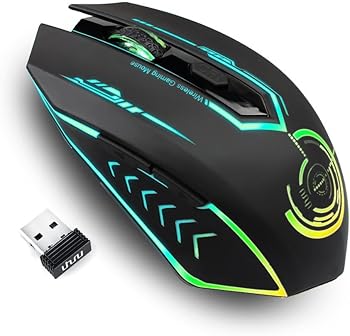
When it comes to gaming peripherals, the mouse is one of the most critical components that can make or break your gaming experience. The UHURU Wireless Gaming Mouse is a versatile and affordable option designed to cater to both casual and hardcore gamers. With its impressive specifications, customizable features, and ergonomic design, this mouse promises to enhance your gaming sessions while providing the convenience of wireless connectivity.
In this comprehensive review, we’ll delve into the key features, specifications, pros and cons, and much more to help you decide if the UHURU Wireless Gaming Mouse is the right choice for you.
Key Features
-
Wireless Freedom
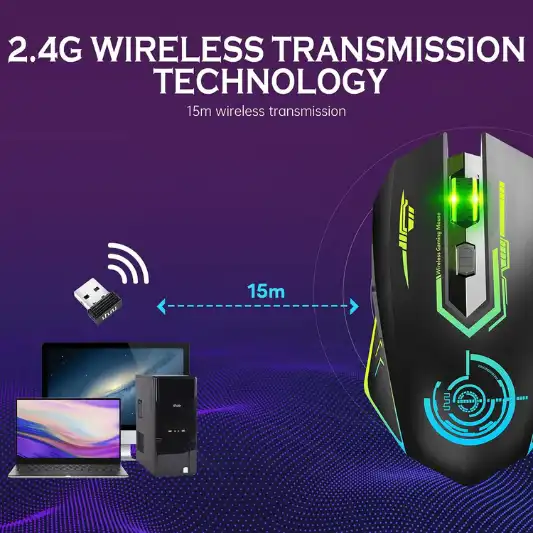
The UHURU Wireless Gaming Mouse operates on a 2.4GHz wireless transmission technology, ensuring a reliable connection with a range of up to 50 feet. This technology provides near-instantaneous response, crucial for competitive gaming where every millisecond counts.
-
Adjustable DPI Settings
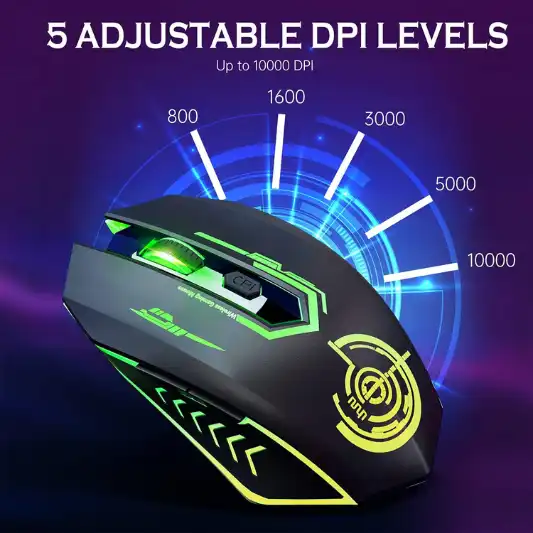
The mouse offers five adjustable DPI levels (800, 1600, 3000, 5000, 10000), allowing you to tailor the sensitivity to your preference. This feature is ideal for both gaming and office work, offering flexibility depending on your current task.
-
Dynamic RGB Lighting
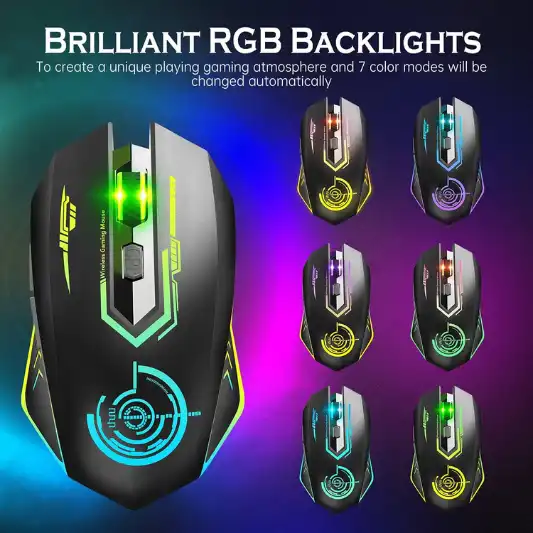
The mouse features 7 different LED colors that change automatically during use. While the colors cannot be locked, they add a visually appealing touch to your gaming setup.
-
Programmable Buttons
With 6 programmable buttons, the UHURU mouse supports macro editing, making it suitable for MMO and RPG gamers who require complex command sequences. The driver software, compatible with Windows, allows you to customize these buttons according to your needs.
-
Ergonomic Design
The UHURU Wireless Gaming Mouse is designed to fit comfortably in your hand, reducing strain during extended gaming sessions. Its lightweight build (0.634 ounces) ensures ease of use without compromising on durability.
-
Broad Compatibility
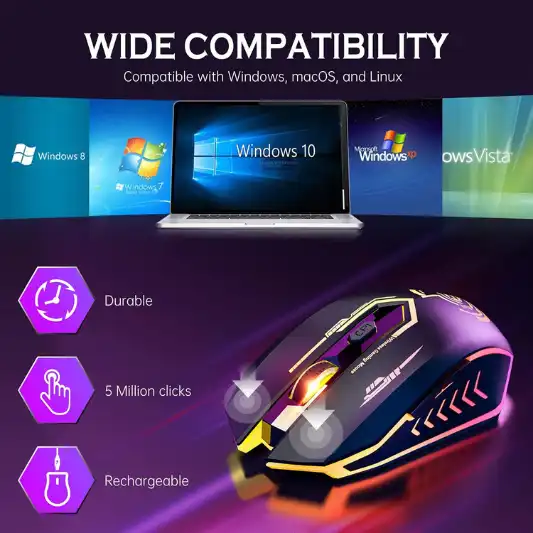
This mouse is compatible with a wide range of systems, including Windows (7/8/10/XP), Mac OS, and Linux, making it a versatile option for various devices like PCs, laptops, and Macbooks.
Specifications
| Feature | Details |
|---|---|
| Brand | UHURU |
| Color | Black |
| Connectivity Technology | USB |
| Special Feature | Programmable Buttons |
| Movement Detection Technology | Optical |
| DPI Levels | 800/1600/3000/5000/10000 |
| Buttons | 6 Programmable Buttons |
| LED Colors | 7 Dynamic Colors |
| Product Dimensions | 4.69 x 2.56 x 1.3 inches |
| Item Weight | 0.634 ounces |
| Battery Type | Lithium Polymer (included) |
| Compatibility | Windows 7/8/10/XP, Mac OS, Linux |
| Manufacturer | Rlg |
| Model Number | WM-170517-BK |
| Response Range | Up to 50 feet |
| ASIN | B071HVWD55 |
| Customer Ratings | 4.4 out of 5 stars (10,877 ratings) |
Pros and Cons
Pros:
- Wireless Freedom: Eliminates cable clutter, providing up to 50 feet of wireless range.
- Adjustable DPI: Offers five levels of DPI adjustment, perfect for various gaming genres.
- Ergonomic Design: Comfortable to use during long gaming sessions.
- Programmable Buttons: Customizable for complex gaming commands.
- Broad Compatibility: Works with multiple operating systems.
Cons:
- Non-Programmable LEDs: The RGB lighting cannot be customized to a single color.
- Driver Compatibility: The customization driver is only available for Windows.
Detailed Review
Design and Build Quality
The first thing you’ll notice about the UHURU Wireless Gaming Mouse is its sleek, ergonomic design. The black exterior is understated yet stylish, fitting comfortably in both small and large hands. The mouse is designed for long gaming sessions, with a shape that naturally supports your palm and fingers, minimizing fatigue. The lightweight design (just 0.634 ounces) further enhances comfort, allowing for swift, effortless movements during intense gameplay.
The build quality is solid, with durable plastic construction that feels sturdy without being too heavy. The buttons have a satisfying click, and the scroll wheel operates smoothly, providing just the right amount of resistance. The addition of 7 dynamic LED colors adds a touch of flair, although it’s worth noting that these lights are not customizable beyond their automatic cycling through colors.
Wireless Performance
One of the standout features of the UHURU Wireless Gaming Mouse is its wireless connectivity. Utilizing 2.4GHz transmission technology, the mouse offers a reliable connection with a range of up to 50 feet. This is particularly advantageous for gamers who prefer a clutter-free desk or need to maintain mobility during play.
The mouse’s response rate is near-instantaneous, ensuring that there is no noticeable lag between your movements and the on-screen action. This is a critical aspect for competitive gaming, where even a slight delay can mean the difference between victory and defeat. The absence of a wired connection also means you won’t have to worry about cable drag, which can be a nuisance during fast-paced games.
DPI and Sensitivity
The UHURU Wireless Gaming Mouse offers five adjustable DPI levels: 800, 1600, 3000, 5000, and 10000. These settings allow you to customize the mouse’s sensitivity to match your preferences, whether you’re sniping enemies in an FPS or managing resources in an RTS. The ability to switch DPI on the fly using the button below the scroll wheel is a convenient feature that allows for quick adjustments without interrupting your gameplay.
At its highest setting (10,000 DPI), the mouse is incredibly responsive, making it ideal for high-speed gaming where precision is paramount. Conversely, the lower DPI settings offer more control, which is useful for tasks that require finer movements, such as graphic design or photo editing.
Programmable Buttons
The UHURU Wireless Gaming Mouse features six programmable buttons, a feature that significantly enhances its versatility. By using the accompanying driver software, you can assign complex macros or key functions to these buttons, tailoring the mouse to your specific needs. This is particularly useful for MMO and RPG games, where multiple commands need to be executed quickly and efficiently.
However, it’s important to note that the driver software is only compatible with Windows. Mac and Linux users will not be able to customize the buttons, which may be a drawback for those who rely heavily on this feature.
Battery Life and Charging
The mouse comes with a built-in rechargeable lithium polymer battery, which is included in the package. The battery life is impressive, lasting for several days on a single charge, depending on usage. Charging is straightforward via the included USB cable, and the mouse can be used while charging, so you won’t have to pause your gaming sessions.
One of the advantages of the UHURU Wireless Gaming Mouse is that it doesn’t require frequent battery replacements, unlike some wireless mice that rely on AA or AAA batteries. This not only saves money but also reduces the environmental impact.
RGB Lighting
The 7-color dynamic RGB lighting is one of the more aesthetic features of the UHURU Wireless Gaming Mouse. The lights automatically cycle through different colors while the mouse is in use, adding a vibrant touch to your gaming setup. While the lighting cannot be programmed to stay on a specific color, the cycling effect is smooth and visually pleasing.
However, the inability to customize the lighting may be a downside for some users who prefer a more personalized look. The RGB lights also do not have any effect on performance, serving purely as a decorative feature.
Compatibility
The UHURU Wireless Gaming Mouse is compatible with a wide range of operating systems, including Windows 7/8/10/XP, Mac OS, and Linux. This makes it a versatile option for gamers and professionals who use different platforms. The plug-and-play functionality ensures that you can start using the mouse right out of the box, with no need for additional drivers or software on most systems.
However, as mentioned earlier, the driver software required for button customization is only available for Windows. This limits the mouse’s full functionality on Mac and Linux systems, which may be a consideration for non-Windows users.
Conclusion
The UHURU Wireless Gaming Mouse offers an impressive array of features for its price point, making it a solid choice for gamers who want a reliable, customizable, and comfortable mouse without breaking the bank. Its wireless technology provides a seamless gaming experience with no noticeable lag, while the adjustable DPI settings cater to various gaming and productivity needs. The ergonomic design ensures comfort during extended use, and the programmable buttons add a layer of customization that can give you an edge in complex games.
However, the mouse is not without its drawbacks. The lack of customizable RGB lighting and the limitation of the driver software to Windows systems may be a deterrent for some users. Despite these minor issues, the UHURU Wireless Gaming Mouse delivers excellent performance and value, making it a worthy addition to any gamer’s arsenal.
You Might Be Interested In
- What Is a DPI Mouse?
- Redragon M711 Cobra Gaming Mouse Review
- Cooler Master Mm710 Mouse Review
- Is The Motherboard A Software Or Hardware?
- What Is A Good Mouse Sensitivity For FPS?
Highly Recommended – ⭐⭐⭐⭐⭐
The UHURU Wireless Gaming Mouse offers an excellent balance of performance, customization, and comfort at an affordable price. Whether you’re a casual gamer looking to improve your setup or a seasoned player in need of a reliable and versatile mouse, the UHURU Wireless Gaming Mouse is a strong contender. With its adjustable DPI, programmable buttons, and ergonomic design, this mouse is well-equipped to handle everything from intense gaming sessions to everyday tasks.
Comparison Overview
| Feature | UHURU Wireless Gaming Mouse | Logitech G305 Lightspeed | Razer Basilisk X Hyperspeed | Corsair Harpoon RGB Wireless |
|---|---|---|---|---|
| DPI Range | 800-10,000 DPI | 200-12,000 DPI | 200-16,000 DPI | 100-10,000 DPI |
| Buttons | 6 Programmable Buttons | 6 Programmable Buttons | 6 Programmable Buttons | 6 Programmable Buttons |
| Wireless Technology | 2.4GHz | Lightspeed Wireless | Hyperspeed Wireless | 2.4GHz Slipstream Wireless |
| Battery Type | Rechargeable Lithium Polymer (included) | AA Battery (up to 250 hours) | AA Battery (up to 450 hours) | Rechargeable Lithium Polymer (included) |
| RGB Lighting | 7 Dynamic Colors | No | No | Yes, Customizable |
| Weight | 0.634 ounces | 3.49 ounces | 3.84 ounces | 3.52 ounces |
| Ergonomics | Ergonomic Design | Ambidextrous | Right-Handed Ergonomic | Ergonomic Design |
| Compatibility | Windows, Mac OS, Linux | Windows, Mac OS | Windows, Mac OS | Windows, Mac OS |
| Software Customization | Yes (Windows only) | Yes (Logitech G HUB) | Yes (Razer Synapse) | Yes (iCUE Software) |
| Battery Life | Several Days (Rechargeable) | Up to 250 hours | Up to 450 hours | Up to 60 hours (with RGB off) |
| Price Range | $$ | $$ | $$ | $$ |
| Customer Rating | 4.4 out of 5 (10,877 ratings) | 4.7 out of 5 (17,000+ ratings) | 4.7 out of 5 (9,000+ ratings) | 4.6 out of 5 (10,000+ ratings) |
Detailed Comparison
1. DPI Range
- UHURU Wireless Gaming Mouse: Offers a wide DPI range from 800 to 10,000, suitable for most gaming genres.
- Logitech G305 Lightspeed: Provides a broader DPI range (200-12,000), catering to users who need ultra-low or ultra-high sensitivity settings.
- Razer Basilisk X Hyperspeed: Features an extensive DPI range (200-16,000), making it ideal for gamers who require extreme precision.
- Corsair Harpoon RGB Wireless: Matches the UHURU in DPI range (100-10,000), offering versatile sensitivity adjustments.
2. Programmable Buttons
- All four mice in this comparison have six programmable buttons, allowing for customization and macro functions. However, the customization software varies:
- UHURU: Customizable with Windows-only software.
- Logitech G305: Uses Logitech G HUB, which is user-friendly and offers extensive customization.
- Razer Basilisk X: Customizable via Razer Synapse, known for its powerful yet complex software.
- Corsair Harpoon: Uses iCUE software, which provides a good balance between ease of use and customization options.
3. Wireless Technology
- UHURU Wireless Gaming Mouse: Operates on 2.4GHz technology, providing a stable connection with a range of up to 50 feet.
- Logitech G305 Lightspeed: Uses Lightspeed Wireless, known for its ultra-fast and reliable performance with low latency.
- Razer Basilisk X Hyperspeed: Utilizes Hyperspeed Wireless, which is praised for its speed and responsiveness, suitable for competitive gaming.
- Corsair Harpoon RGB Wireless: Features Slipstream Wireless technology, offering low-latency performance comparable to wired connections.
4. Battery Type and Life
- UHURU: Rechargeable lithium polymer battery, lasting several days depending on use.
- Logitech G305: Powered by a single AA battery, with an impressive battery life of up to 250 hours.
- Razer Basilisk X: Also uses a single AA battery but extends battery life up to 450 hours, making it ideal for users who prefer minimal charging.
- Corsair Harpoon: Features a rechargeable battery, with up to 60 hours of battery life with RGB lighting turned off.
5. RGB Lighting
- UHURU: Offers 7 dynamic colors, though they are not customizable.
- Logitech G305 and Razer Basilisk X: Do not feature RGB lighting, focusing more on performance than aesthetics.
- Corsair Harpoon: Provides customizable RGB lighting through iCUE software, allowing users to personalize their gaming setup.
6. Weight and Ergonomics
- UHURU: Lightweight at just 0.634 ounces, with an ergonomic design tailored for comfort during extended use.
- Logitech G305: Weighs 3.49 ounces and has an ambidextrous design, making it suitable for both left- and right-handed users.
- Razer Basilisk X: Heavier at 3.84 ounces, designed specifically for right-handed users with an ergonomic shape.
- Corsair Harpoon: Weighs 3.52 ounces, also ergonomically designed for comfortable use over long periods.
7. Compatibility and Software Customization
- UHURU: Compatible with Windows, Mac OS, and Linux, though customization software is limited to Windows.
- Logitech G305, Razer Basilisk X, and Corsair Harpoon: All compatible with Windows and Mac OS, with respective software for extensive customization.
8. Price Range and Value
- All four mice are within a similar price range, offering good value for the features they provide. The choice largely depends on your specific needs, such as battery life, DPI range, and customization options.
9. Customer Ratings
- UHURU: 4.4 out of 5 stars from over 10,000 ratings, reflecting general satisfaction with the product.
- Logitech G305: 4.7 out of 5 stars, highly rated for its performance and reliability.
- Razer Basilisk X: 4.7 out of 5 stars, praised for its precision and battery life.
- Corsair Harpoon: 4.6 out of 5 stars, known for its balanced performance and RGB customization.
FAQs
How do I customize the buttons on the UHURU Wireless Gaming Mouse?
To customize the buttons on the UHURU Wireless Gaming Mouse, you need to download and install the driver software from the UHURU website. Once installed, the software allows you to assign different functions or macros to the six programmable buttons. Please note that this software is only compatible with Windows operating systems.
What is the battery life of the UHURU Wireless Gaming Mouse?
The UHURU Wireless Gaming Mouse is equipped with a rechargeable lithium polymer battery, which offers impressive longevity. Depending on usage, the battery can last several days on a single charge. If the battery starts to run low, you can continue to use the mouse while it charges via the included USB cable, ensuring that your gaming sessions are uninterrupted.
Can the RGB lighting on the UHURU Wireless Gaming Mouse be customized?
The RGB lighting on the UHURU Wireless Gaming Mouse features 7 dynamic colors that automatically cycle while the mouse is in use. Unfortunately, the lighting cannot be customized to stay on a specific color, nor can it be programmed to follow a particular pattern. This is a limitation for users who prefer personalized lighting setups.
Is the UHURU Wireless Gaming Mouse suitable for professional work, such as graphic design or video editing?
Yes, the UHURU Wireless Gaming Mouse can be a good option for professional work, especially due to its adjustable DPI settings. You can switch between lower DPI settings for precise control needed in graphic design or video editing and higher DPI settings for general navigation. The ergonomic design also ensures comfort during long hours of work.
Is the UHURU Wireless Gaming Mouse compatible with Mac and Linux systems?
The UHURU Wireless Gaming Mouse is compatible with both Mac and Linux systems, in addition to Windows. However, the button customization driver software is only available for Windows. This means that while the mouse will function normally on Mac and Linux, you won’t be able to program the buttons on these platforms, which could be a limitation for users who rely on that functionality.
