


The Logitech G910 Orion Spectrum RGB Wired Mechanical Gaming Keyboard is a premium product tailored for gamers who demand top-tier performance and advanced features. With its sophisticated design and exceptional functionality, the G910 Orion Spectrum has become a popular choice among both casual and professional gamers.
This comprehensive review will cover the key features, specifications, pros and cons, a detailed conclusion, and frequently asked questions to provide a thorough understanding of the best Logitech gaming keyboards.
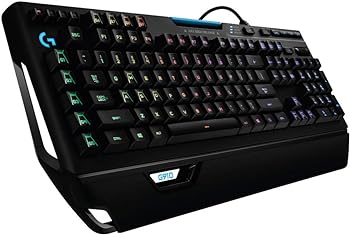
Key Features
Exclusive Romer-G Mechanical Switches
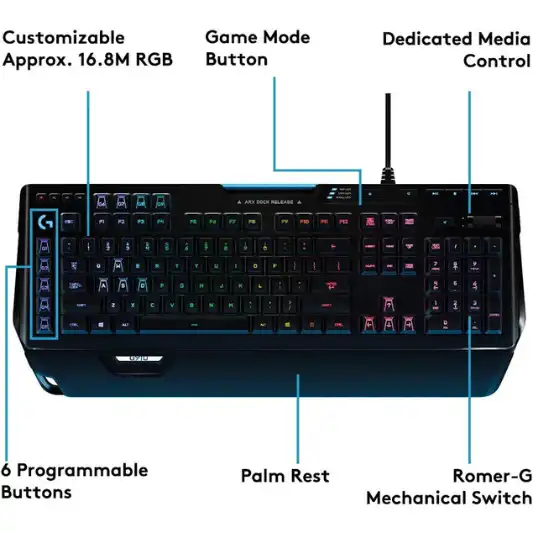
The Logitech G910 Orion Spectrum is equipped with exclusive Romer-G mechanical switches. These switches are renowned for their exceptional responsiveness and durability, offering a 1.5mm actuation point that enables inputs up to 25% faster than many leading competitors. Furthermore, the Romer-G switches are designed to withstand up to 70 million keystrokes, ensuring long-lasting performance.
Intelligent RGB Illumination
One of the standout features of the G910 Orion Spectrum is its customizable RGB illumination. Users can personalize the keyboard’s lighting with a palette of up to 16 million colors. Each key is fully illuminated, providing an evenly lit glow that enhances the visual appeal of the keyboard. This feature allows gamers to customize key illumination for specific games or in-game events, enhancing the overall gaming experience.
Arx Control Integration
The G910 Orion Spectrum includes an adjustable Smart Dock that allows smartphones and tablets to be connected to the keyboard. Through the Arx Control app, users can display in-game information, vital system statistics, and more on their mobile devices, providing a secondary screen for enhanced gaming and productivity.
Customizable G-keys
The keyboard features nine fully customizable G-keys that can be assigned specific commands per profile. These G-keys are strategically positioned for optimal speed and accessibility, allowing gamers to execute complex commands with ease.
Dedicated Media Controls
The G910 Orion Spectrum includes dedicated media controls for convenient access to play, pause, and mute functions. The on-board roller bar can be used to adjust the volume, and users can skip scenes at the touch of a button, making it easy to manage multimedia without interrupting gameplay.
Specifications
| Feature | Description |
|---|---|
| Brand | Logitech |
| Series | G910 Orion Spectrum |
| Item model number | 920-008012 |
| Hardware Platform | PC |
| Operating System | Windows 7, 8, 8.1, 10 |
| Item Weight | 3.3 pounds |
| Product Dimensions | 19.88 x 8.27 x 1.4 inches |
| Connectivity Technology | USB |
| Keyboard Description | Multimedia |
| Recommended Uses | Multimedia, Gaming, Business |
| Special Features | Volume Roller, Media Keys, Wrist Rest |
| Number of Keys | 102 |
| Backlighting Color Support | RGB |
| Color | Black |
| Batteries | 1 AAA battery required |
| Date First Available | May 28, 2016 |
Pros and Cons
Pros
- Exceptional Responsiveness: The Romer-G mechanical switches provide a highly responsive typing experience.
- Durability: Designed to withstand up to 70 million keystrokes.
- Customizable Lighting: RGB illumination with 16 million colors for personalized aesthetics.
- Arx Control Integration: Connects mobile devices for additional functionality.
- Customizable G-keys: Nine G-keys for personalized commands.
- Dedicated Media Controls: Convenient access to media functions.
Cons
- Price: Higher price point compared to other gaming keyboards.
- Size: Large size may not be suitable for all desk setups.
- Software: Some users may find the software interface complex.



Conclusion
The Logitech G910 Orion Spectrum RGB Wired Mechanical Gaming Keyboard is a powerhouse designed for gamers who seek precision, speed, and customization. Its exclusive Romer-G mechanical switches offer unparalleled responsiveness and durability, making it ideal for intense gaming sessions. The intelligent RGB illumination adds a visually striking element to the keyboard, allowing for extensive customization to match individual preferences and game-specific needs.
The Arx Control integration is a unique feature that provides added functionality by allowing mobile devices to display crucial information, enhancing both gaming and productivity. The nine customizable G-keys offer an additional layer of personalization, enabling users to assign commands and macros for a more efficient gaming experience.
While the G910 Orion Spectrum comes with a higher price tag, its advanced features and build quality justify the investment for serious gamers. The keyboard’s large size may require ample desk space, and some users might find the software interface to be complex. However, these minor drawbacks are outweighed by the keyboard’s overall performance and feature set.
In conclusion, the Logitech G910 Orion Spectrum is a top-tier gaming keyboard that delivers on all fronts, making it a worthy addition to any gamer’s arsenal.
You Might Be Interested In
- What are the new innovations in telemedicine?
- Logitech G613 Review
- Logitech G512 Review
- Hyperx Pulsefire Core Gaming Mouse Review
- Best Budget Gaming Mouse
Highly Recommended – ⭐⭐⭐⭐⭐
The Logitech G910 Orion Spectrum is a feature-rich, high-performance gaming keyboard that excels in responsiveness, customization, and build quality. Its advanced features and superior performance make it a top choice for gamers who demand the best from their peripherals.
Ready to elevate your gaming experience with a keyboard that offers unmatched performance and customization? The Logitech G910 Orion Spectrum is the perfect choice for gamers who demand precision, speed, and style. Don’t miss out on this incredible gaming keyboard—order yours today and take your gaming to the next level!
FAQs about Logitech G910 Orion Spectrum
What makes the Romer-G mechanical switches unique?
The Romer-G mechanical switches, exclusive to Logitech keyboards, are designed to enhance the gaming and typing experience through superior responsiveness and durability. Unlike traditional mechanical switches, Romer-G switches have a 1.5mm actuation point, which means they register key presses faster—up to 25% faster than many leading competitors. This reduced actuation distance allows for quicker inputs, giving gamers a competitive edge in fast-paced games where every millisecond counts.
Moreover, Romer-G switches are built to last, with an impressive durability rating of up to 70 million keystrokes. This longevity ensures that the keyboard can withstand years of heavy use without degradation in performance. The switches also feature a shorter travel distance, which not only improves speed but also reduces the force required for each keystroke, making them more comfortable for extended gaming sessions.
In addition to their technical advantages, Romer-G switches have been engineered for quieter operation compared to other mechanical switches. This means you can enjoy the tactile feedback of mechanical keys without the loud clicking noise often associated with them. Overall, the Romer-G switches provide a balanced blend of speed, durability, and comfort, making them ideal for both gaming and general use.
How can I customize the RGB lighting on the G910 Orion Spectrum?
Customizing the RGB lighting on the Logitech G910 Orion Spectrum is a straightforward process thanks to the Logitech Gaming Software (LGS). Once you have installed the software, you can start personalizing your keyboard’s illumination from a palette of up to 16 million colors.
Here’s a step-by-step guide to help you get started:
- Download and Install Logitech Gaming Software: First, download the latest version of the Logitech Gaming Software from Logitech’s official website. Install it on your computer and launch the application.
- Select Your Device: Within the software, your G910 Orion Spectrum should appear as a connected device. Click on the keyboard icon to access its customization options.
- Choose Lighting Settings: Navigate to the lighting settings section. Here, you can choose from various lighting modes such as fixed color, breathing, color cycle, and more. Each mode offers different ways to display the RGB lighting.
- Customize Individual Keys: For more granular control, you can customize the color of each individual key. This feature is particularly useful for highlighting important keys in specific games or applications.
- Create Profiles: The software allows you to create multiple profiles, each with its own lighting setup. You can switch between these profiles manually or have them change automatically based on the application or game you are using.
- Sync with Games and Other Devices: Some games are compatible with Logitech’s LIGHTSYNC technology, which can synchronize your keyboard’s lighting with in-game events. Additionally, you can sync the lighting effects across other Logitech RGB devices for a cohesive setup.
- Save and Apply: Once you have configured your desired lighting settings, save your profile and apply the changes. Your keyboard should now display the customized lighting setup.
This high level of customization not only enhances the aesthetic appeal of your setup but can also improve functionality by allowing you to visually segment different keys and commands.
What is Arx Control and how does it work?
Arx Control is a feature that sets the Logitech G910 Orion Spectrum apart from many other gaming keyboards. It leverages the power of your smartphone or tablet to provide additional functionality and enhance your gaming experience.
Here’s how it works:
- Download the Arx Control App: First, download the Logitech Arx Control app from the App Store or Google Play Store on your smartphone or tablet.
- Connect Your Device: The G910 Orion Spectrum includes an adjustable Smart Dock designed to hold your mobile device securely. Place your smartphone or tablet in the dock and connect it to the keyboard via Bluetooth or your local Wi-Fi network.
- Pair with Logitech Gaming Software: Open the Logitech Gaming Software on your PC and ensure it is up-to-date. The software will detect your mobile device and pair it with the Arx Control app.
- Customize Your Display: The Arx Control app can display a wide range of information, including in-game data, system statistics, and media controls. You can customize the dashboard to show the information most relevant to you. For example, you can monitor CPU and GPU temperatures, RAM usage, and more, all in real-time.
- In-Game Integration: Many games support Arx Control, allowing you to view in-game information directly on your mobile device. This can include mini-maps, health status, ammo count, and other critical stats that enhance your situational awareness without cluttering your main screen.
- Applets and Extensions: Arx Control supports various applets and extensions, expanding its functionality further. For instance, you can use media controls to play, pause, or skip tracks without leaving your game, or use it to manage voice communication apps like Discord.
- Enhanced Productivity: Beyond gaming, Arx Control can be used for productivity purposes. You can keep track of system performance during heavy workloads, monitor background applications, or even control presentations.
By utilizing Arx Control, the G910 Orion Spectrum transforms your mobile device into a powerful companion tool, providing an extra layer of information and control that can significantly enhance your overall experience.
Are the G-keys customizable for different profiles?
Yes, the nine G-keys on the Logitech G910 Orion Spectrum are fully customizable and can be assigned different commands and macros for various profiles. This feature allows for a high degree of personalization, enabling you to optimize the keyboard for different games or applications.
Here’s how you can customize the G-keys:
- Open Logitech Gaming Software: Launch the Logitech Gaming Software on your PC.
- Select Your Device: Click on the G910 Orion Spectrum icon to access its settings.
- Navigate to the G-key Settings: Within the software, go to the G-key customization section. Here, you can see the layout of the G-keys and start assigning functions.
- Assign Commands: Click on a G-key to begin the customization process. You can assign various types of commands, such as single keystrokes, complex macros, system commands, media controls, and more.
- Create Macros: For more advanced customization, you can create macros. Macros are sequences of keystrokes and mouse actions that can be executed with a single press of a G-key. This is particularly useful in games where complex actions need to be performed quickly and accurately.
- Profile Management: Logitech Gaming Software allows you to create multiple profiles. Each profile can have its own set of G-key assignments, lighting configurations, and other settings. Profiles can be switched manually or set to change automatically based on the application or game you are using.
- Export and Import Profiles: You can save your profiles and share them with others or import profiles created by other users. This is a great way to try different setups and find what works best for you.
- Use Pre-configured Profiles: Logitech often provides pre-configured profiles for popular games and applications, which can be a great starting point. You can use these as they are or customize them further to suit your preferences.
The ability to customize G-keys per profile makes the G910 Orion Spectrum highly versatile, allowing you to tailor the keyboard’s functionality to match your specific needs for different contexts, whether it’s gaming, work, or multimedia use.
Is the Logitech G910 Orion Spectrum compatible with all operating systems?
The Logitech G910 Orion Spectrum is primarily designed for use with Windows-based PCs and is compatible with Windows 7, 8, 8.1, and 10.
Here’s a detailed look at its compatibility and considerations for different operating systems:
- Windows Compatibility: The G910 Orion Spectrum is fully supported on Windows 7, 8, 8.1, and 10. This means that all of the keyboard’s features, including the customizable RGB lighting, Arx Control integration, and G-key customization, can be accessed and configured using Logitech Gaming Software on these operating systems.
- Mac OS Compatibility: While the G910 Orion Spectrum can be connected to a Mac, its advanced features may not be fully supported. Logitech Gaming Software, which is essential for customizing the keyboard’s lighting and G-keys, is primarily designed for Windows. Mac users can still use the keyboard for basic typing and gaming functions, but they may not be able to access the full range of customization options.
- Linux Compatibility: Similar to Mac OS, the G910 Orion Spectrum can be used with Linux operating systems for basic functionality. However, Logitech does not provide official software support for Linux, so advanced features like RGB customization and G-key programming might not be available.
- Gaming Consoles: The keyboard is designed to work with gaming consoles such as the PlayStation and Xbox. However, compatibility can vary depending on the specific console model and game. Most consoles support basic keyboard input, but advanced features and customizations typically require a PC for setup.
- Mobile Devices: The Arx Control integration allows the G910 Orion Spectrum to connect with smartphones and tablets for additional functionality. However, this requires the Logitech Gaming Software to be installed on a compatible PC to manage the connection and customize the display information.
- Updates and Drivers: Logitech frequently updates its software and drivers to improve compatibility and add new features. It’s important to keep your Logitech Gaming Software and firmware up to date to ensure optimal performance and compatibility with the latest operating systems.
