


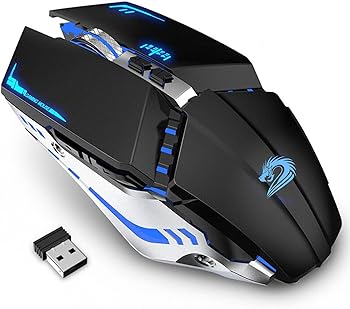
The gaming mouse industry is saturated with countless options, each vying for the attention of avid gamers and tech enthusiasts. Among these, the TENMOS T12 Wireless Gaming Mouse stands out with its combination of practicality, aesthetics, and performance.
This review delves into the features, specifications, performance, and overall value of the TENMOS T12, the best budget gaming mouse that promises to elevate your gaming experience while keeping things quiet and stylish.
Key Features
-
2.4G Wireless & Rechargeable Technology
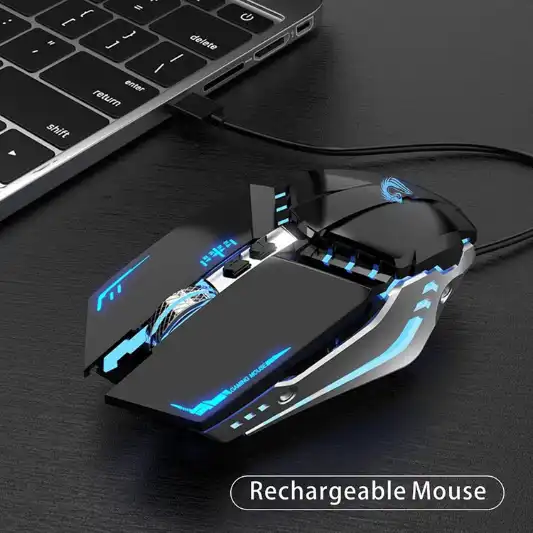
The TENMOS T12 employs advanced 2.4GHz wireless technology, ensuring a stable transmission with no delays or dropouts. This makes it an ideal choice for gamers who demand consistent and reliable performance. The mouse also boasts a rechargeable function, eliminating the need for disposable batteries and making it an eco-friendly option.
-
Quiet Click Design
One of the standout features of the TENMOS T12 is its silent operation. Both the left and right buttons are designed to be quiet, making it suitable for environments where noise is a concern, such as offices, libraries, or late-night gaming sessions at home. The quiet click design also minimizes distractions, allowing you to focus entirely on your gameplay or work.
-
Cool LED Light with 7 Color Options
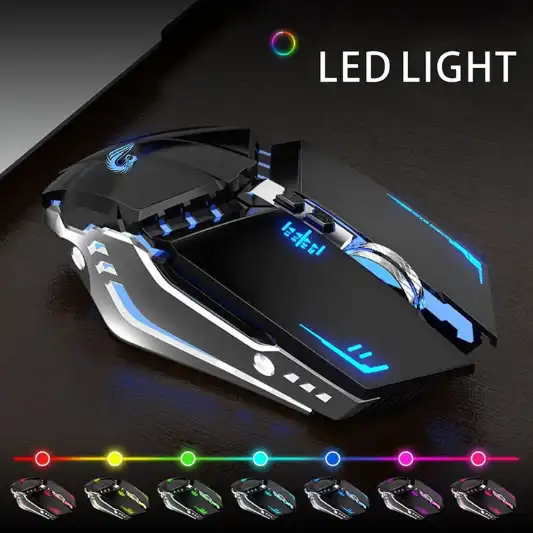
Aesthetics play a crucial role in gaming peripherals, and the TENMOS T12 doesn’t disappoint. The mouse features a cool LED light that changes randomly among 7 soothing colors. This dynamic lighting adds a touch of flair to your setup, making your gaming sessions visually appealing. Although the LED light cannot be set to a specific color, it can be turned off via a switch at the bottom of the mouse, giving you control over your visual environment.
-
Plug and Play Simplicity
The TENMOS T12 is designed for ease of use. It comes with a USB receiver, stored conveniently within the package along with the charging cable. The mouse is truly plug-and-play, requiring no additional drivers or software for installation. This makes it accessible to users of all levels, from beginners to seasoned gamers.
-
Adjustable DPI Settings:
To cater to different user preferences and tasks, the TENMOS T12 offers 3 adjustable DPI levels: 800, 1600, and 2400. This allows you to control the cursor speed to match your needs, whether you’re navigating through documents, editing photos, or playing a fast-paced game. The DPI adjustment is straightforward, enabling quick changes on the fly.
-
Wide Compatibility
Compatibility is a non-issue with the TENMOS T12. It is widely compatible with various operating systems, including Windows XP, Vista, 7, 8, 10, and Mac OS. Whether you’re using a desktop, laptop, PC, or Mac, this mouse is designed to work seamlessly across different platforms. Additionally, the mouse automatically enters a power-saving sleep mode after 10 minutes of inactivity, extending battery life.
Specifications
| Feature | Details |
|---|---|
| Brand | TENMOS |
| Color | Black |
| Connectivity Technology | USB |
| Special Features | Wireless, Ergonomic Design, Rechargeable, Soundless, LED Lights |
| Movement Detection Technology | Optical |
| Product Dimensions | 4.9 x 2.5 x 1.7 inches |
| Item Weight | 5 ounces |
| Batteries | 1 Product Specific battery (included) |
| DPI Levels | 800, 1600, 2400 |
| Compatibility | Windows XP, Vista, 7/8/10, Mac OS |
| LED Light | 7 Changeable Colors |
| Working Distance | Up to 30ft / 10m |
| ASIN | B082B4XD8Z |
| Customer Ratings | 4.2 out of 5 stars (4,778 ratings) |
| Best Sellers Rank | #8,228 in Video Games, #467 in PC Gaming Mice |
| Date First Available | January 5, 2020 |
Pros and Cons
Pros
-
Stable Wireless Connection
Reliable 2.4GHz wireless technology ensures smooth operation.
-
Rechargeable Battery
Eco-friendly with no need for constant battery replacements.
-
Silent Click Design
Perfect for noise-sensitive environments.
-
Adjustable DPI
Customizable cursor speed for various tasks.
-
Wide Compatibility
Works with multiple operating systems and devices.
Cons
-
Limited LED Customization
LED light colors cannot be fixed to a single hue.
-
No Side Buttons
Lacks additional side buttons for advanced gaming functions.
-
Lightweight Design
May feel too light for users preferring a heavier mouse.


Detailed Review
Wireless & Rechargeable Functionality
The TENMOS T12 Wireless Gaming Mouse shines in its wireless functionality, offering a strong and stable connection up to 30 feet (10 meters). This makes it ideal for both gaming and regular computer use, providing flexibility and freedom of movement without the hassle of wires. The rechargeable battery is a significant plus, as it eliminates the need for constant battery replacements. A single charge lasts for several days of regular use, depending on the intensity of your gaming sessions or work tasks.
Charging the mouse is also hassle-free, with the included USB cable making it easy to power up. The transition from charging to usage is seamless, ensuring that your gaming experience remains uninterrupted.
Silent Operation
For those who value peace and quiet during their computing tasks, the silent operation of the TENMOS T12 is a game-changer. The quiet click design is especially useful in shared spaces where noise might be an issue. Whether you’re clicking through a presentation at work, browsing late at night, or immersed in an intense gaming session, the silent buttons ensure that your actions are barely audible.
This feature also adds to the durability of the mouse, as the buttons are rated for up to 5 million clicks, providing long-term reliability.
LED Lighting and Aesthetic Appeal
The LED lighting is one of the more visually appealing aspects of the TENMOS T12. The soft, soothing lights that change colors randomly create an immersive gaming environment. While some users might prefer the option to select a specific color, the random cycle adds a dynamic element to the mouse’s appearance. If you prefer a more subdued look, the LED lights can be turned off easily, giving you control over the mouse’s aesthetics.
DPI Adjustability
The ability to switch between three DPI settings—800, 1600, and 2400—provides versatility that caters to different tasks. Lower DPI settings are ideal for precision tasks like photo editing or detailed work, while higher settings are perfect for fast-paced gaming where quick reflexes are essential. The adjustment process is intuitive, allowing for quick changes without interrupting your flow.
Ergonomics and Comfort
Ergonomics play a critical role in any mouse, especially for gamers and professionals who spend long hours at their computers. The TENMOS T12 is designed with comfort in mind, featuring a shape that fits naturally in the hand. The lightweight design, combined with its ergonomic contouring, reduces strain during extended use, making it suitable for long gaming sessions or work periods.
Compatibility and Ease of Use
The wide compatibility of the TENMOS T12 ensures that it works well with various devices and operating systems. Whether you’re using it with a Windows PC, a Mac, or a laptop, the setup is straightforward. The plug-and-play functionality means you don’t have to worry about installing drivers or software; simply insert the USB receiver, and you’re ready to go.
The mouse’s automatic sleep mode is a thoughtful addition, helping to conserve battery life when not in use. Reactivating the mouse is as simple as pressing any button, and the transition from sleep mode to active use is nearly instantaneous.
You Might Be Interested In
- What Is The Polling Rate Of The Tecknet Gaming Mouse?
- How To Pair A Uhuru Mouse?
- What Mouse Is Better Than Logitech G203 Prodigy Mouse?
- What Is The Best Redragon Mouse For FPS Games?
- What Is The Lifespan Of The Redragon M711?
Conclusion
The TENMOS T12 Wireless Gaming Mouse is a well-rounded device that offers a balance of performance, aesthetics, and practicality. Its silent operation, coupled with a stable wireless connection and rechargeable battery, makes it a great choice for both gamers and professionals. The adjustable DPI settings provide flexibility, while the cool LED lighting adds a touch of style to your setup.
However, the inability to customize the LED lights and the absence of side buttons might be minor drawbacks for some users. Despite these, the TENMOS T12 offers excellent value for its price point, making it an ideal option for those looking for a reliable and stylish wireless mouse.
Highly Recommended – ⭐⭐⭐⭐⭐
If you’re looking for a reliable and stylish wireless mouse that offers quiet operation and customizable performance, the TENMOS T12 Wireless Gaming Mouse is an excellent choice. With its ergonomic design, adjustable DPI settings, and eye-catching LED lights, it’s a great addition to any gaming setup or workspace. Click the link below to purchase your TENMOS T12 and experience the perfect blend of functionality and style!
Product Comparison
When choosing a gaming mouse, it’s essential to consider various factors such as wireless performance, ergonomics, customization options, and price. Below, we compare the TENMOS T12 Wireless Gaming Mouse with three similar products: the Logitech G305 Lightspeed Wireless Gaming Mouse, the Razer Basilisk X Hyperspeed Wireless Gaming Mouse, and the Corsair Harpoon RGB Wireless Gaming Mouse. These mice are popular in the same category, offering different features and price points to cater to various user preferences.
Comparison Table
| Feature | TENMOS T12 Wireless Gaming Mouse | Logitech G305 Lightspeed Wireless Gaming Mouse | Razer Basilisk X Hyperspeed Wireless Gaming Mouse | Corsair Harpoon RGB Wireless Gaming Mouse |
|---|---|---|---|---|
| Price | ~$20 | ~$50 | ~$60 | ~$50 |
| Connectivity Technology | 2.4GHz Wireless, USB | Lightspeed Wireless, USB | Bluetooth & 2.4GHz Wireless, USB | 2.4GHz Wireless, USB |
| DPI Levels | 800, 1600, 2400 | 200-12,000 DPI | 800-16,000 DPI | 200-10,000 DPI |
| Battery Type | Rechargeable | AA Battery (250 hours) | AA Battery (450 hours) | Rechargeable (Up to 60 hours) |
| Silent Click | Yes | No | No | No |
| RGB Lighting | 7-Color LED (random) | No | No | Yes (Fully customizable RGB) |
| Number of Buttons | 7 | 6 | 6 | 6 |
| Adjustable Weight | No | No | No | No |
| Ergonomic Design | Yes | Yes | Yes | Yes |
| Compatibility | Windows, Mac OS | Windows, Mac OS, Linux | Windows, Mac OS | Windows, Mac OS |
| Wireless Range | Up to 30ft / 10m | Up to 33ft / 10m | Up to 33ft / 10m | Up to 33ft / 10m |
| Software Customization | No | Yes (Logitech G HUB) | Yes (Razer Synapse) | Yes (iCUE Software) |
| Weight | 5 oz (142 g) | 3.4 oz (99 g) | 3.8 oz (107 g) | 3.5 oz (99 g) |
| Dimensions | 4.9 x 2.5 x 1.7 inches | 4.6 x 2.5 x 1.5 inches | 5.1 x 2.4 x 1.7 inches | 4.6 x 2.7 x 1.6 inches |
| Best Sellers Rank (Category) | #467 in PC Gaming Mice | #12 in PC Gaming Mice | #53 in PC Gaming Mice | #29 in PC Gaming Mice |
| Customer Rating | 4.2 out of 5 stars | 4.7 out of 5 stars | 4.7 out of 5 stars | 4.6 out of 5 stars |
Detailed Comparison Analysis
1. Price
The TENMOS T12 Wireless Gaming Mouse is the most budget-friendly option among the four, priced around $20. This makes it an attractive choice for casual gamers or users who want a decent wireless mouse without breaking the bank. In contrast, the Logitech G305, Razer Basilisk X Hyperspeed, and Corsair Harpoon RGB Wireless are priced higher, ranging from $50 to $60. These higher-priced mice offer more advanced features, such as customizable DPI settings, advanced sensors, and software customization options.
2. Connectivity Technology
All four mice offer wireless connectivity, but the technologies differ. The TENMOS T12 uses a 2.4GHz wireless connection with a USB receiver, providing a stable and reliable connection. Similarly, the Logitech G305 and Corsair Harpoon also utilize 2.4GHz wireless technology, but with more advanced wireless protocols like Logitech’s Lightspeed, which is known for its ultra-low latency. The Razer Basilisk X Hyperspeed stands out with dual connectivity options—Bluetooth and 2.4GHz wireless—giving users more flexibility in connecting to different devices.
3. DPI Levels
The DPI (dots per inch) setting is crucial for gamers, as it determines the mouse’s sensitivity. The TENMOS T12 offers three DPI levels (800, 1600, 2400), which is adequate for casual gaming and general use. However, for more demanding gamers, the other three mice provide significantly higher DPI ranges. The Logitech G305 and Corsair Harpoon have ranges up to 12,000 and 10,000 DPI, respectively, while the Razer Basilisk X Hyperspeed tops out at an impressive 16,000 DPI, making it ideal for high-precision tasks and competitive gaming.
4. Battery Type and Life
The TENMOS T12 features a rechargeable battery, which is convenient and environmentally friendly, as you won’t need to replace batteries frequently. However, the battery life isn’t specified in detail, and regular recharging is necessary depending on usage. The Logitech G305 and Razer Basilisk X Hyperspeed use AA batteries, offering an extensive battery life of 250 hours and 450 hours, respectively, on a single battery, which is beneficial for users who prefer longer periods between charges. The Corsair Harpoon also has a rechargeable battery, with up to 60 hours of usage on a single charge, making it a great middle-ground option.
5. Silent Click Feature
One of the unique features of the TENMOS T12 is its silent click design, which makes it ideal for use in quiet environments like offices or shared spaces. None of the other three mice—Logitech G305, Razer Basilisk X Hyperspeed, or Corsair Harpoon—offer this feature, which might be a deciding factor for users who prioritize noise reduction.
6. RGB Lighting
RGB lighting is a popular feature among gamers for adding flair to their setups. The TENMOS T12 offers a simple 7-color LED light that changes randomly, while the Corsair Harpoon provides fully customizable RGB lighting through software. The Logitech G305 and Razer Basilisk X Hyperspeed lack RGB lighting, focusing instead on performance and battery life.
7. Ergonomics and Design
All four mice are designed with ergonomics in mind, ensuring comfort during extended use. The TENMOS T12 has a lightweight and comfortable design, making it suitable for long gaming sessions. The Razer Basilisk X Hyperspeed and Corsair Harpoon are slightly larger and have a more contoured shape, which some users may find more comfortable, especially for palm or claw grip styles. The Logitech G305 is the lightest and most compact, making it a good choice for users who prefer a smaller, more portable mouse.
8. Software Customization
Software customization allows users to fine-tune their mouse settings for specific tasks or games. The TENMOS T12 does not offer software customization, making it a more straightforward option. In contrast, the Logitech G305, Razer Basilisk X Hyperspeed, and Corsair Harpoon come with dedicated software (Logitech G HUB, Razer Synapse, and Corsair iCUE, respectively), enabling users to customize DPI settings, button functions, and, in the case of the Corsair Harpoon, RGB lighting.
FAQs
How long does the battery last on the TENMOS T12 Wireless Gaming Mouse?
The battery life of the TENMOS T12 Wireless Gaming Mouse varies depending on usage. On a full charge, it typically lasts several days under regular use. The mouse also features an automatic sleep mode, which helps conserve battery life when the mouse is not in use.
Can the LED lights on the TENMOS T12 be set to a specific color?
No, the LED lights on the TENMOS T12 cannot be set to a specific color. They change randomly among 7 different colors. However, you can turn off the LED lights entirely using a switch located at the bottom of the mouse.
Is the TENMOS T12 suitable for gaming?
Yes, the TENMOS T12 Wireless Gaming Mouse is suitable for gaming, thanks to its stable wireless connection, adjustable DPI settings, and ergonomic design. While it lacks some advanced gaming features like programmable side buttons, it performs well for general gaming purposes.
How do I adjust the DPI settings on the TENMOS T12?
You can adjust the DPI settings on the TENMOS T12 Wireless Gaming Mouse by pressing the DPI button located near the scroll wheel. The mouse offers three DPI levels: 800, 1600, and 2400. Each press of the button will cycle through these settings, allowing you to select the one that best suits your needs.
Does the TENMOS T12 require any drivers or software for installation?
No, the TENMOS T12 Wireless Gaming Mouse is a plug-and-play device. It does not require any drivers or additional software for installation. Simply plug in the USB receiver to your computer, and the mouse will be ready to use immediately.
