

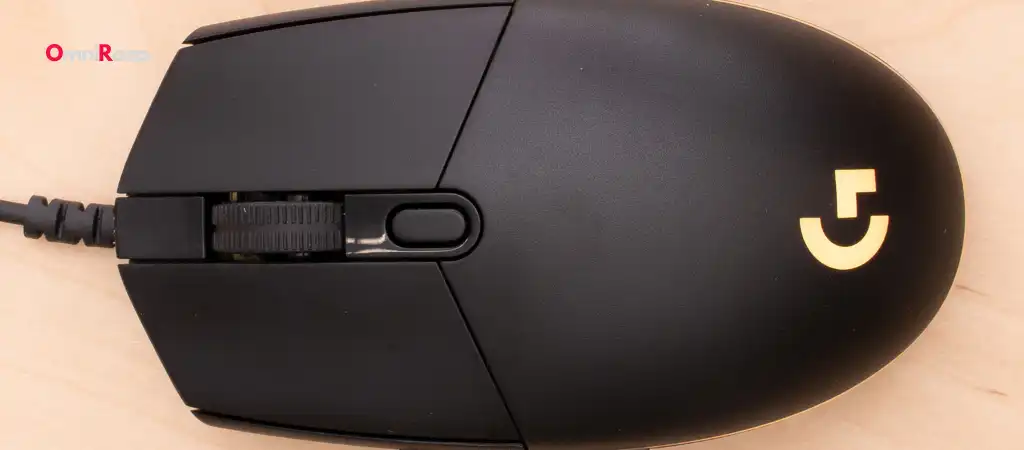
When it comes to gaming mice, the Logitech G203 Prodigy has long been a popular choice for gamers and casual users alike. With its solid performance, affordability, and brand reliability, the G203 Prodigy has garnered a dedicated following. However, in the ever-evolving world of gaming peripherals, there are other mice on the market that may be considered better than the Logitech G203 Prodigy Mouse.
This guide will explore several alternatives that offer improved performance, features, or value, making them worth considering for anyone looking for the best budget gaming mouse upgrade.

Logitech G203 Prodigy Mouse
Before diving into the alternatives, it’s important to understand what makes the Logitech G203 Prodigy such a popular choice.
The G203 Prodigy is known for its:
-
Affordable Price
It’s one of the most budget-friendly gaming mice available.
-
Simplicity
A straightforward design with minimalistic aesthetics.
-
Performance
8,000 DPI sensor, responsive buttons, and reliable tracking.
-
Customization
RGB lighting and programmable buttons through Logitech’s G HUB software.
-
Build Quality
Durable construction despite its lightweight design.
While these features make the G203 Prodigy a great mouse for many users, some may seek better specifications, more advanced features, or an enhanced user experience. Let’s explore some options that might be considered better than the Logitech G203 Prodigy Mouse.
Top Alternatives to the Logitech G203 Prodigy Mouse
Razer DeathAdder Elite
Why It’s Better than Logitech G203 Prodigy Mouse
The Razer DeathAdder Elite is a well-known gaming mouse that has set a high standard for ergonomics, performance, and durability.
It surpasses the G203 Prodigy in several areas:
-
Ergonomics
Designed specifically for right-handed users, the DeathAdder Elite is praised for its comfortable grip, making it suitable for extended gaming sessions.
-
Sensor
Equipped with a 16,000 DPI optical sensor, the DeathAdder Elite offers more precise tracking compared to the G203 Prodigy.
-
Build Quality
The overall construction of the DeathAdder Elite is robust, with a design that feels more premium than the G203.
-
Customization
Razer’s Synapse software offers extensive customization options for buttons, lighting, and performance settings.
Key Features
- 16,000 DPI Optical Sensor
- Razer Mechanical Mouse Switches (50 million clicks lifespan)
- 7 Programmable Buttons
- Chroma RGB Lighting
- Ergonomic Design for Right-Handed Users
SteelSeries Rival 310
Why It’s Better than Logitech G203 Prodigy Mouse
The SteelSeries Rival 310 is another excellent alternative that outshines the G203 Prodigy in several aspects:
-
Sensor Technology
The Rival 310 features the TrueMove3 sensor, co-developed with PixArt, offering 1-to-1 tracking for ultra-precise movements.
-
Comfort
The mouse is designed for a natural hand position, reducing strain during long gaming sessions.
-
Build Quality
Made with durable materials, including a high-grade polymer, the Rival 310 is built to last.
-
Customization
SteelSeries Engine software provides a wide range of customization options for performance and aesthetics.
Key Features
- TrueMove3 12,000 CPI Optical Sensor
- Split-Trigger Mechanical Switches
- Ergonomic Design with Silicon Grip
- PrismSync RGB Lighting
- Lightweight Construction
Corsair M65 Pro RGB
Why It’s Better than Logitech G203 Prodigy Mouse
The Corsair M65 Pro RGB is a mouse tailored for FPS gamers, offering features that make it superior to the G203 Prodigy:
-
Customizable Weight
The M65 Pro RGB allows users to adjust the weight and balance of the mouse to suit their preferences, which the G203 lacks.
-
Durability
Constructed with an aircraft-grade aluminum frame, the M65 Pro RGB is exceptionally durable and built to withstand intense gaming.
-
Precision
The 12,000 DPI optical sensor ensures pinpoint accuracy, making it a great choice for fast-paced FPS games.
-
Dedicated Sniper Button
A unique feature that instantly lowers DPI for better aiming precision in FPS games.
Key Features
- 12,000 DPI Optical Sensor
- Aircraft-Grade Aluminum Frame
- Adjustable Weight System
- 8 Programmable Buttons
- Customizable RGB Lighting
Logitech G502 HERO
Why It’s Better than Logitech G203 Prodigy Mouse
Even within the same brand, there are options that are better than the Logitech G203 Prodigy Mouse. The Logitech G502 HERO is one such example, offering enhanced performance and versatility:
-
Sensor
The G502 HERO features the HERO 25K sensor, offering up to 25,600 DPI, which is significantly higher than the G203’s 8,000 DPI.
-
Customizable Weight System
Users can adjust the weight and balance of the G502 HERO to match their preferences, a feature not available in the G203.
-
More Buttons
With 11 programmable buttons, the G502 HERO provides more control options compared to the G203’s six buttons.
-
Advanced Customization
Logitech’s G HUB software allows for deep customization of DPI settings, lighting, and macros.
Key Features
- HERO 25K Optical Sensor (25,600 DPI)
- Adjustable Weight System
- 11 Programmable Buttons
- LIGHTSYNC RGB Lighting
- Onboard Memory for Storing Profiles
Glorious Model O
Why It’s Better than Logitech G203 Prodigy Mouse
The Glorious Model O is a lightweight gaming mouse that has become a favorite among competitive gamers, offering several advantages over the G203 Prodigy:
-
Weight
The Model O weighs just 67 grams, making it significantly lighter than the G203, which is beneficial for fast-paced gaming.
-
Cable
The ultra-flexible Ascended Cord is one of the best cables in the market, offering a drag-free experience that the G203 cannot match.
-
Sensor
Equipped with a PixArt PMW-3360 sensor, the Model O provides excellent tracking performance.
-
Build Quality
Despite its lightweight design, the Model O is built to last, with a honeycomb shell that provides strength without adding weight.
Key Features
- PixArt PMW-3360 Optical Sensor (12,000 DPI)
- 67 Grams Weight
- Ascended Cord (Ultra-Flexible)
- G-Skates Feet for Smooth Glide
- RGB Lighting with Multiple Zones
HyperX Pulsefire Surge
Why It’s Better than Logitech G203 Prodigy Mouse
The HyperX Pulsefire Surge is known for its aesthetics and performance, offering some features that make it better than the Logitech G203 Prodigy Mouse:
-
Sensor
The Pulsefire Surge uses a PixArt 3389 sensor, which is known for its accuracy and responsiveness, providing better performance than the G203.
-
Design
The 360-degree RGB lighting ring gives the Pulsefire Surge a unique look, setting it apart from the more subdued design of the G203.
-
Durability
Omron switches rated for 50 million clicks ensure that the Pulsefire Surge will last for years of intense use.
-
Customization
HyperX NGenuity software allows for detailed customization of DPI settings, lighting, and button assignments.
Key Features
- PixArt 3389 Sensor (16,000 DPI)
- 360-Degree RGB Lighting
- Omron Switches (50 Million Clicks)
- Lightweight and Comfortable Design
- 6 Programmable Buttons
How to Choose the Best Mouse for Your Needs
Performance vs. Price
When searching for a mouse that is better than the Logitech G203 Prodigy Mouse, one of the first considerations is the balance between performance and price. While some of the alternatives listed above offer superior performance, they often come at a higher cost. If budget is a concern, it’s important to weigh the benefits of higher DPI sensors, additional buttons, and customization options against the price difference.
Ergonomics and Comfort
Ergonomics play a critical role in choosing the right mouse, especially for gamers who spend long hours playing. While the Logitech G203 Prodigy is designed for a comfortable grip, some users may find that the ergonomic designs of the Razer DeathAdder Elite or SteelSeries Rival 310 offer better support for their hand shape and size.
Customization and Features
If customization is a priority, mice like the Logitech G502 HERO or Corsair M65 Pro RGB offer extensive options through their respective software, allowing users to fine-tune their mouse settings to match their playstyle. Features like adjustable weights, additional buttons, and customizable lighting can enhance the gaming experience, providing a level of personalization that the G203 lacks.
Build Quality and Durability
The build quality is another essential factor to consider. While the Logitech G203 Prodigy is well-built for its price, options like the Corsair M65 Pro RGB and Glorious Model O offer more robust construction, often using premium materials like aluminum or high-grade polymers. For users seeking a mouse that will last through years of heavy use, investing in a model with superior durability may be worth it.
Aesthetics
Aesthetics might be a secondary concern, but for many gamers, the look of their gear is important. Mice like the HyperX Pulsefire Surge, with its 360-degree RGB lighting, offer a visually striking alternative to the more understated G203. Those looking to create a cohesive gaming setup may prefer a mouse with more customizable lighting options.
You Might Be Interested In
- How Do I Get 400 Dpi On My Corsair Harpoon?
- How Much DPI Is Glorious Model O?
- Does Steelseries Rival 3 Have Dpi?
- What Is The Lifespan Of The Redragon M711?
- Is Razer Deathadder Essential A Gaming Mouse?
Conclusion
The Logitech G203 Prodigy Mouse is a fantastic entry-level gaming mouse that offers solid performance at an affordable price. However, as this guide has shown, there are several alternatives on the market that can be considered better than the Logitech G203 Prodigy Mouse, depending on what you prioritize in a gaming mouse.
Whether you’re looking for better ergonomics, higher DPI, more customization options, or a mouse that simply feels more premium, there are plenty of options to choose from. The Razer DeathAdder Elite, SteelSeries Rival 310, Corsair M65 Pro RGB, Logitech G502 HERO, Glorious Model O, and HyperX Pulsefire Surge all offer something different, catering to various needs and preferences.
By considering the factors discussed in this guide—performance, ergonomics, customization, build quality, and aesthetics—you can make an informed decision and find the perfect mouse that’s not only better than the Logitech G203 Prodigy Mouse but also the right fit for your gaming setup.
FAQs about Logitech G203 Prodigy Mouse?
What should I prioritize when choosing a mouse better than the Logitech G203 Prodigy Mouse?
When looking for a mouse that is better than the Logitech G203 Prodigy, prioritize factors based on your specific needs.
Here are some key considerations:
- Performance and DPI: If you need a mouse with higher sensitivity and precision, look for one with a higher DPI range and a more advanced sensor, like the Logitech G502 HERO or Razer DeathAdder Elite.
- Ergonomics: For long gaming sessions, comfort is crucial. Mice like the Razer DeathAdder Elite and SteelSeries Rival 310 are designed with ergonomics in mind, offering better support and reducing strain.
- Customization: If you want more control over your mouse’s functions, consider models with additional programmable buttons, customizable weights, and lighting options, such as the Corsair M65 Pro RGB.
- Build Quality: If durability is a priority, look for mice made from premium materials, like the aircraft-grade aluminum frame of the Corsair M65 Pro RGB.
- Aesthetics: For those who value the visual appeal of their gaming setup, options like the HyperX Pulsefire Surge with its 360-degree RGB lighting might be more appealing.
Is the Logitech G502 HERO a significant upgrade over the Logitech G203 Prodigy Mouse?
Yes, the Logitech G502 HERO is a significant upgrade over the G203 Prodigy in several areas:
- Sensor: The G502 HERO is equipped with the HERO 25K sensor, offering a maximum DPI of 25,600 compared to the G203’s 8,000 DPI, allowing for more precise and customizable sensitivity settings.
- Programmable Buttons: The G502 HERO has 11 programmable buttons, giving you more control options in games compared to the six buttons on the G203.
- Adjustable Weight: The G502 HERO includes a customizable weight system, which lets you adjust the mouse’s weight and balance according to your preference—something the G203 lacks.
- Build Quality and Comfort: The G502 HERO is built with more robust materials and offers an ergonomic design that may provide better comfort during extended gaming sessions.
- Customization: The G502 HERO provides more extensive customization through Logitech’s G HUB software, allowing you to create profiles, adjust DPI settings, and customize RGB lighting.
How does the Razer DeathAdder Elite compare to the Logitech G203 Prodigy Mouse for gaming?
The Razer DeathAdder Elite is considered better than the Logitech G203 Prodigy Mouse for gaming due to several key differences:
- Ergonomics: The DeathAdder Elite is designed with a focus on ergonomics, making it more comfortable for long gaming sessions, especially for users with larger hands or those who prefer a palm grip style.
- Sensor: The DeathAdder Elite features a 16,000 DPI optical sensor, which provides more precise tracking and better performance in fast-paced gaming scenarios compared to the 8,000 DPI sensor in the G203.
- Build Quality: The DeathAdder Elite is built with more durable materials and features Razer Mechanical Mouse Switches, which are rated for 50 million clicks, offering greater longevity.
- Customization: Through Razer Synapse software, the DeathAdder Elite allows for extensive customization of button functions, DPI settings, and Chroma RGB lighting, providing more personalization options than the G203.
- Gaming Focus: The DeathAdder Elite is specifically tailored for gaming, with features like on-the-fly DPI adjustment and a design optimized for precision, making it a better choice for competitive gamers.
What makes the Glorious Model O a better choice for competitive gamers compared to the Logitech G203 Prodigy Mouse?
The Glorious Model O is particularly well-suited for competitive gamers due to its lightweight design and advanced features:
- Weight: The Model O weighs just 67 grams, significantly lighter than the G203 Prodigy, which makes it easier to execute quick flicks and fast movements, essential for competitive gaming.
- Cable Quality: The Model O’s Ascended Cord is ultra-flexible and provides a near wireless feel, reducing drag during gameplay, something the G203’s standard cable doesn’t offer.
- Sensor: The PixArt PMW-3360 sensor in the Model O offers excellent tracking accuracy and responsiveness, crucial for high-speed gaming, providing an edge over the G203’s 8,000 DPI sensor.
- Build and Design: Despite being lightweight, the Model O is built with a honeycomb shell that is both durable and breathable, helping to keep your hand cool during intense gaming sessions.
- Customization: The Model O offers multiple RGB lighting zones and a sleek design, with software support for DPI adjustments, polling rate changes, and button remapping, giving competitive gamers the flexibility they need to optimize performance.
Are there any gaming mice better than the Logitech G203 Prodigy Mouse for FPS games specifically?
Yes, several gaming mice are better than the Logitech G203 Prodigy Mouse for FPS games due to their tailored features:
- Corsair M65 Pro RGB: Specifically designed for FPS games, the M65 Pro RGB features a dedicated sniper button that instantly lowers DPI for precise aiming. It also has an adjustable weight system, allowing you to fine-tune the mouse’s balance for more accurate control.
- Logitech G502 HERO: With its high DPI HERO 25K sensor and customizable weight system, the G502 HERO offers exceptional precision and control, which are critical for FPS gameplay.
- Razer DeathAdder Elite: Known for its ergonomic design and high-precision sensor, the DeathAdder Elite provides the accuracy and comfort needed for long FPS sessions, making it a preferred choice among FPS players.
- SteelSeries Rival 310: Featuring the TrueMove3 sensor, the Rival 310 offers true 1-to-1 tracking, ensuring that every movement translates accurately on-screen. Its ergonomic design also makes it comfortable for extended use, which is essential in FPS gaming.
These mice are designed with features that enhance accuracy, control, and comfort, making them better suited for FPS games compared to the Logitech G203 Prodigy.
