


The Logitech G203 Prodigy RGB Wired Gaming Mouse – Black is a remarkable device that promises to enhance your gaming experience with its advanced features and ergonomic design.
This review will delve into the key features, specifications, pros and cons, detailed analysis, FAQs, overall grading, and a call to action for this impressive best budget gaming mouse.

Key Features
-
Advanced Gaming Performance
The Logitech G203 Prodigy Mouse boasts a performance level up to eight times faster than standard mice. This results in near-instantaneous responses to every click and movement, giving gamers an edge in fast-paced scenarios.
-
High-Precision Sensor
Equipped with a cutting-edge 6000 DPI sensor, the mouse offers incredible accuracy, tracking speed, and control. This ensures that no matter your gameplay style, the mouse will perform reliably.
-
Classic Design
Inspired by the iconic Logitech G100S, the G203 features a design that is beloved by gamers worldwide. It is optimized for both gaming and everyday versatility, ensuring durability and comfort.
-
RGB Lighting
The mouse allows customization of lighting from up to 16.8 million colors. This personalization can enhance your gaming setup and match your other gaming gear.
-
Customizable Buttons
With six programmable buttons, you can simplify and execute complex in-game actions quickly. This customization is crucial for competitive gaming.
-
Onboard Memory
The onboard memory lets you store your game-ready settings and use them on any PC without needing to reconfigure your preferences each time.
Specifications
| Feature | Details |
|---|---|
| Brand | Logitech |
| Color | Black |
| Connectivity Technology | USB |
| Movement Detection Technology | Optical |
| Number of Buttons | 6 |
| Max. DPI | 6000 DPI |
| Max. Acceleration | >25 G |
| Max. Speed | >200 IPS |
| Dimensions | 1.5 x 2.45 x 4.59 inches |
| Weight | 3 ounces |
| Compatibility | Windows 7 or later, macOS 10.11 or later, Chrome OS |
| Model Number | 910-004842 |
| Date First Available | January 4, 2017 |
| Warranty | Manufacturer Warranty Available |
Pros and Cons
Pros:
- Exceptional responsiveness and performance
- High precision with 6000 DPI sensor
- Customizable RGB lighting and buttons
- Comfortable and durable design
- Onboard memory for easy portability
Cons:
- Wired, which may be a limitation for some users
- Lacks some advanced features of more expensive models
Detailed Review
Design and Build Quality
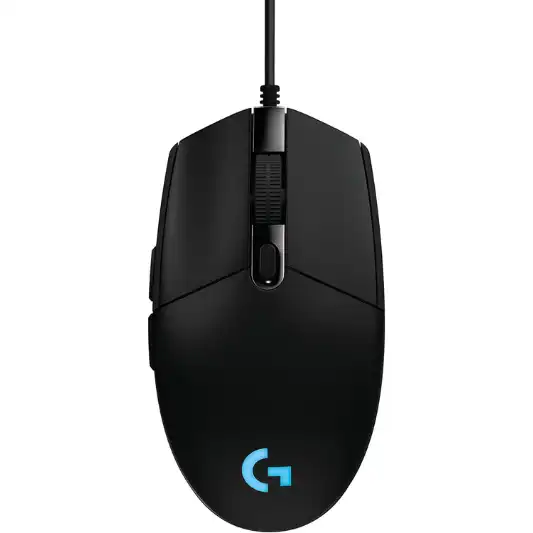
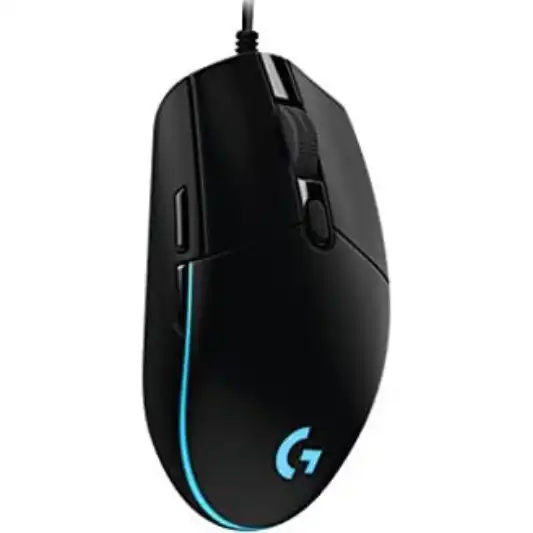
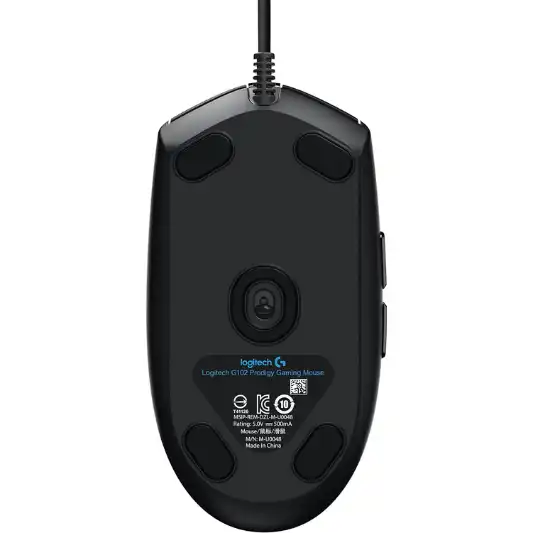
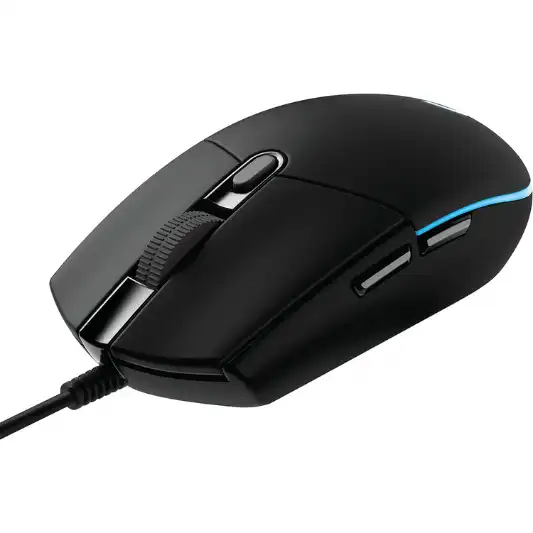
The Logitech G203 Prodigy Mouse inherits its design from the legendary Logitech G100S, a favorite among gamers and eSports professionals. This classic design is not just for nostalgia; it’s engineered for comfort and durability. The mouse fits comfortably in the hand, with a lightweight structure that makes it easy to maneuver during intense gaming sessions. The build quality is solid, ensuring that it can withstand the rigors of daily use.
Performance
Performance is where the Logitech G203 Prodigy Mouse truly shines. The advanced gaming-grade performance is up to eight times faster than standard mice, providing near-instantaneous responses to every click and movement. This can be a game-changer in fast-paced gaming environments where every millisecond counts.
The 6000 DPI sensor offers remarkable precision and tracking speed. Whether you’re playing an FPS, MOBA, or any other genre, this sensor ensures your movements are accurately reflected on the screen. The mouse also supports a maximum acceleration of >25 G and a maximum speed of >200 IPS, making it suitable for high-intensity gaming.
Customization
Customization is a key feature of the Logitech G203 Prodigy Mouse. With six programmable buttons, you can assign complex in-game actions to single clicks, giving you an edge in competitive play. The Logitech G HUB software makes it easy to configure these buttons to suit your needs.
The RGB lighting can be customized from a palette of 16.8 million colors. You can sync the lighting with your other Logitech G devices for a unified look or create a unique aesthetic that matches your gaming setup. The lighting customization options are extensive, allowing you to tweak the brightness, effects, and color to your liking.
Onboard Memory
One of the standout features of the Logitech G203 Prodigy Mouse is its onboard memory. This allows you to store your personalized settings directly on the mouse. Whether you’re switching between PCs or taking your mouse to a gaming tournament, you can easily access your preferred settings without needing to reconfigure each time. This feature adds a level of convenience that is particularly useful for gamers who are always on the go.
Durability and Comfort
The mouse is designed to be durable, with a build that can withstand heavy use. The buttons are rated for high durability, ensuring they will continue to perform well even after extensive use. The advanced button tensioning reduces the force needed to click the left and right buttons, providing a satisfying click feel and consistent response.
Comfort is another area where the Logitech G203 Prodigy Mouse excels. The classic design ensures that it fits comfortably in the hand, reducing strain during long gaming sessions. The mouse’s lightweight nature makes it easy to move quickly, which is crucial in fast-paced games.
Conclusion
In conclusion, the Logitech G203 Prodigy Mouse is a stellar choice for gamers looking for high performance, customization, and comfort in an affordable package. Its advanced gaming-grade performance, high-precision 6000 DPI sensor, and customizable features make it a versatile tool for both gaming and everyday use.
The mouse’s design is both nostalgic and functional, inspired by the iconic Logitech G100S but optimized for modern gaming needs. The RGB lighting and programmable buttons offer extensive customization options, while the onboard memory ensures your settings are always at your fingertips.
While the mouse is wired, which may be a drawback for some, it compensates with its reliable performance and low latency. The durability and comfort of the Logitech G203 Prodigy Mouse further enhance its appeal, making it a reliable companion for long gaming sessions.
Overall, the Logitech G203 Prodigy Mouse delivers exceptional value for its price. It combines Logitech’s decades of experience in gaming technology with a user-friendly design and advanced features, helping you play to your full potential.
You Might Be Interested In
- Logitech G613 Review
- How to Choose the Right Micro USB Cord for Your Devices
- Logitech G513 Review
- 10 Best Logitech Gaming Keyboards
- 5 Best AI Copywriting Tools for 2023 (Not ChatGPT)
Highly Recommended – ⭐⭐⭐⭐⭐
If you’re looking for a reliable, high-performance gaming mouse that offers customization and comfort, the Logitech G203 Prodigy Mouse is an excellent choice. Its advanced features and ergonomic design make it a versatile tool for both gaming and everyday use. Enhance your gaming experience today by choosing the Logitech G203 Prodigy Mouse. Click here to purchase or learn more.
Comparison with Similar Products
The Logitech G203 Prodigy Mouse is a popular choice among gamers, but it faces competition from several other well-regarded gaming mice. Here, we will compare the Logitech G203 Prodigy with the Razer DeathAdder Essential, SteelSeries Rival 3, and Corsair Harpoon RGB Wireless. This comparison will highlight their key features, specifications, and pros and cons to help you make an informed decision.
Key Competitors:
- Razer DeathAdder Essential
- SteelSeries Rival 3
- Corsair Harpoon RGB Wireless
Comparison Table
| Feature | Logitech G203 Prodigy | Razer DeathAdder Essential | SteelSeries Rival 3 | Corsair Harpoon RGB Wireless |
|---|---|---|---|---|
| Brand | Logitech | Razer | SteelSeries | Corsair |
| Color | Black | Black | Black | Black |
| Connectivity Technology | USB | USB | USB | Wireless (also supports USB connection) |
| Movement Detection Technology | Optical | Optical | Optical | Optical |
| Number of Buttons | 6 | 5 | 6 | 6 |
| Max. DPI | 6000 DPI | 6400 DPI | 8500 DPI | 10000 DPI |
| Max. Acceleration | >25 G | 30 G | 35 G | 20 G |
| Max. Speed | >200 IPS | 220 IPS | 300 IPS | 100 IPS |
| Dimensions | 1.5 x 2.45 x 4.59 inches | 2.9 x 1.7 x 5 inches | 1.49 x 2.64 x 4.75 inches | 1.57 x 2.68 x 4.55 inches |
| Weight | 3 ounces | 3.7 ounces | 2.7 ounces | 3.52 ounces |
| RGB Lighting | Yes | No | Yes | Yes |
| Programmable Buttons | Yes | Yes | Yes | Yes |
| Onboard Memory | Yes | No | Yes | Yes |
| Battery Life | N/A | N/A | N/A | Up to 60 hours |
| Price | ~$39.99 | ~$29.99 | ~$29.99 | ~$49.99 |
Detailed Comparison
1. Razer DeathAdder Essential
- Design and Build Quality: The Razer DeathAdder Essential has an ergonomic design with a slightly larger build compared to the Logitech G203 Prodigy. It is designed to fit comfortably in the hand for extended gaming sessions.
- Performance: With a 6400 DPI optical sensor and 30 G acceleration, the Razer DeathAdder Essential offers excellent precision and responsiveness. Its 220 IPS tracking speed makes it suitable for fast-paced games.
- Customization: It features 5 programmable buttons, which can be configured using Razer Synapse software. However, it lacks RGB lighting.
- Durability and Comfort: Known for its durability, the DeathAdder Essential is built to last with high-quality materials. The ergonomic design ensures comfort even during long gaming sessions.
- Price: At around $29.99, it is slightly more affordable than the Logitech G203 Prodigy.
Pros:
- Ergonomic design
- High DPI sensor
- Durable build
Cons:
- No RGB lighting
- Fewer programmable buttons compared to some competitors
2. SteelSeries Rival 3
- Design and Build Quality: The SteelSeries Rival 3 features a sleek and lightweight design, making it comfortable for both gaming and everyday use.
- Performance: It boasts an 8500 DPI optical sensor with 35 G acceleration and 300 IPS tracking speed, offering high precision and speed.
- Customization: The Rival 3 has 6 programmable buttons and customizable RGB lighting. The SteelSeries Engine software allows for extensive customization.
- Durability and Comfort: Made with high-quality materials, the Rival 3 is built to withstand heavy use. Its ergonomic design ensures comfort over long periods.
- Price: Priced around $29.99, it offers excellent value for its features.
Pros:
- High DPI sensor
- Customizable RGB lighting
- Lightweight design
Cons:
- Wired only
- May feel small for users with larger hands
3. Corsair Harpoon RGB Wireless
- Design and Build Quality: The Corsair Harpoon RGB Wireless has a compact and lightweight design. It can be used both wirelessly and wired, providing flexibility.
- Performance: With a 10000 DPI optical sensor, 20 G acceleration, and 100 IPS tracking speed, the Harpoon offers high precision and speed, especially in wireless mode.
- Customization: It features 6 programmable buttons and customizable RGB lighting. The Corsair iCUE software allows for detailed customization.
- Durability and Comfort: The mouse is designed for comfort and durability, with a contoured shape that fits well in the hand.
- Price: At approximately $49.99, it is more expensive than the Logitech G203 Prodigy but offers wireless capabilities.
Pros:
- Wireless and wired options
- High DPI sensor
- Long battery life
Cons:
- More expensive
- Lower acceleration and IPS compared to some competitors
FAQs
What makes the Logitech G203 Prodigy Mouse different from other gaming mice?
The Logitech G203 Prodigy Mouse distinguishes itself from other gaming mice with several unique features. Firstly, its advanced gaming-grade performance is up to eight times faster than standard mice. This means that every click and movement is nearly instantaneous, providing a significant advantage in fast-paced games where reaction time is crucial.
Another key differentiator is the high-precision 6000 DPI sensor. This sensor offers incredible accuracy and tracking speed, ensuring that your movements are accurately reflected on the screen. This precision is essential for games that require pinpoint accuracy, such as first-person shooters (FPS) and real-time strategy (RTS) games.
The design of the G203 is also a standout feature. It is inspired by the iconic Logitech G100S, a mouse that has been a favorite among gamers and eSports professionals for years. This classic design is not only comfortable but also durable, making it suitable for long gaming sessions.
Customization is another area where the G203 excels. It features six programmable buttons that can be configured to execute complex in-game actions with a single click. The RGB lighting can be customized from a palette of 16.8 million colors, allowing you to personalize the mouse to match your gaming setup.
Lastly, the onboard memory allows you to store your game-ready settings directly on the mouse. This means you can take your settings with you and use them on any PC without needing to reconfigure your preferences each time. This level of convenience is particularly useful for gamers who frequently switch between different gaming environments.
How do I customize the buttons and lighting on the Logitech G203 Prodigy Mouse?
Customizing the buttons and lighting on the Logitech G203 Prodigy Mouse is a straightforward process, thanks to the Logitech G HUB software. This intuitive software provides a user-friendly interface that makes customization easy, even for those who are not particularly tech-savvy.
To customize the buttons, you first need to download and install the Logitech G HUB software from the Logitech website. Once installed, open the software and select the G203 mouse from the list of connected devices. You will see an image of the mouse with its six buttons highlighted. Clicking on any of these buttons will allow you to assign a new function. You can choose from a wide range of actions, including keyboard shortcuts, macros, and in-game commands. This flexibility allows you to tailor the mouse to your specific gaming needs, enhancing your efficiency and performance.
Customizing the RGB lighting is equally simple. In the Logitech G HUB software, navigate to the lighting section. Here, you can choose from a palette of 16.8 million colors and apply different lighting effects, such as breathing, color cycling, and static. You can also adjust the brightness and speed of the effects to create the perfect look for your setup. If you have other Logitech G devices, you can sync the lighting across all your devices for a unified aesthetic.
Is the Logitech G203 Prodigy Mouse suitable for all types of games?
Yes, the Logitech G203 Prodigy Mouse is designed to be versatile and is suitable for a wide range of gaming genres. Whether you’re playing first-person shooters (FPS), multiplayer online battle arenas (MOBA), role-playing games (RPG), or real-time strategy (RTS) games, the G203 can handle it all.
For FPS games, the high-precision 6000 DPI sensor provides the accuracy needed for pinpoint targeting. The mouse’s fast response time ensures that your movements and clicks are registered without delay, which is critical in high-stakes environments where reaction time can determine the outcome.
In MOBA games, where multiple actions need to be performed quickly and accurately, the six programmable buttons are invaluable. You can assign frequently used abilities, items, or commands to these buttons, allowing for quicker execution and freeing up your keyboard hand for movement and other tasks.
RPG and RTS games also benefit from the G203’s customization options. In RPGs, you can assign macros to the programmable buttons to streamline complex sequences of actions, such as casting spells or using abilities. In RTS games, quick access to commands and shortcuts can give you a strategic advantage by allowing you to manage your units and resources more efficiently.
Overall, the G203’s combination of precision, responsiveness, and customization makes it a great choice for virtually any type of game. Its versatility ensures that it can adapt to different gameplay styles and preferences, providing a reliable performance no matter what you’re playing.
Can I use the Logitech G203 Prodigy Mouse on different operating systems?
Yes, the Logitech G203 Prodigy Mouse is compatible with multiple operating systems, making it a flexible choice for gamers who use different platforms. It works seamlessly with Windows 7 or later, macOS 10.11 or later, and Chrome OS. This broad compatibility ensures that you can use the G203 with almost any computer, whether you’re a Windows, Mac, or Chromebook user.
To set up the mouse on your preferred operating system, simply plug it into a USB port. The mouse will be recognized automatically, and basic functionality will be available immediately. For full customization and access to advanced features, you will need to download and install the Logitech G HUB software, which is available for both Windows and macOS.
The Logitech G HUB software allows you to customize the buttons, lighting, and DPI settings on your mouse. It also lets you create profiles for different games or applications, which can be stored in the onboard memory of the mouse. This means you can take your personalized settings with you and use them on any compatible operating system without needing to reconfigure each time.
For Chrome OS users, while the Logitech G HUB software is not available, the G203 will still function as a standard mouse with its default settings. This makes it a versatile and reliable option for users who need a high-performance mouse that can work across different platforms.
How durable is the Logitech G203 Prodigy Mouse?
The Logitech G203 Prodigy Mouse is built to be durable and withstand extensive use, making it a reliable choice for gamers who spend long hours in front of their screens. The overall build quality is solid, with a design that is both robust and comfortable.
One of the key features that contribute to the mouse’s durability is the advanced button tensioning. This mechanism reduces the force needed to click the left and right buttons, providing a satisfying click feel and consistent response. The buttons are rated for high durability, ensuring that they will continue to perform well even after extensive use. This is particularly important for gamers who need a mouse that can withstand the rigors of intense gaming sessions.
