

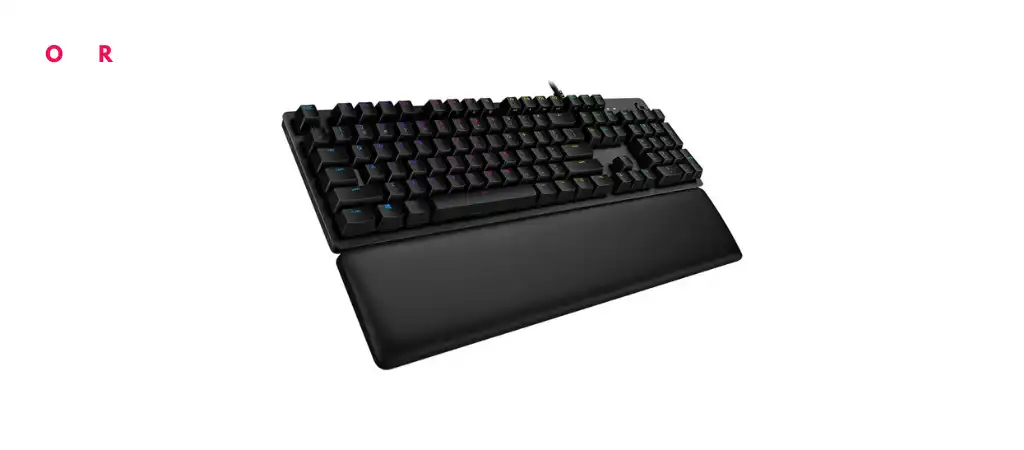
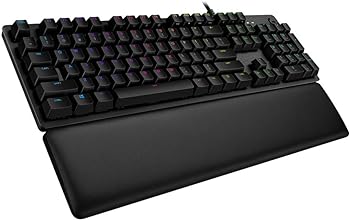
The Logitech G513 Carbon LIGHTSYNC RGB Mechanical Gaming Keyboard is a testament to Logitech’s commitment to providing high-quality gaming peripherals. Designed with the serious gamer in mind, this keyboard features GX Brown switches, customizable RGB lighting, and a durable aluminum frame.
In this detailed review, we’ll dive deep into the key features, specifications, pros and cons, and overall performance of the Logitech G513, one of the Best Logitech Gaming Keyboards. We’ll also address common questions and provide a final verdict on whether this keyboard is worth the investment.
Key Features
-
Personalized RGB Lighting
With Logitech G HUB software, you can customize the lighting for each individual key, create lighting effects, and enjoy in-game integrations from a spectrum of 16.8 million colors.
-
GX Brown Switches
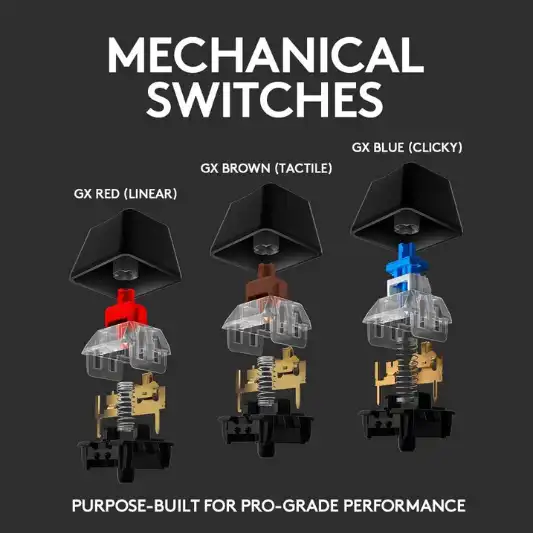
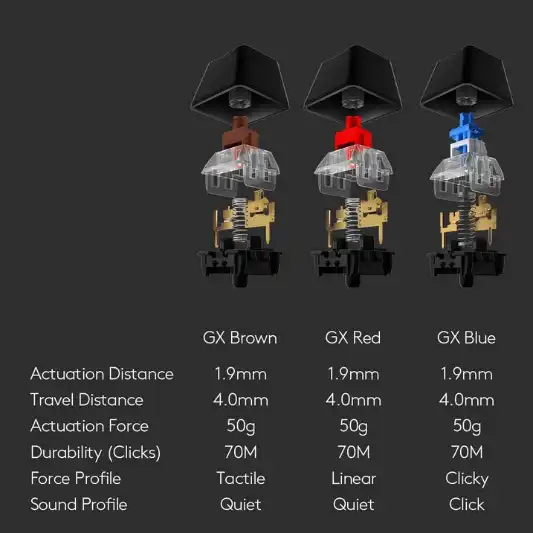
The GX Brown switches offer a traditional mechanical feel with tactile feedback, making them ideal for gamers who prefer precise actuation without the noise of clicky switches.
-
Comfortable Design
The memory foam wrist rest provides excellent comfort, recovering quickly from pressure to ensure every use is as comfortable as the first.
-
Durable Build
The keyboard features an aircraft-grade 5052 aluminum top case that is anodized and brushed, giving it a slim, premium design along with rigid durability.
-
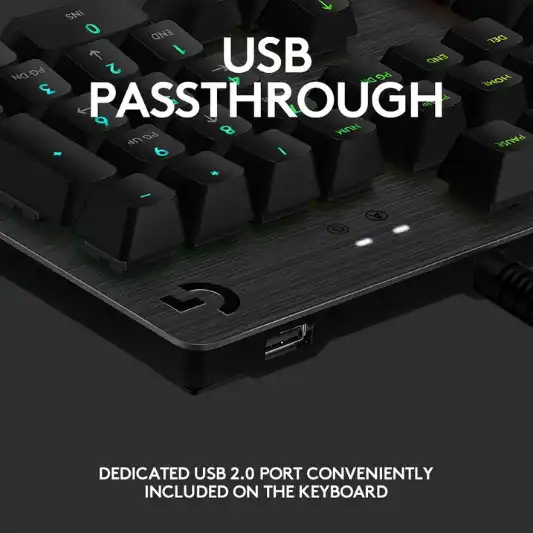
USB Pass-Through
A convenient USB pass-through port allows you to easily plug in your mouse, flash drive, or phone for direct data transmission or charging.
Specifications
| Feature | Specification |
|---|---|
| Brand | Logitech G |
| Series | G513 Carbon RGB Mechanical Gaming Keyboard, GX Brown |
| Item Model Number | 920-009321 |
| Hardware Platform | PC |
| Item Weight | 4.23 pounds |
| Product Dimensions | 18.31 x 2.36 x 7.28 inches |
| Color | Carbon |
| Power Source | Corded Electric |
| Number of Keys | 104 |
| Keyboard Backlighting Color Support | RGB |
| Style | Brown Tactile |
| Connectivity Technology | Wired |
| Recommended Uses | Gaming |
| Batteries Required | 1 Lithium Ion battery |
| Manufacturer | Logitech |
| Date First Available | October 6, 2019 |
Pros and Cons
Pros:
- Highly customizable RGB lighting
- Tactile GX Brown switches ideal for gaming
- Comfortable memory foam wrist rest
- Durable, premium aluminum construction
- Convenient USB pass-through port
Cons:
- Heavier than some other keyboards
- Requires Logitech G HUB software for full customization
- Higher price point compared to non-mechanical keyboards

Conclusion
The Logitech G513 Carbon LIGHTSYNC RGB Mechanical Gaming Keyboard is a formidable contender in the realm of gaming keyboards. Its GX Brown switches are a standout feature, offering a tactile experience that is both satisfying and precise. These switches provide the perfect balance for gamers who need responsive feedback without the noise typically associated with mechanical keyboards.
The customizable RGB lighting is another highlight, allowing users to personalize their gaming setup with a wide range of colors and effects. The Logitech G HUB software makes this process straightforward, though it does add a layer of complexity for those who prefer plug-and-play devices.
Comfort is a key consideration for any gaming keyboard, and the Logitech G513 excels in this area with its memory foam wrist rest. This feature ensures that even during long gaming sessions, your wrists remain comfortable, reducing the strain that can lead to repetitive strain injuries.
Durability is another area where the Logitech G513 shines. The aircraft-grade 5052 aluminum top case not only adds to the aesthetic appeal of the keyboard but also ensures it can withstand the rigors of intense gaming. This is a keyboard built to last, making it a worthwhile investment for serious gamers.
The USB pass-through port is a practical addition, offering a convenient way to connect other devices without having to reach around to the back of your PC. This is particularly useful for those who frequently use external storage devices or charge their phones while gaming.
Despite its many strengths, the Logitech G513 is not without its drawbacks. The keyboard is on the heavier side, which may be a consideration for those who need a more portable solution. Additionally, while the Logitech G HUB software offers extensive customization options, it can be a bit daunting for users who prefer a simpler setup.
In terms of price, the Logitech G513 is positioned at the higher end of the market, reflecting its premium features and build quality. While it offers excellent value for its price, it may not be the best choice for budget-conscious gamers.
Overall, the Logitech G513 Carbon LIGHTSYNC RGB Mechanical Gaming Keyboard with GX Brown switches is an outstanding choice for gamers who value performance, customization, and durability. It delivers on all fronts, providing a superior gaming experience that is both comfortable and highly customizable.
You Might Be Interested In
- 5 Best AI Copywriting Tools for 2023 (Not ChatGPT)
- Logitech G413 Review
- Logitech G815 Review
- Biomimicry Innovation Unveiled: A Remarkable Example
- Logitech G Pro X Keyboard Review
Highly Recommended – ⭐⭐⭐⭐⭐
If you are a serious gamer looking for a keyboard that combines performance, comfort, and customization, the Logitech G513 Carbon LIGHTSYNC RGB Mechanical Gaming Keyboard with GX Brown switches is an excellent choice. Its durable build, tactile feedback, and customizable features make it a standout option in the market. Don’t settle for less—enhance your gaming experience with the Logitech G513. Click here to buy now and elevate your gaming setup to the next level!
Logitech G513 vs. Corsair K70 RGB MK.2 vs. Razer BlackWidow Elite
When looking for a high-end gaming keyboard, the Logitech G513, Corsair K70 RGB MK.2, and Razer BlackWidow Elite are among the top contenders. Each of these keyboards offers a range of features designed to enhance the gaming experience, but they also have unique aspects that set them apart. In this comparative review, we’ll analyze their key features, performance, build quality, and overall value to help you make an informed decision.
Key Features Comparison
Logitech G513 Carbon LIGHTSYNC RGB Mechanical Gaming Keyboard
- Switches: GX Brown (tactile), also available in GX Blue (clicky) and GX Red (linear)
- Lighting: Customizable RGB lighting with 16.8 million colors
- Build: Aircraft-grade 5052 aluminum top case
- Comfort: Memory foam wrist rest
- Connectivity: Wired with USB pass-through
- Software: Logitech G HUB
Corsair K70 RGB MK.2 Mechanical Gaming Keyboard
- Switches: Cherry MX (Red, Brown, Blue, Speed, and Silent options)
- Lighting: Per-key RGB backlighting
- Build: Aircraft-grade anodized brushed aluminum frame
- Comfort: Detachable soft-touch wrist rest
- Connectivity: Wired with USB pass-through
- Software: Corsair iCUE
Razer BlackWidow Elite Mechanical Gaming Keyboard
- Switches: Razer Green (clicky), Razer Orange (tactile), and Razer Yellow (linear)
- Lighting: Razer Chroma RGB
- Build: Military-grade metal top plate
- Comfort: Ergonomic wrist rest
- Connectivity: Wired with USB 2.0 and audio pass-through
- Software: Razer Synapse 3
Specifications Comparison
| Feature | Logitech G513 | Corsair K70 RGB MK.2 | Razer BlackWidow Elite |
|---|---|---|---|
| Switches | GX Brown (also GX Blue, GX Red) | Cherry MX (Red, Brown, Blue, Speed, Silent) | Razer Green, Orange, Yellow |
| Lighting | RGB (16.8M colors) | Per-key RGB backlighting | Razer Chroma RGB |
| Build Material | 5052 Aluminum | Anodized brushed aluminum | Military-grade metal |
| Wrist Rest | Memory foam | Detachable soft-touch | Ergonomic |
| USB Pass-Through | Yes | Yes | Yes (USB 2.0 and audio) |
| Software | Logitech G HUB | Corsair iCUE | Razer Synapse 3 |
| Dimensions | 18.31 x 2.36 x 7.28 inches | 17.24 x 6.53 x 1.53 inches | 17.65 x 6.08 x 1.67 inches |
| Weight | 4.23 pounds | 2.76 pounds | 3.69 pounds |
| Price | $$$ | $$$ | $$$ |
Performance and Build Quality
Logitech G513
The Logitech G513’s GX Brown switches provide a balanced tactile feedback, making it suitable for both gaming and typing. The customizable RGB lighting is vibrant and offers extensive personalization options through the Logitech G HUB software. The aluminum frame ensures durability, while the memory foam wrist rest adds to the overall comfort.
Corsair K70 RGB MK.2
The Corsair K70 RGB MK.2 is known for its versatile switch options, catering to different preferences. The Cherry MX switches are renowned for their reliability and performance. Its per-key RGB lighting is vivid and can be deeply customized using Corsair’s iCUE software. The aluminum frame is robust, and the detachable wrist rest is comfortable, though not as plush as Logitech’s.
Razer BlackWidow Elite
The Razer BlackWidow Elite stands out with its Razer-designed switches, which offer a unique feel. The Razer Green switches are particularly known for their clicky tactile feedback. Razer Chroma RGB provides excellent lighting effects that are fully customizable via Razer Synapse 3. The military-grade metal build is solid, and the ergonomic wrist rest is among the most comfortable, though it may not be as durable as the Logitech’s.
Pros and Cons Comparison
Logitech G513
Pros:
- High-quality tactile GX Brown switches
- Excellent RGB customization with G HUB
- Durable aluminum build
- Comfortable memory foam wrist rest
- Convenient USB pass-through
Cons:
- Heavier than competitors
- Requires software for full customization
- Higher price point
Corsair K70 RGB MK.2
Pros:
- Wide variety of Cherry MX switches
- Robust iCUE software for customization
- Durable aluminum frame
- Comfortable detachable wrist rest
- USB pass-through
Cons:
- Wrist rest less plush than Logitech’s
- Slightly narrower customization options compared to G HUB
- Similar high price point
Razer BlackWidow Elite
Pros:
- Unique Razer Green, Orange, and Yellow switches
- High-quality Razer Chroma RGB lighting
- Military-grade metal build
- Extremely comfortable ergonomic wrist rest
- USB and audio pass-through
Cons:
- Razer switches might not appeal to everyone
- Heavier than Corsair
- Requires Synapse 3 for customization
- High price point
FAQs
What makes the GX Brown switches different from other mechanical switches?
GX Brown switches are designed to offer a tactile feedback without the audible click found in other mechanical switches like the GX Blue. This makes them ideal for gamers who prefer a responsive, yet quieter, keyboard. The tactile bump provides a noticeable actuation point, ensuring accurate and precise keystrokes, which is essential for gaming.
How customizable is the RGB lighting on the Logitech G513?
The RGB lighting on the Logitech G513 is highly customizable. Using the Logitech G HUB software, users can personalize the lighting for each individual key, create dynamic lighting effects, and integrate with in-game events. The software provides a spectrum of 16.8 million colors to choose from, allowing for virtually unlimited customization options to match your gaming setup or personal preference.
Is the memory foam wrist rest detachable?
Yes, the memory foam wrist rest that comes with the Logitech G513 is detachable. This allows users to use the keyboard with or without the wrist rest, depending on their comfort preference. The wrist rest is designed to recover quickly from pressure, ensuring that it remains comfortable even during extended gaming sessions.
Does the keyboard require any special software to operate?
While the Logitech G513 can function as a standard keyboard without any additional software, to fully utilize its features, including the customizable RGB lighting and key assignments, the Logitech G HUB software is required. This software is easy to download and install from the Logitech website and provides a user-friendly interface for managing your keyboard’s settings.
Can the USB pass-through port be used for all USB devices?
The USB pass-through port on the Logitech G513 is versatile and can be used for a variety of USB devices, including mice, flash drives, and even charging smartphones. However, the performance of high-power USB devices might be limited, and it is primarily intended for convenience rather than high-speed data transfer or powering large devices.
