


The Logitech G815 LIGHTSYNC RGB Mechanical Gaming Keyboard is a testament to Logitech’s innovation in the realm of gaming peripherals. Featuring a sleek, low-profile design, the G815 promises both aesthetics and functionality.
This review will delve into the key features, specifications, pros and cons, a detailed conclusion, FAQs, overall grading, and a call to action to help you decide if this keyboard is the right fit for your gaming setup among the Best Logitech Gaming Keyboards.
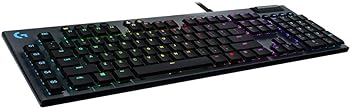
Key Features
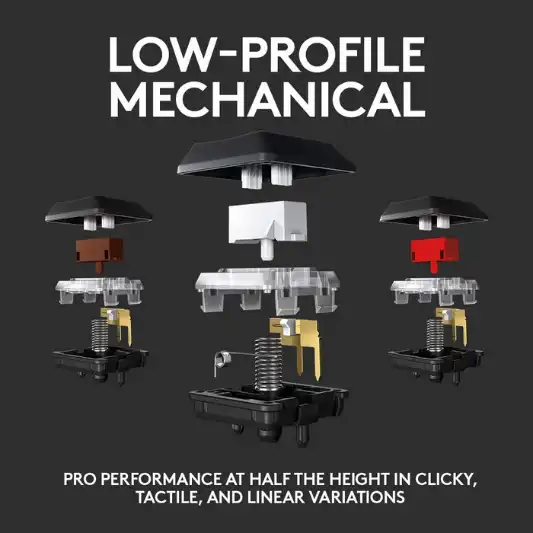
Low Profile Mechanical Switches
The G815 is equipped with low-profile GL mechanical switches, available in three types: GL Tactile, GL Linear, and GL Clicky. These switches offer the speed, accuracy, and performance of traditional mechanical switches but at half the height, making them ideal for gamers who prefer a more streamlined and responsive experience.
LIGHTSYNC RGB Technology
The LIGHTSYNC technology provides advanced RGB lighting that synchronizes with any content. This allows for personalized lighting effects and custom animations, which can be managed through the Logitech G Hub software. With 16.8 million colors to choose from, the customization possibilities are nearly endless.
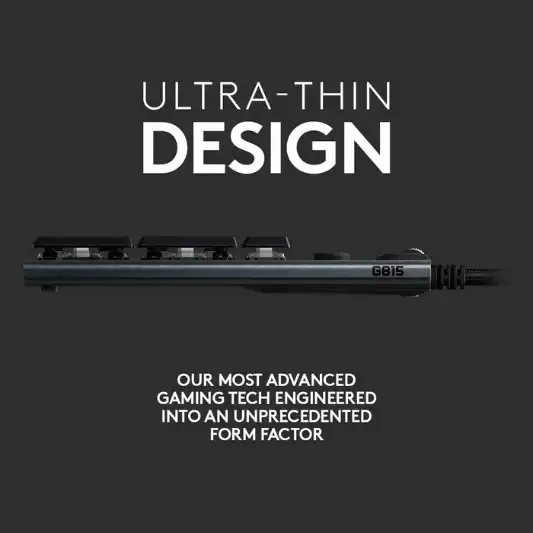
Aircraft-Grade Aluminum Alloy Design
The G815 is beautifully crafted using aircraft-grade aluminum alloy, which makes it incredibly thin yet durable. This premium material ensures the keyboard is both lightweight and robust, capable of withstanding intense gaming sessions.
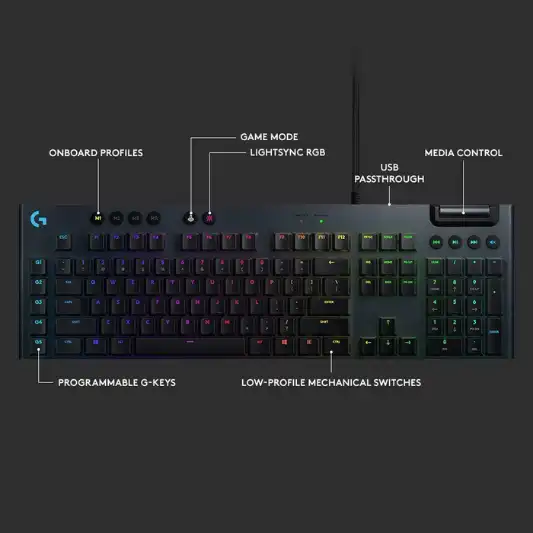
Five Programmable G-Keys
The keyboard features five dedicated G-keys that can be programmed with custom macros and commands for each game or application profile. This allows for enhanced flexibility and efficiency during gameplay, giving gamers a competitive edge.
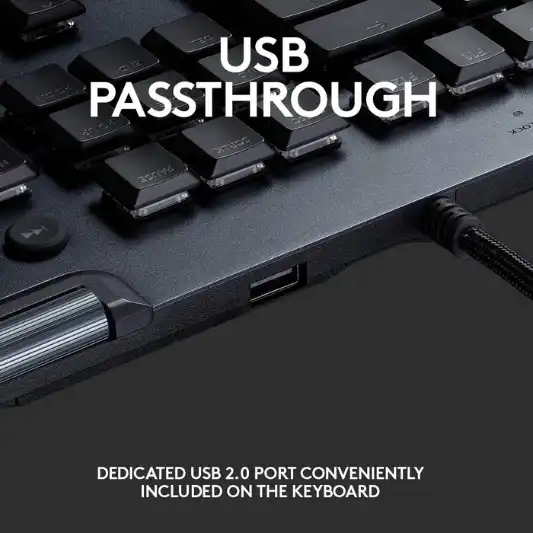
USB Passthrough
An additional dedicated USB cable connects the USB 2.0 pass-through port to its own input for full power throughput and data speed. This feature is particularly useful for connecting other peripherals, such as a mouse or a USB drive, directly to the keyboard.
Dedicated Media Controls
The G815 includes dedicated media controls with a precision-engineered, edgeless volume wheel. These controls allow for quick and convenient management of media, enabling you to play, pause, skip, or mute your media without interrupting your gameplay.
Logitech G Hub Software
The Logitech G Hub software provides easy control for customizing and accessing advanced features. It allows you to personalize your keyboard by game, connect to third-party apps like Discord, and download and share custom game profiles with the Logitech G community.
Specifications
| Specification | Detail |
|---|---|
| Brand | Logitech G |
| Compatible Devices | Gaming Console |
| Connectivity Technology | USB, USB 2.0 |
| Keyboard Description | Mechanical, Gaming |
| Recommended Uses for Product | Gaming |
| Special Feature | Dedicated media controls, Programmable G-keys |
| Color | Black |
| Number of Keys | 104 |
| Keyboard Backlighting Color | RGB |
| Style | Wired |
| Item Weight | 3.52 pounds |
| Product Dimensions | 18.7 x 5.9 x 0.87 inches |
| Item Dimensions LxWxH | 18.7 x 5.9 x 0.87 inches |
| Manufacturer | Logitech |
| ASIN | B07P1DHN65 |
| Country of Origin | China |
| Date First Available | August 15, 2019 |
| Hardware Platform | PC |
| Operating System | Mac OS, IOS, Android |
Pros and Cons
Pros
- Low-profile mechanical switches offer a unique blend of speed and comfort.
- LIGHTSYNC RGB provides extensive customization options.
- Durable, premium build with aircraft-grade aluminum alloy.
- Five programmable G-keys for enhanced functionality.
- USB passthrough for convenient peripheral connectivity.
- Dedicated media controls for easy media management.
Cons
- Premium price might be a deterrent for budget-conscious buyers.
- Software dependency for full customization may not appeal to everyone.
- No wrist rest included, which might affect comfort during extended use.
Conclusion
The Logitech G815 LIGHTSYNC RGB Mechanical Gaming Keyboard is a top-tier choice for gamers seeking a blend of performance, aesthetics, and functionality. Its low-profile mechanical switches deliver the tactile satisfaction of traditional mechanical keyboards while offering a more streamlined and responsive experience. The LIGHTSYNC RGB technology enhances the visual appeal, allowing for extensive customization to match your gaming setup.
The aircraft-grade aluminum alloy construction ensures durability, making the G815 a reliable companion for intense gaming sessions. The five programmable G-keys provide a level of flexibility that can give gamers a competitive edge, while the USB passthrough and dedicated media controls add to the overall convenience.
However, the G815 comes with a premium price tag, which might be a consideration for budget-conscious gamers. Additionally, the reliance on Logitech G Hub software for full customization might not appeal to everyone, and the lack of a wrist rest could impact comfort during prolonged use.
Overall, the Logitech G815 is an excellent investment for serious gamers who value performance, customization, and durability. Its advanced features and sleek design make it a standout choice in the crowded market of gaming keyboards.
You Might Be Interested In
- Sustainability in Green Technology: A Path to Innovative Greener Future
- 10 Best Nintendo Switch ROMs
- Steelseries Rival 3 Mouse Review
- Logitech G512 Review
- Logitech G915 TKL Review
Highly Recommended – ⭐⭐⭐⭐⭐
If you’re a gamer looking for a high-performance keyboard that offers a perfect blend of speed, accuracy, and customization, the Logitech G815 is an excellent choice. This keyboard stands out with its advanced features and sleek design, making it a standout option in the market of gaming peripherals.
The low-profile GL mechanical switches provide a unique and responsive typing experience, whether you choose the tactile, linear, or clicky variant. The LIGHTSYNC RGB technology allows you to personalize your setup with nearly endless lighting possibilities, creating an immersive gaming environment tailored to your preferences.
Logitech G815 vs. Similar Products
When choosing a gaming keyboard, it’s crucial to consider all your options. The Logitech G815 is a standout product, but how does it compare to other popular gaming keyboards on the market? We’ll compare it to the Corsair K95 RGB Platinum, Razer Huntsman Elite, and SteelSeries Apex Pro to see how it stacks up in terms of features, performance, and value.
Corsair K95 RGB Platinum
Key Features
- Cherry MX RGB Mechanical Switches: Known for their reliability and performance.
- 6 Programmable Macro Keys: Customize your gameplay with dedicated macro keys.
- RGB Backlighting: Per-key RGB backlighting with customization options.
- Aircraft-Grade Aluminum Frame: Durable and robust build quality.
- Detachable Wrist Rest: Provides additional comfort during extended gaming sessions.
- Dedicated Media Controls: Easily control your media without leaving the game.
Specifications
| Specification | Corsair K95 RGB Platinum |
|---|---|
| Switch Type | Cherry MX RGB Mechanical |
| Number of Keys | 104 |
| Programmable Keys | 6 |
| Backlighting | RGB |
| Frame Material | Aircraft-Grade Aluminum |
| Wrist Rest | Detachable |
| Media Controls | Yes |
| Connectivity Technology | USB |
| Dimensions | 18.3 x 6.7 x 1.4 inches |
| Weight | 2.92 pounds |
| Software | Corsair iCUE |
| Price Range | $170 – $200 |
Pros and Cons
Pros
- High-quality Cherry MX switches
- Durable aluminum frame
- Detachable wrist rest for added comfort
- Extensive customization with iCUE software
Cons
- Higher price point
- Bulky design
Razer Huntsman Elite
Key Features
- Opto-Mechanical Switches: Razer’s innovative switches provide speed and responsiveness.
- Dedicated Media Controls: Convenient media controls with a multifunction digital dial.
- RGB Lighting: Customizable RGB lighting with Razer Chroma.
- Magnetic Wrist Rest: Comfortable wrist rest with RGB underglow.
- Fully Programmable Keys: Customize all keys for macros and functions.
- Razer Synapse 3: Comprehensive software for customization and settings.
Specifications
| Specification | Razer Huntsman Elite |
|---|---|
| Switch Type | Opto-Mechanical |
| Number of Keys | 104 |
| Programmable Keys | All keys |
| Backlighting | RGB |
| Frame Material | Aluminum |
| Wrist Rest | Magnetic |
| Media Controls | Yes |
| Connectivity Technology | USB |
| Dimensions | 17.6 x 5.5 x 1.4 inches |
| Weight | 2.60 pounds |
| Software | Razer Synapse 3 |
| Price Range | $180 – $200 |
Pros and Cons
Pros
- Fast and responsive Opto-Mechanical switches
- Customizable RGB lighting with Razer Chroma
- Comfortable magnetic wrist rest
- Comprehensive customization with Razer Synapse 3
Cons
- Expensive
- Synapse 3 software can be complex
SteelSeries Apex Pro
Key Features
- OmniPoint Adjustable Switches: Customize actuation points for each key.
- OLED Smart Display: Integrated display for in-game information and settings.
- RGB Lighting: Dynamic per-key RGB illumination.
- Aircraft-Grade Aluminum Alloy: Sturdy and durable build quality.
- Detachable Magnetic Wrist Rest: Provides comfort during long gaming sessions.
- Dedicated Media Controls: Easily manage media without disrupting gameplay.
Specifications
| Specification | SteelSeries Apex Pro |
|---|---|
| Switch Type | OmniPoint Adjustable Mechanical |
| Number of Keys | 104 |
| Programmable Keys | All keys |
| Backlighting | RGB |
| Frame Material | Aircraft-Grade Aluminum |
| Wrist Rest | Detachable Magnetic |
| Media Controls | Yes |
| Connectivity Technology | USB |
| Dimensions | 17.2 x 5.5 x 1.6 inches |
| Weight | 2.14 pounds |
| Software | SteelSeries Engine |
| Price Range | $190 – $210 |
Pros and Cons
Pros
- Highly customizable OmniPoint switches
- Integrated OLED Smart Display
- Durable aluminum build
- Comfortable detachable wrist rest
Cons
- High price point
- Software can be overwhelming for new users
Logitech G815 vs. Competitors
Key Features Comparison
| Feature | Logitech G815 | Corsair K95 RGB Platinum | Razer Huntsman Elite | SteelSeries Apex Pro |
|---|---|---|---|---|
| Switch Type | Low-Profile GL Tactile | Cherry MX RGB Mechanical | Opto-Mechanical | OmniPoint Adjustable Mechanical |
| Programmable Keys | 5 | 6 | All keys | All keys |
| Backlighting | RGB | RGB | RGB | RGB |
| Frame Material | Aircraft-Grade Aluminum Alloy | Aircraft-Grade Aluminum | Aluminum | Aircraft-Grade Aluminum |
| Wrist Rest | None | Detachable | Magnetic | Detachable Magnetic |
| Media Controls | Yes | Yes | Yes | Yes |
| Connectivity | USB, USB 2.0 | USB | USB | USB |
| Dimensions | 18.7 x 5.9 x 0.87 inches | 18.3 x 6.7 x 1.4 inches | 17.6 x 5.5 x 1.4 inches | 17.2 x 5.5 x 1.6 inches |
| Weight | 3.52 pounds | 2.92 pounds | 2.60 pounds | 2.14 pounds |
| Software | Logitech G Hub | Corsair iCUE | Razer Synapse 3 | SteelSeries Engine |
| Price Range | $150 – $200 | $170 – $200 | $180 – $200 | $190 – $210 |
Performance and Customization
The Logitech G815 stands out with its low-profile GL switches, offering a different typing experience compared to the traditional mechanical switches found in the Corsair K95 and SteelSeries Apex Pro. The Razer Huntsman Elite‘s Opto-Mechanical switches provide a unique blend of speed and tactile feedback.
When it comes to customization, all four keyboards offer extensive options through their respective software. However, the SteelSeries Apex Pro takes customization a step further with its OmniPoint Adjustable Mechanical switches, allowing users to set the actuation points for each key. The Logitech G815 and Corsair K95 provide a more traditional approach with dedicated macro keys and extensive lighting options.
Build Quality and Comfort
All four keyboards feature high-quality aluminum frames, ensuring durability and a premium feel. The Logitech G815 and SteelSeries Apex Pro boast aircraft-grade aluminum alloy, while the Corsair K95 and Razer Huntsman Elite also offer robust builds.
Comfort is another important factor. The Corsair K95 and Razer Huntsman Elite include detachable wrist rests, with the Huntsman Elite’s magnetic wrist rest providing additional RGB underglow. The SteelSeries Apex Pro also offers a detachable magnetic wrist rest. In contrast, the Logitech G815 does not include a wrist rest, which might be a drawback for some users.
Value for Money
The Logitech G815 is competitively priced within the $150-$200 range, making it a strong contender for gamers seeking a high-quality keyboard without breaking the bank. The Corsair K95, Razer Huntsman Elite, and SteelSeries Apex Pro are slightly more expensive, ranging from $170 to $210.
While the Logitech G815 offers excellent value with its advanced features and build quality, the higher price points of the other keyboards reflect their additional features, such as the adjustable switches on the SteelSeries Apex Pro and the Opto-Mechanical switches on the Razer Huntsman Elite.
FAQs
What are the differences between the GL Tactile, GL Linear, and GL Clicky switches?
The GL Tactile switch provides a discernible bump at the point of actuation, offering tactile feedback without being too loud. The GL Linear switch offers a smooth keystroke with no tactile bump, making it quieter and ideal for rapid key presses. The GL Clicky switch provides an audible click along with the tactile bump, offering both sound and feedback for those who prefer a more traditional mechanical keyboard feel.
How does the LIGHTSYNC RGB technology work?
LIGHTSYNC RGB technology allows the keyboard’s lighting to synchronize with any content, including games, videos, and music. Using the Logitech G Hub software, you can personalize each key’s lighting or create custom animations from a palette of 16.8 million colors. The software also allows you to manage lighting profiles and effects for different games and applications.
Can the G815 be used with gaming consoles?
Yes, the Logitech G815 is compatible with gaming consoles. However, the full range of customization options and programmable G-keys might be limited depending on the console’s compatibility with Logitech G Hub software. For the best experience, it is recommended to use the keyboard with a PC where the software can be fully utilized.
Does the keyboard come with a wrist rest?
No, the Logitech G815 does not come with a wrist rest. While the keyboard’s low profile design is meant to provide a comfortable typing experience, some users might prefer an additional wrist rest for extended gaming sessions. Third-party wrist rests can be purchased separately if needed.
How do I set up and program the G-keys?
To set up and program the G-keys, you need to download and install the Logitech G Hub software. Once installed, the software will recognize the G815 keyboard and allow you to customize the G-keys. You can assign macros, commands, or actions to each G-key based on your preferences and create different profiles for various games or applications. The software also allows you to switch between profiles easily, ensuring that your G-keys are always configured for your current activity.
