

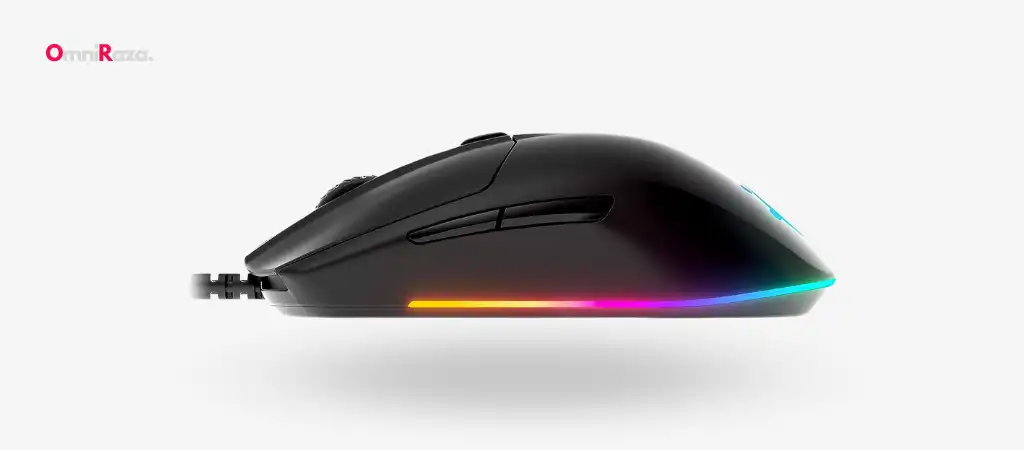
The SteelSeries Rival 3 Mouse is a gaming peripheral that combines performance, durability, and style in an affordable package. With a high-grade TrueMove Core optical sensor, ergonomic design, and vibrant Prism RGB lighting, the Rival 3 is engineered to meet the needs of both casual and competitive gamers.
This review delves into the key features, specifications, and overall performance of the SteelSeries Rival 3 Mouse, providing an in-depth analysis to help you determine if this is the best budget gaming mouse for you.
Key Features
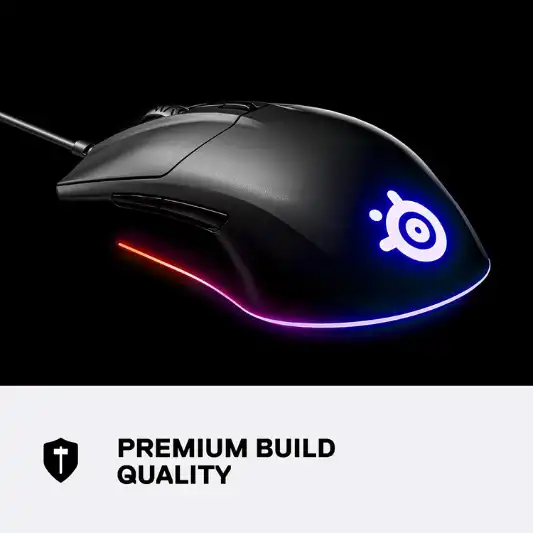
Hyper Durable Materials
The SteelSeries Rival 3 Mouse is built with high-grade polymer, ensuring durability even during the most intense gaming sessions. This material choice guarantees that the mouse can withstand the rigors of daily use without showing significant wear and tear.
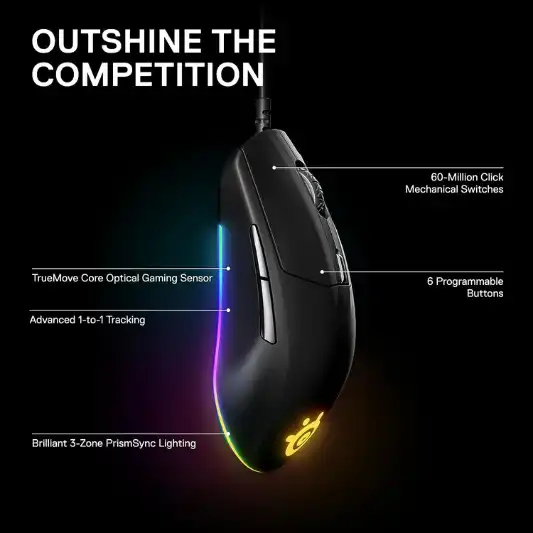
60 Million Click Mechanical Switches
One of the standout features of the Rival 3 is its mechanical switches, rated for 60 million clicks. This ensures that every click feels crisp and responsive, providing a reliable experience from the first click to the last.
TrueMove Core Optical Gaming Sensor
The TrueMove Core sensor, developed in collaboration with PixArt, offers true 1-to-1 tracking with a CPI (Counts Per Inch) of 8,500, a maximum speed of 300 inches per second (IPS), and 35g acceleration. This sensor ensures precise and accurate tracking, essential for high-stakes gaming.
Ergonomic Design
The ergonomic construction of the SteelSeries Rival 3 Mouse is designed to provide comfort during extended gaming sessions. Its shape supports a natural hand position, reducing strain and fatigue.
Brilliant Prism RGB Lighting
The Rival 3 features a redesigned RGB lighting system with three zones and 16.8 million colors. This allows for vibrant and dynamic lighting effects that can be customized to match your gaming setup.
Specifications
| Specification | Detail |
|---|---|
| Brand | SteelSeries |
| Series | Rival 3 |
| Item Model Number | 62513 |
| Hardware Platform | PC |
| Operating System | Windows, Mac, Linux, Xbox |
| Item Weight | 2.7 ounces |
| Product Dimensions | 1.49 x 2.64 x 4.74 inches |
| Item Dimensions (LxWxH) | 1.49 x 2.64 x 4.74 inches |
| Color | Black |
| Connectivity Technology | USB |
| Power Source | Corded Electric |
| Movement Detection Technology | Optical |
| Special Feature | Ergonomic |
| Country of Origin | China |
| Date First Available | January 21, 2019 |
| Warranty & Support | Manufacturer’s warranty available |
| Best Sellers Rank | #1,242 in Video Games |
| Customer Reviews | 4.4 out of 5 stars (9,037 ratings) |
Pros and Cons
Pros:
- Durable Construction: Built with high-grade polymer for long-lasting use.
- High Performance: TrueMove Core sensor ensures precise tracking.
- Comfortable Design: Ergonomic shape reduces hand strain.
- Vibrant Lighting: Customizable RGB lighting with 16.8 million colors.
- Affordable Price: Excellent value for the features offered.
Cons:
- Limited Buttons: Only six programmable buttons may be insufficient for some users.
- Wired Connectivity: USB connection might be less convenient compared to wireless options.


Conclusion
The SteelSeries Rival 3 Mouse stands out in the crowded gaming mouse market by offering a blend of performance, durability, and aesthetics at an affordable price point. The use of high-grade polymer materials ensures that the mouse can withstand heavy usage, while the 60 million click mechanical switches guarantee a consistent and reliable clicking experience. The TrueMove Core optical sensor, developed in partnership with PixArt, delivers exceptional tracking accuracy, making it a suitable choice for both casual gamers and those who participate in competitive gaming.
The ergonomic design of the Rival 3 provides a comfortable grip, reducing hand fatigue during long gaming sessions. This is particularly important for gamers who spend hours at a time in front of their computers. The mouse’s shape supports a natural hand position, which helps to prevent strain and potential injury.
One of the standout features of the SteelSeries Rival 3 Mouse is its Prism RGB lighting system. With three customizable zones and a palette of 16.8 million colors, the lighting can be tailored to match your gaming setup or personal preferences. The dynamic lighting effects add a touch of flair to the mouse, making it a visually appealing addition to any gaming rig.
While the Rival 3 excels in many areas, it does have a few limitations. The mouse features only six programmable buttons, which may be insufficient for users who require more inputs for their gaming needs. Additionally, the mouse’s wired connectivity, while reliable, may be seen as a drawback by those who prefer the convenience of wireless peripherals.
Overall, the SteelSeries Rival 3 Mouse offers an impressive combination of durability, performance, and style. Its affordable price point makes it accessible to a wide range of gamers, from casual players to those who compete at a high level. If you’re in the market for a new gaming mouse that delivers on all fronts, the SteelSeries Rival 3 is definitely worth considering.
You Might Be Interested In
- Logitech G513 Review
- Logitech G203 Prodigy Mouse Review
- Sustainability in Green Technology: A Path to Innovative Greener Future
- Logitech G213 Prodigy Review
- What are the frugal innovations around the world?
Highly Recommended – ⭐⭐⭐⭐⭐
If you’re looking for a reliable, high-performance gaming mouse that won’t break the bank, the SteelSeries Rival 3 Mouse is an excellent choice. With its durable construction, precise tracking, ergonomic design, and customizable RGB lighting, it offers everything you need for an enhanced gaming experience. Click here to purchase the SteelSeries Rival 3 Mouse and elevate your gaming setup today.
SteelSeries Rival 3 Mouse Comparison with Similar Products
When considering a gaming mouse like the SteelSeries Rival 3, it’s beneficial to compare it with other similar products on the market to see how it stands out. Here, we’ll compare the SteelSeries Rival 3 Mouse with the Logitech G203, Razer DeathAdder Essential, and Corsair Harpoon RGB, which are all popular choices in the same category.
Comparison Table
| Feature | SteelSeries Rival 3 | Logitech G203 | Razer DeathAdder Essential | Corsair Harpoon RGB |
|---|---|---|---|---|
| Sensor Type | TrueMove Core Optical Sensor | Mercury Optical Sensor | Razer Optical Sensor | Optical Sensor |
| CPI (DPI) | 8,500 | 8,000 | 6,400 | 6,000 |
| IPS (Inches Per Second) | 300 | 200 | 220 | 220 |
| Acceleration | 35g | 25g | 30g | 20g |
| Buttons | 6 Programmable | 6 Programmable | 5 Programmable | 6 Programmable |
| Switch Durability | 60 million clicks | 10 million clicks | 10 million clicks | 20 million clicks |
| RGB Lighting | 3-zone Prism RGB | 1-zone RGB | Single color (green) | 1-zone RGB |
| Ergonomic Design | Ergonomic | Ambidextrous | Ergonomic | Ergonomic |
| Weight | 2.7 ounces (77 grams) | 2.1 ounces (60 grams) | 3.7 ounces (105 grams) | 3.0 ounces (85 grams) |
| Dimensions (LxWxH) | 1.49 x 2.64 x 4.74 inches | 1.38 x 2.44 x 4.56 inches | 1.69 x 2.83 x 5.00 inches | 1.55 x 2.67 x 4.55 inches |
| Connectivity | USB | USB | USB | USB |
| Price | $29.99 | $39.99 | $29.99 | $29.99 |
Detailed Comparison
SteelSeries Rival 3 vs. Logitech G203
The Logitech G203 is often compared to the SteelSeries Rival 3 due to its similar price point and features. Both mice offer excellent performance with optical sensors and a similar CPI range (8,500 for Rival 3 and 8,000 for G203).
However, the SteelSeries Rival 3 stands out with its TrueMove Core sensor, which offers better tracking with a higher IPS (300 vs. 200) and higher acceleration (35g vs. 25g). The Rival 3 also boasts a more durable build with 60 million click mechanical switches compared to the G203’s 10 million clicks. Additionally, the Rival 3 offers three-zone RGB lighting, whereas the G203 only has one-zone RGB.
SteelSeries Rival 3 vs. Razer DeathAdder Essential
The Razer DeathAdder Essential is known for its ergonomic design and solid performance. It features a Razer optical sensor with a CPI of 6,400, which is lower than the Rival 3’s 8,500. The Rival 3 also has a higher IPS (300 vs. 220) and acceleration (35g vs. 30g).
In terms of durability, the Rival 3’s switches are rated for 60 million clicks, significantly higher than the DeathAdder Essential’s 10 million clicks. One key difference is in the RGB lighting; the Rival 3 offers customizable RGB lighting, while the DeathAdder Essential only has a single green color.
SteelSeries Rival 3 vs. Corsair Harpoon RGB
The Corsair Harpoon RGB is another popular choice in the budget gaming mouse category. It features an optical sensor with a CPI of 6,000, lower than the Rival 3’s 8,500. The Harpoon RGB also has a lower IPS (220 vs. 300) and acceleration (20g vs. 35g).
While both mice offer six programmable buttons, the Rival 3 excels in switch durability with 60 million clicks compared to the Harpoon’s 20 million clicks. Both mice have RGB lighting, but the Rival 3’s three-zone RGB lighting offers more customization options than the Harpoon’s single-zone RGB.
FAQs about Steelseries Rival 3 Mouse
How does the TrueMove Core sensor compare to other gaming sensors?
The TrueMove Core sensor in the SteelSeries Rival 3 Mouse stands out in the crowded field of gaming sensors due to its exceptional accuracy and precision. Developed in collaboration with PixArt, one of the industry’s leading sensor manufacturers, the TrueMove Core offers true 1-to-1 tracking. This means that the movements you make with the mouse are precisely mirrored on the screen, without any latency or interpolation. The sensor boasts a CPI (Counts Per Inch) of 8,500, allowing for highly detailed and responsive tracking that is essential for fast-paced gaming scenarios.
In addition to the high CPI, the TrueMove Core sensor supports a maximum speed of 300 inches per second (IPS) and an acceleration of 35g. These specifications ensure that the sensor can handle rapid movements and quick direction changes without losing accuracy.
Compared to other sensors in the market, the TrueMove Core provides a competitive edge, especially in first-person shooter (FPS) games where precise aim and quick reflexes are crucial. Overall, the TrueMove Core sensor places the SteelSeries Rival 3 Mouse on par with, if not superior to, many other high-end gaming mice in terms of tracking performance and responsiveness.
Is the SteelSeries Rival 3 Mouse suitable for left-handed users?
The SteelSeries Rival 3 Mouse is designed with a right-handed ergonomic shape, making it less suitable for left-handed users who may find the mouse uncomfortable during extended use. The contours and button placements are optimized for right-handed gamers, ensuring a natural hand position that minimizes strain and fatigue.
However, left-handed users are not entirely excluded. While the Rival 3 is not ambidextrous, it is still possible for left-handed individuals to use it, though they may not experience the same level of comfort and ease as right-handed users.
For left-handed gamers, SteelSeries offers other models designed with ambidextrous shapes that cater to both left and right-handed users. These ambidextrous models typically feature a symmetrical design, allowing for a more comfortable grip and button access regardless of hand preference. If you’re a left-handed gamer seeking the same level of performance and quality as the Rival 3, it may be worth exploring SteelSeries’ ambidextrous options to find a mouse that better suits your needs.
Can the RGB lighting be customized?
Absolutely, the Prism RGB lighting on the SteelSeries Rival 3 Mouse is fully customizable, allowing you to tailor the lighting effects to your personal preferences or match your gaming setup. The mouse features three distinct lighting zones that can be individually customized with a palette of 16.8 million colors. Using the SteelSeries Engine software, you can create and save multiple lighting profiles, each with unique color schemes and effects.
The SteelSeries Engine software provides a user-friendly interface for customizing the lighting. You can choose from a variety of effects, such as static colors, color shifts, breathing patterns, and reactive lighting that responds to in-game actions or music. This level of customization not only adds a visual appeal to your gaming setup but also allows for functional uses, such as setting specific colors for different DPI settings or in-game events.
For gamers who appreciate aesthetics and personalization, the ability to customize the RGB lighting on the Rival 3 adds a significant value. It transforms the mouse from a mere input device to a vibrant part of your gaming environment, enhancing the overall experience.
What is the lifespan of the SteelSeries Rival 3 Mouse?
The SteelSeries Rival 3 Mouse is built to last, thanks to its construction with high-grade polymer materials and mechanical switches rated for 60 million clicks. This durability ensures that the mouse can withstand extensive use over time, making it a reliable choice for gamers who demand longevity from their peripherals. The high-grade polymer used in the Rival 3’s construction provides a robust and sturdy feel, capable of enduring the daily wear and tear that comes with intense gaming sessions.
In addition to the durable materials, the mechanical switches in the Rival 3 are engineered for longevity. Rated for 60 million clicks, these switches maintain their responsiveness and tactile feedback throughout their lifespan. This means that even after years of heavy use, the clicks will still feel crisp and precise, just like they did on day one.
With proper care and maintenance, the SteelSeries Rival 3 Mouse should provide reliable performance for several years. Regular cleaning to remove dust and debris, as well as ensuring that the mouse is used on an appropriate surface, can further extend its lifespan. For gamers looking for a dependable and long-lasting gaming mouse, the Rival 3 offers a robust solution that won’t disappoint.
Does the SteelSeries Rival 3 Mouse support Mac and Linux operating systems?
Yes, the SteelSeries Rival 3 Mouse is designed to be compatible with multiple operating systems, including Windows, Mac, and Linux. This versatility makes it an excellent choice for gamers and users who operate on different platforms. Whether you are gaming on a PC, working on a Mac, or using a Linux-based system, the Rival 3 will function seamlessly, providing the same level of performance and reliability across all platforms.
In addition to desktop operating systems, the Rival 3 is also compatible with Xbox, offering even greater flexibility for users who game on consoles. This multi-platform compatibility ensures that you can use the Rival 3 with virtually any setup, without worrying about compatibility issues.
The SteelSeries Engine software, which is used for customizing the mouse’s settings and RGB lighting, is also available for both Windows and Mac. This allows you to access and modify the mouse’s features regardless of your preferred operating system. For Linux users, while the SteelSeries Engine software may not be officially supported, the basic functions of the mouse will still work, and community-driven solutions often provide ways to access advanced features.
