


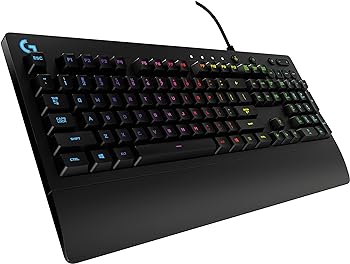
The Logitech G213 Prodigy Gaming Keyboard is a robust, feature-rich keyboard designed for gamers of all levels. With its brilliant LIGHTSYNC RGB backlit keys, spill-resistant design, and customizable features, the G213 Prodigy promises a seamless gaming experience.
This review delves into the keyboard’s key features, specifications, pros and cons, and overall performance, providing an in-depth analysis to help you decide if this is one of the best Logitech gaming keyboards for you.
Key Features
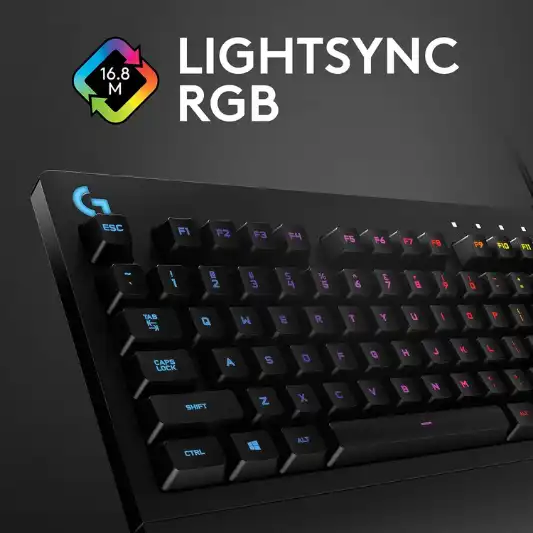
1. LIGHTSYNC RGB Backlit Keys
The G213 Prodigy features customizable RGB lighting with over 16.8 million colors. You can personalize five individual lighting zones to match your setup, specific games, or showcase your favorite colors. The lighting effects can be synchronized with other Logitech G devices using Logitech Gaming Software, creating a cohesive and immersive gaming environment.
2. Spill-Resistant Design
This keyboard is designed with durability in mind. It can withstand liquid spills, crumbs, and dirt, making it easy to clean and maintain. This spill-resistant feature ensures longevity, even in the most intense gaming sessions.
3. Comfortable and Durable Build
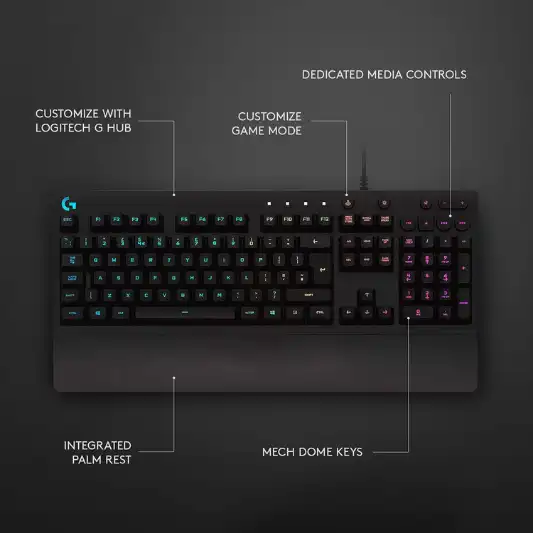
The G213 Prodigy is a full-sized keyboard with an integrated palm rest and adjustable feet, allowing you to set it to the ideal position for comfort during long gaming sessions. The slim body and durable construction are designed to enhance both gaming and productivity.
4. Performance Tuned with Multi-Key Input
Each key on the G213 is tuned for ultra-quick, responsive feedback, up to four times faster than standard keyboards. The anti-ghosting gaming matrix ensures optimal performance, allowing you to press multiple gaming keys simultaneously without losing control.
5. Dedicated Media Controls
The keyboard features dedicated media controls, enabling you to play, pause, and mute music and videos instantly without switching out of your game. You can adjust the volume or skip to the next song with the touch of a button, adding convenience to your gaming experience.
6. Customizable with Logitech Gaming Software
Logitech Gaming Software allows full customization of the G213. You can set the RGB lighting, assign multiple functions to function (F1-F12) keys, and more, enhancing convenience and personalization.
Specifications
| Feature | Details |
|---|---|
| Brand | Logitech G |
| Compatible Devices | PC |
| Connectivity Technology | Wired, USB |
| Keyboard Description | Gaming |
| Recommended Uses | Gaming |
| Special Feature | Lighting |
| Color | Black |
| Number of Keys | 104 |
| Keyboard Backlighting Color | RGB |
| Style | Keyboard only |
| Item Model Number | 920-009284 |
| Hardware Platform | PC |
| Operating System | Windows 10 |
| Item Weight | 2.2 pounds |
| Product Dimensions | 8.58 x 17.8 x 1.3 inches |
| Power Source | Corded Electric |
| Batteries | 1 Lithium Ion battery required |
| Manufacturer | Logitech |
| Country of Origin | China |
| Date First Available | March 2, 2020 |
Pros and Cons
Pros:
- Brilliant RGB Lighting: Customizable and vibrant lighting effects.
- Spill-Resistant: Durable design that repels liquids and debris.
- Comfortable: Integrated palm rest and adjustable feet for ergonomic use.
- Responsive Keys: Performance-tuned for fast, accurate keypresses.
- Dedicated Media Controls: Convenient access to media functions.
Cons:
- Wired Connection: Limited mobility due to wired USB connection.
- No Mechanical Keys: Lacks the tactile feedback of mechanical switches.


Conclusion
The Logitech G213 Prodigy Gaming Keyboard is a well-rounded option for gamers looking for a durable, customizable, and comfortable keyboard. Its standout feature is the LIGHTSYNC RGB backlit keys, offering an extensive range of colors and synchronization options with other Logitech G devices. The spill-resistant design ensures that accidental spills do not compromise the keyboard’s longevity, making it a practical choice for everyday use.
The keyboard’s performance-tuned keys provide a responsive and satisfying typing experience, ideal for both gaming and productivity. The anti-ghosting gaming matrix is particularly beneficial for gamers who need precise control when pressing multiple keys simultaneously. Additionally, the dedicated media controls add a layer of convenience, allowing you to manage your media without interrupting your gaming session.
However, the G213 Prodigy is not without its drawbacks. The wired connection may be a limitation for users who prefer the freedom of a wireless setup. Moreover, the absence of mechanical keys means it lacks the tactile feedback that many gamers prefer. Despite these minor cons, the G213 Prodigy offers exceptional value for its price, combining style, functionality, and durability.
In conclusion, the Logitech G213 Prodigy is a great choice for gamers seeking a reliable and customizable keyboard with excellent RGB lighting and spill-resistant features. Its comfortable design and responsive keys make it suitable for extended gaming sessions and daily use.
You Might Be Interested In
- What are the new innovations in telemedicine?
- Logitech G910 Orion Spark Review
- Logitech G915 TKL Review
- 10 Best Logitech Gaming Keyboards
- Best Budget Gaming Mouse
Highly Recommended – ⭐⭐⭐⭐⭐
If you’re in the market for a gaming keyboard that combines vibrant RGB lighting, durability, and comfort, the Logitech G213 Prodigy is a solid choice. Its customizable features and responsive keys make it suitable for both gaming and productivity. Don’t miss out on enhancing your gaming experience—grab the Logitech G213 Prodigy today and take your setup to the next level!
Comparison with Similar Products
When evaluating the Logitech G213 Prodigy, it’s essential to compare it with similar gaming keyboards in the market. Here, we’ll compare the G213 Prodigy with the Razer Cynosa Chroma, Corsair K55 RGB, and SteelSeries Apex 3. These keyboards share some common features but also have distinct characteristics that may appeal to different types of users.
1. Logitech G213 Prodigy vs. Razer Cynosa Chroma
Key Features
-
Lighting
Both keyboards feature customizable RGB lighting. The G213 Prodigy offers five lighting zones, whereas the Cynosa Chroma provides per-key RGB lighting, offering more granular control over the lighting effects.
-
Build Quality
The G213 Prodigy has a spill-resistant design and integrated palm rest, while the Cynosa Chroma lacks spill resistance but does come with a more robust build quality.
-
Software
Logitech Gaming Software vs. Razer Synapse. Both software solutions allow extensive customization, but Razer Synapse is often considered more user-friendly with more advanced features.
-
Performance
Both keyboards offer membrane switches. The G213 is tuned for faster response, while the Cynosa Chroma focuses on delivering a softer keystroke experience.
Specifications Comparison:
| Feature | Logitech G213 Prodigy | Razer Cynosa Chroma |
|---|---|---|
| RGB Lighting | 5 zones | Per-key |
| Spill-Resistant | Yes | No |
| Palm Rest | Integrated | None |
| Software | Logitech Gaming Software | Razer Synapse |
| Switch Type | Membrane | Membrane |
| Dedicated Media Keys | Yes | No |
| Price Range | Mid-range | Mid-range |
2. Logitech G213 Prodigy vs. Corsair K55 RGB
Key Features
-
Lighting
The G213 Prodigy and K55 RGB both offer customizable RGB lighting with multiple zones. The K55 has six programmable lighting zones compared to the G213’s five.
-
Build Quality
Both keyboards are designed to be durable. The K55 is also spill-resistant and comes with a detachable palm rest.
-
Software
Logitech Gaming Software vs. Corsair iCUE. iCUE is renowned for its advanced customization options, including macro programming and system monitoring.
-
Performance
Both keyboards use membrane switches. The K55 offers macro programming with six dedicated macro keys, providing more flexibility for gamers who rely heavily on macros.
Specifications Comparison
| Feature | Logitech G213 Prodigy | Corsair K55 RGB |
|---|---|---|
| RGB Lighting | 5 zones | 6 zones |
| Spill-Resistant | Yes | Yes |
| Palm Rest | Integrated | Detachable |
| Software | Logitech Gaming Software | Corsair iCUE |
| Switch Type | Membrane | Membrane |
| Dedicated Media Keys | Yes | Yes |
| Macro Keys | No | Yes (6 keys) |
| Price Range | Mid-range | Mid-range |
3. Logitech G213 Prodigy vs. SteelSeries Apex 3
Key Features
-
Lighting
Both keyboards feature customizable RGB lighting. The G213 Prodigy offers five lighting zones, while the Apex 3 provides ten-zone RGB illumination, offering more customization.
-
Build Quality
Both keyboards are spill-resistant. The Apex 3 includes a magnetic wrist rest for added comfort.
-
Software
Logitech Gaming Software vs. SteelSeries Engine. Both are powerful, but the SteelSeries Engine is known for its ease of use and powerful macro programming.
-
Performance
Both keyboards use membrane switches, but the Apex 3 is designed to offer a quieter typing experience.
Specifications Comparison:
| Feature | Logitech G213 Prodigy | SteelSeries Apex 3 |
|---|---|---|
| RGB Lighting | 5 zones | 10 zones |
| Spill-Resistant | Yes | Yes |
| Palm Rest | Integrated | Magnetic detachable |
| Software | Logitech Gaming Software | SteelSeries Engine |
| Switch Type | Membrane | Membrane |
| Dedicated Media Keys | Yes | Yes |
| Price Range | Mid-range | Mid-range |
FAQs
Is the Logitech G213 Prodigy compatible with Mac computers?
The Logitech G213 Prodigy is primarily designed for Windows PCs and is officially supported on Windows 10. While it may work on Mac computers to some extent, some features, such as the Logitech Gaming Software for customization, may not be fully functional on macOS.
How do I customize the RGB lighting on the G213 Prodigy?
To customize the RGB lighting, you need to download and install the Logitech Gaming Software from the Logitech website. Once installed, you can use the software to personalize the lighting zones, synchronize effects with other Logitech G devices, and save your lighting profiles.
Is the G213 Prodigy suitable for competitive gaming?
Yes, the Logitech G213 Prodigy is suitable for competitive gaming. Its performance-tuned keys offer ultra-quick, responsive feedback, and the anti-ghosting gaming matrix ensures precise control when pressing multiple keys simultaneously. While it may not have the tactile feedback of mechanical keyboards, it provides a reliable and responsive experience for gamers.
Can I use the G213 Prodigy without the palm rest?
Yes, you can use the Logitech G213 Prodigy without the integrated palm rest. However, the palm rest is designed to provide additional comfort during long gaming sessions, and its removal may affect the overall ergonomic experience.
How durable is the G213 Prodigy in terms of key lifespan?
The Logitech G213 Prodigy is built with durability in mind, including its spill-resistant design. While specific key lifespan details are not provided, Logitech typically designs its keyboards to withstand extensive use. Regular cleaning and proper maintenance will help extend the lifespan of the keyboard.
