


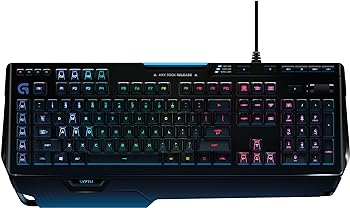
The Logitech G910 Orion Spark is a gaming keyboard that has made a significant mark in the world of gaming peripherals. It stands out with its exclusive Romer-G mechanical switches, customizable RGB illumination, Arx Control app, and smartphone dock, making it a powerhouse for any serious gamer.
This review delves into the key features, specifications, pros and cons, and offers a comprehensive analysis to help you decide if this is one of the best Logitech gaming keyboards for your needs.
Key Features
-
Romer-G Mechanical Switches
The exclusive Romer-G mechanical switches provide up to 25% faster actuation, ensuring quick and precise key presses.
-
Customizable RGB Illumination
With a palette of 16 million colors, you can personalize the lighting for each key, creating a unique and visually stunning setup.
-
Arx Control App and Smartphone Dock
This feature allows you to access in-game data on your smartphone or tablet without interrupting your game.
-
9 Programmable G-Keys
These keys enable the creation of custom game macros for executing complex commands with speed and accuracy.
-
Dedicated Media Controls
The keyboard includes a one-touch control panel for quick access to play, pause, mute, volume, and skip functions.
Specifications
| Feature | Description |
|---|---|
| Brand | Logitech |
| Compatible Devices | Tablet, Smartphone |
| Connectivity Technology | USB |
| Keyboard Description | AWERTY |
| Recommended Uses For Product | Gaming |
| Special Feature | Lighting |
| Color | G910 |
| Number of Keys | 104 |
| Keyboard Backlighting Color Support | RGB |
| Style | Keyboard |
| Series | 78406873 |
| Item Model Number | 920-006385 |
| Hardware Platform | PC |
| Operating System | Android |
| Item Weight | 3.3 pounds |
| Product Dimensions | 19.8 x 8.2 x 1.4 inches |
| Cable Length (Power/Charging) | 6 feet (1.8 meters) |
| Batteries | 2 AA batteries required |
| Manufacturer | Logitech |
| ASIN | B00N3OELPU |
| Date First Available | September 18, 2014 |
Pros and Cons
Pros
- Fast Actuation: The Romer-G switches are 25% faster than standard mechanical switches.
- Customizable Lighting: Extensive RGB customization options.
- Smartphone Integration: Arx Control app and dock enhance gaming experience.
- Programmable Keys: 9 G-keys for complex macros.
- Media Controls: Dedicated media buttons for easy access.
Cons
- Price: It is on the pricier side compared to other gaming keyboards.
- Key Layout: The AWERTY layout might take some time to get used to.
- Size: The keyboard is relatively large, which might not suit all desk setups.

Detailed Review
Design and Build Quality
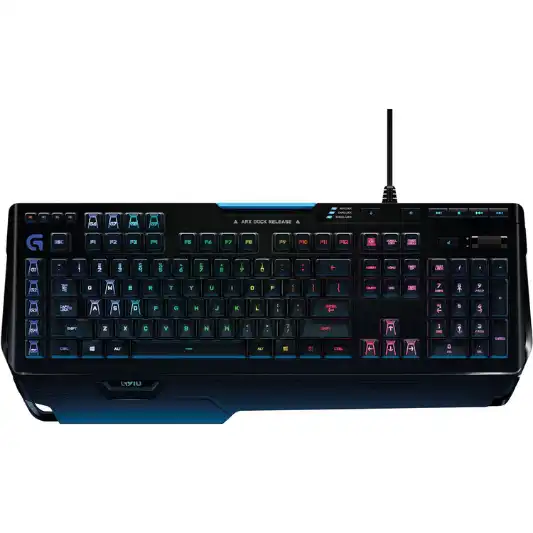
The Logitech G910 Orion Spark boasts a striking design with angular edges and a futuristic look. The keyboard is predominantly black with a sleek finish, and the RGB lighting enhances its visual appeal. The build quality is solid, with a robust plastic frame that ensures durability. The keycaps are well-spaced and have a slightly concave surface, providing a comfortable typing experience.
Romer-G Mechanical Switches
One of the standout features of the G910 Orion Spark is its Romer-G mechanical switches. These switches are designed for gamers who require quick and precise key presses. With a 1.5mm actuation distance, the Romer-G switches register key presses 25% faster than standard mechanical switches, which typically have a 2.0mm actuation distance. This speed advantage can make a significant difference in fast-paced gaming scenarios where every millisecond counts.
The tactile feedback of the Romer-G switches is subtle but noticeable, providing a satisfying feel without being too loud. This makes the keyboard suitable for both gaming and general typing.
RGB Illumination
The customizable RGB illumination is another highlight of the G910 Orion Spark. With a palette of 16 million colors, you can personalize the lighting for each key. The Logitech Gaming Software allows you to create custom lighting profiles, sync the lighting with other Logitech G devices, and even set up reactive lighting effects that respond to in-game events.
The RGB lighting is bright and vibrant, making the keyboard stand out in any gaming setup. The per-key illumination allows for endless customization possibilities, whether you want a uniform color scheme or a more dynamic, multicolored display.
Arx Control App and Smartphone Dock
The Arx Control app and smartphone dock are innovative features that set the G910 Orion Spark apart from other gaming keyboards. The Arx Control app, available for both Android and iOS devices, allows you to monitor in-game stats, system performance, and more, directly from your smartphone or tablet. This secondary screen can be incredibly useful for keeping track of vital information without cluttering your main display.
The smartphone dock is located at the top of the keyboard and can hold a variety of devices securely. The integration between the keyboard and the Arx Control app is seamless, providing a valuable tool for serious gamers who want to maximize their performance.
Programmable G-Keys
The G910 Orion Spark features nine programmable G-keys located on the left side of the keyboard. These keys can be customized using the Logitech Gaming Software to execute complex macros with a single press. This is particularly useful for MMO and MOBA players who need to perform multiple actions quickly and efficiently.
The placement of the G-keys is ergonomic, allowing for easy access without causing strain during extended gaming sessions. The ability to program these keys adds a layer of versatility to the keyboard, making it adaptable to a wide range of gaming styles and genres.
Dedicated Media Controls
The dedicated media controls on the G910 Orion Spark provide quick access to essential functions such as play, pause, mute, volume, and skip. These controls are located in the upper right corner of the keyboard, making them easily accessible without interrupting your gameplay. The volume roller, in particular, is a convenient feature that allows for precise volume adjustments on the fly.
Performance
In terms of performance, the Logitech G910 Orion Spark excels in every aspect. The Romer-G switches provide a responsive and tactile feel that is ideal for both gaming and typing. The faster actuation of the switches gives gamers a competitive edge, particularly in fast-paced games where quick reflexes are crucial.
The customizable RGB lighting adds a visual flair to your gaming setup, while the Arx Control app and smartphone dock offer a practical way to monitor in-game and system information. The programmable G-keys and dedicated media controls further enhance the keyboard’s functionality, making it a versatile and powerful tool for gamers.
Conclusion
The Logitech G910 Orion Spark is a top-tier gaming keyboard that offers a blend of performance, customization, and innovative features. The Romer-G mechanical switches provide a speed advantage that can be crucial in competitive gaming, while the customizable RGB illumination allows for a personalized and visually appealing setup. The Arx Control app and smartphone dock add a unique element of convenience, and the programmable G-keys and dedicated media controls enhance the overall user experience.
While the G910 Orion Spark is on the pricier side, its feature set justifies the investment for serious gamers who demand high performance and customization options. The keyboard’s build quality, design, and array of features make it a worthy addition to any gaming rig.
You Might Be Interested In
- Logitech G815 Review
- Best Budget Gaming Mouse
- Razer Deathadder Essential Mouse Review
- Logitech G Pro X Keyboard Review
- Hyperx Pulsefire Core Gaming Mouse Review
Highly Recommended – ⭐⭐⭐⭐⭐
The Logitech G910 Orion Spark is a high-performance gaming keyboard that delivers on all fronts. Its speed, customization options, and innovative features make it a top contender for gamers looking to elevate their gaming setup.
If you’re a serious gamer seeking a keyboard that offers exceptional performance, customizable features, and innovative technology, the Logitech G910 Orion Spark is a perfect choice. Its Romer-G mechanical switches, customizable RGB lighting, and unique Arx Control app integration set it apart from the competition. Upgrade your gaming experience today with the Logitech G910 Orion Spark and gain the edge you need to dominate in your favorite games.
Logitech G910 Orion Spark vs. Similar Gaming Keyboards
When evaluating the Logitech G910 Orion Spark, it’s beneficial to compare it with other popular gaming keyboards in the market. This comparison will help you understand how the G910 Orion Spark stands out and where it might fall short in comparison to its competitors. Here, we’ll compare it with the Corsair K95 RGB Platinum, the Razer BlackWidow Elite, and the SteelSeries Apex Pro.
Logitech G910 Orion Spark vs. Corsair K95 RGB Platinum
Design and Build Quality
- Logitech G910 Orion Spark: Features a futuristic design with angular edges, a solid plastic frame, and customizable RGB lighting for each key.
- Corsair K95 RGB Platinum: Offers a premium aluminum build with a sleek design, RGB backlighting, and an integrated light bar for an additional lighting effect.
Key Switches
- Logitech G910 Orion Spark: Uses Romer-G mechanical switches with 25% faster actuation and tactile feedback.
- Corsair K95 RGB Platinum: Equipped with Cherry MX Speed or Brown switches, offering a choice between linear and tactile feedback with fast actuation.
Customization
- Logitech G910 Orion Spark: 9 programmable G-keys and customizable RGB lighting for individual keys.
- Corsair K95 RGB Platinum: 6 dedicated macro keys and extensive RGB customization options, including the light bar.
Additional Features
- Logitech G910 Orion Spark: Includes the Arx Control app and smartphone dock for real-time game data monitoring.
- Corsair K95 RGB Platinum: Features a detachable wrist rest, USB pass-through port, and dedicated media controls.
Price
- Logitech G910 Orion Spark: Typically priced lower than the Corsair K95 RGB Platinum.
- Corsair K95 RGB Platinum: Generally more expensive due to its premium build and additional features.
Logitech G910 Orion Spark vs. Razer BlackWidow Elite
Design and Build Quality
- Logitech G910 Orion Spark: Sturdy plastic frame with a futuristic look and customizable RGB lighting.
- Razer BlackWidow Elite: Durable metal top plate with an understated design, full RGB backlighting, and a comfortable wrist rest.
Key Switches
- Logitech G910 Orion Spark: Romer-G switches with fast actuation and tactile feedback.
- Razer BlackWidow Elite: Razer’s own Green (clicky), Orange (tactile), or Yellow (linear) switches, allowing for personalized switch feel.
Customization
- Logitech G910 Orion Spark: Offers 9 programmable G-keys and extensive lighting customization.
- Razer BlackWidow Elite: Fully programmable keys through Razer Synapse software and customizable RGB lighting.
Additional Features
- Logitech G910 Orion Spark: Arx Control app and smartphone dock for enhanced game monitoring.
- Razer BlackWidow Elite: Features a multi-function digital dial, USB and audio pass-through, and dedicated media controls.
Price
- Logitech G910 Orion Spark: More affordable compared to the BlackWidow Elite.
- Razer BlackWidow Elite: Priced slightly higher due to its premium features and build quality.
Logitech G910 Orion Spark vs. SteelSeries Apex Pro
Design and Build Quality
- Logitech G910 Orion Spark: Bold design with a solid plastic frame and customizable RGB lighting.
- SteelSeries Apex Pro: Minimalist design with an aluminum alloy frame, RGB backlighting, and a detachable magnetic wrist rest.
Key Switches
- Logitech G910 Orion Spark: Romer-G mechanical switches with fast actuation.
- SteelSeries Apex Pro: Features OmniPoint adjustable mechanical switches, allowing users to customize actuation points for each key.
Customization
- Logitech G910 Orion Spark: 9 programmable G-keys and per-key RGB customization.
- SteelSeries Apex Pro: Customizable actuation points and per-key RGB lighting through SteelSeries Engine software.
Additional Features
- Logitech G910 Orion Spark: Arx Control app and smartphone dock for additional functionality.
- SteelSeries Apex Pro: Includes an OLED smart display for real-time information, USB pass-through, and dedicated media controls.
Price
- Logitech G910 Orion Spark: More budget-friendly compared to the Apex Pro.
- SteelSeries Apex Pro: Higher price point due to advanced features like adjustable actuation switches.
FAQs
What makes the Romer-G switches different from other mechanical switches?
The Romer-G switches on the Logitech G910 Orion Spark have a shorter actuation distance of 1.5mm, compared to the standard 2.0mm found in other mechanical switches. This results in 25% faster key registration, providing a speed advantage in gaming scenarios. Additionally, the switches offer tactile feedback without being excessively loud, making them suitable for both gaming and typing.
Can I customize the RGB lighting on the G910 Orion Spark?
Yes, the RGB lighting on the G910 Orion Spark is fully customizable. You can choose from a palette of 16 million colors and personalize the lighting for each individual key. The Logitech Gaming Software allows you to create custom lighting profiles, sync lighting with other Logitech G devices, and set up reactive lighting effects that respond to in-game events.
How does the Arx Control app enhance the gaming experience?
The Arx Control app allows you to monitor in-game stats, system performance, and more on your smartphone or tablet. This secondary screen can be incredibly useful for keeping track of vital information without cluttering your main display. The app integrates seamlessly with the keyboard, providing real-time data that can help improve your gaming performance.
Are the programmable G-keys easy to use?
Yes, the nine programmable G-keys on the G910 Orion Spark are easy to use and can be customized using the Logitech Gaming Software. You can assign complex macros to these keys, allowing you to perform multiple actions with a single press. The placement of the G-keys is ergonomic, ensuring easy access without causing strain during extended gaming sessions.
Is the Logitech G910 Orion Spark compatible with all PCs?
The Logitech G910 Orion Spark is compatible with PCs that have a USB port. It also supports devices with Android 3.2 or later, allowing you to use the Arx Control app on a wide range of smartphones and tablets. The keyboard is designed for gaming, but its features and build quality make it suitable for general use as well.
