


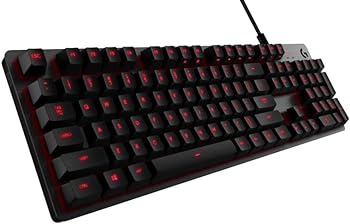
The Logitech G413 is a mechanical gaming keyboard that promises to deliver professional-grade performance, responsiveness, and durability. As a brand that has consistently delivered high-quality peripherals, Logitech aims to meet the needs of gamers and typists alike with this product.
This review will delve into every aspect of the Logitech G413, including its key features, specifications, pros and cons, a detailed conclusion, and frequently asked questions (FAQs). We will also provide a comprehensive grading and a call to action for potential buyers, considering it as one of the best Logitech gaming keyboards.
Key Features
Romer-G Mechanical Switches
The Romer-G mechanical switches are the cornerstone of the Logitech G413. These switches are designed for pro-grade performance, providing a balance of speed, precision, and quiet operation. They actuate at a distance of 1.5mm, which is 25% faster than the leading competitor, making them ideal for both gaming and typing.
Precision Lighting
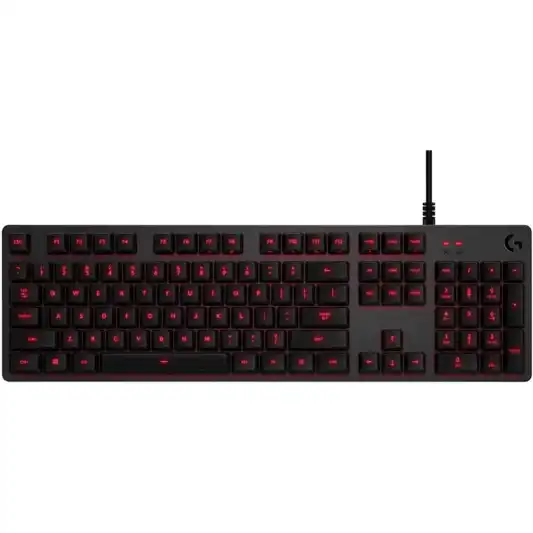
One of the standout features of the Romer-G switches is their ability to offer precise and clean lighting through the keycaps. This ensures that the keys are always visible and never distracting, even during late-night gaming sessions. The single color backlighting in the Logitech G413 Carbon version offers a sleek and focused aesthetic.
USB Passthrough
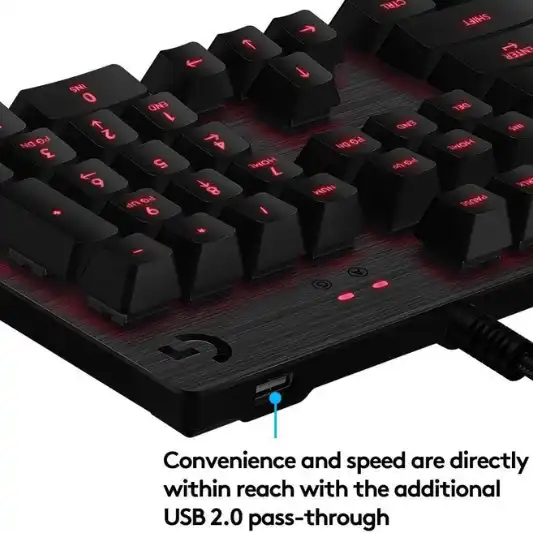
The Logitech G413 comes with an additional USB cable that connects the USB passthrough port to its own input, providing 100% power and data speed. This feature is particularly useful for charging devices or connecting a mouse, allowing for a more streamlined and efficient gaming setup.
Full Function Keys
The keyboard features full function (FN) keys that allow users to control volume, play and pause, skip tracks, mute, toggle lighting, and enter game mode, among other functions. This adds a layer of convenience and functionality, making it easy to control media and customize your gaming experience.
Durable Design
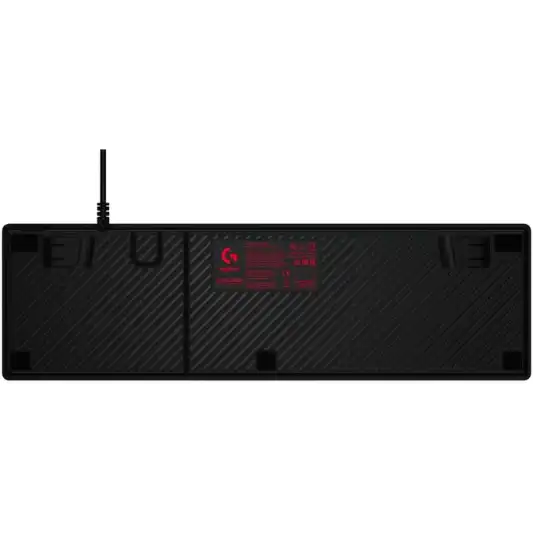
The top case of the Logitech G413 is made from a brushed aluminum-magnesium alloy, which serves as the backbone of the keyboard. This design choice results in a minimal yet sturdy build that can withstand the rigors of intense gaming sessions. The keyboard’s minimalist design is balanced with a full set of features, offering both form and function.
Specifications
| Feature | Specification |
|---|---|
| Brand | Logitech G |
| Series | 920-008300 |
| Item Model Number | 920-008300 |
| Hardware Platform | PC |
| Operating System | Windows 7, Windows 8, Windows 8.1, Windows 10 |
| Item Weight | 2.43 pounds |
| Product Dimensions | 1.4 x 17.5 x 5.1 inches |
| Color | G413 Carbon |
| Power Source | Corded Electric |
| Batteries | 2 AA batteries required |
| Keyboard Backlighting Color | Single Color |
| Connectivity Technology | Bluetooth |
| Number of Keys | 84 |
| Special Feature | Backlit |
Pros and Cons
Pros
- Fast and Responsive: The Romer-G switches offer quick actuation and precise input.
- Durable Build: The aluminum-magnesium alloy top case ensures longevity.
- USB Passthrough: Convenient for connecting and charging devices.
- Functional FN Keys: Easy control of media and lighting settings.
Cons
- Limited Backlighting Color Options: Only single color backlighting available.
- No Wrist Rest: Extended gaming sessions may be uncomfortable for some users.
- Requires Two AA Batteries: Additional maintenance required.

Conclusion
The Logitech G413 is a mechanical gaming keyboard that stands out for its performance, durability, and sleek design. The Romer-G mechanical switches are a significant highlight, offering fast actuation and precise input that benefit both gamers and typists. These switches are quieter than traditional mechanical switches, making them suitable for environments where noise is a concern.
The keyboard’s backlighting is another strong point, with precise and clean lighting through the keycaps. While it only offers a single color option, the backlighting is effective and adds to the overall aesthetic of the keyboard without being distracting.
The inclusion of a USB passthrough is a thoughtful addition, providing a convenient way to connect and charge devices. This feature, combined with the full function keys, enhances the usability of the keyboard, making it a versatile tool for various tasks beyond gaming.
The build quality of the Logitech G413 is impressive, thanks to the brushed aluminum-magnesium alloy top case. This material choice ensures that the keyboard is not only sturdy but also visually appealing. The minimalistic design is both modern and functional, fitting well into any gaming or work setup.
However, there are a few drawbacks to consider. The single color backlighting may not appeal to those who prefer customizable RGB options. Additionally, the lack of a wrist rest could be a dealbreaker for users who prioritize ergonomic comfort during long gaming sessions. The requirement for two AA batteries is another potential inconvenience, as it adds to the maintenance of the keyboard.
Overall, the Logitech G413 is a solid choice for gamers and typists looking for a reliable and high-performing mechanical keyboard. Its strengths lie in its responsive switches, durable build, and practical features like USB passthrough and full function keys. While it has a few limitations, its performance and design make it a worthwhile investment.
You Might Be Interested In
- Biomimicry Innovation Unveiled: A Remarkable Example
- Corsair Harpoon RGB Mouse Review
- Logitech G613 Review
- Logitech G513 Review
- Sustainability in Green Technology: A Path to Innovative Greener Future
Highly Recommended – ⭐⭐⭐⭐⭐
The Logitech G413 is a robust and reliable mechanical keyboard that excels in performance and durability. Its Romer-G switches, precise backlighting, and convenient features like USB passthrough make it an excellent choice for both gamers and typists.
If you’re in the market for a high-quality keyboard that balances form and function, the Logitech G413 is worth considering. Click here to purchase the Logitech G413 and elevate your gaming experience today!
Comparison with Similar Products
When evaluating the Logitech G413, it’s essential to compare it with other similar mechanical gaming keyboards on the market. This comparison will help highlight the strengths and weaknesses of the G413 and provide a broader perspective for potential buyers. We’ll compare it to the following popular models:
- Corsair K70 RGB MK.2
- Razer BlackWidow Elite
- SteelSeries Apex M750
Logitech G413 vs. Corsair K70 RGB MK.2
Key Features
-
Switches
The Corsair K70 RGB MK.2 uses Cherry MX switches, which are renowned for their reliability and variety (available in Red, Brown, Blue, and Speed variants). In contrast, the Logitech G413 features Romer-G switches, known for their fast actuation and quiet operation.
-
Backlighting
The K70 offers full RGB backlighting with per-key customization, while the G413 provides single color backlighting (red for the Carbon version).
-
Build Quality
Both keyboards boast durable builds, with the K70 featuring a brushed aluminum frame similar to the G413’s aluminum-magnesium alloy top case.
-
USB Passthrough
Both models include USB passthrough ports, allowing for easy connectivity of other devices.
-
Media Controls
The K70 includes dedicated media controls, whereas the G413 uses FN keys for media control.
Pros and Cons
| Logitech G413 | Corsair K70 RGB MK.2 |
|---|---|
| Pros | Pros |
| Fast and quiet Romer-G switches | Wide variety of Cherry MX switches |
| Durable aluminum-magnesium build | Full RGB backlighting |
| USB passthrough | Dedicated media controls |
| Affordable price | Robust software customization options |
| Cons | Cons |
| Single color backlighting | Higher price point |
| No dedicated media controls | Slightly bulkier design |
Logitech G413 vs. Razer BlackWidow Elite
Key Features
-
Switches
The Razer BlackWidow Elite features Razer’s proprietary Green, Orange, or Yellow switches, offering different tactile and audible feedback options. The Logitech G413 uses Romer-G switches, optimized for speed and quiet operation.
-
Backlighting
The BlackWidow Elite offers full RGB backlighting with extensive customization through Razer Synapse software. The G413 provides single color backlighting.
-
Build Quality
The BlackWidow Elite is built with a sturdy metal top plate, while the G413 uses a brushed aluminum-magnesium alloy.
-
USB Passthrough
Both keyboards feature USB passthrough ports. The BlackWidow Elite also includes an audio pass-through.
-
Media Controls
The BlackWidow Elite has dedicated media controls and a multifunction digital dial, whereas the G413 uses FN keys for these functions.
Pros and Cons
| Logitech G413 | Razer BlackWidow Elite |
|---|---|
| Pros | Pros |
| Quiet and responsive Romer-G switches | Multiple switch types available |
| Sleek and durable design | Full RGB backlighting |
| USB passthrough | Dedicated media controls and digital dial |
| More affordable | Audio pass-through |
| Cons | Cons |
| Single color backlighting | Higher price |
| No dedicated media controls | Larger footprint |
Logitech G413 vs. SteelSeries Apex M750
Key Features
-
Switches
The SteelSeries Apex M750 utilizes QX2 mechanical switches, designed for a balanced gaming experience. The Logitech G413 features Romer-G switches, known for their fast actuation.
-
Backlighting
The Apex M750 offers full RGB backlighting with extensive customization options via SteelSeries Engine software. The G413 has single color backlighting.
-
Build Quality
The Apex M750 is made with a durable aluminum alloy frame, similar to the G413’s robust build.
-
USB Passthrough
The Apex M750 does not have a USB passthrough, unlike the G413.
-
Media Controls
The Apex M750 uses FN keys for media controls, similar to the G413.
Pros and Cons
| Logitech G413 | SteelSeries Apex M750 |
|---|---|
| Pros | Pros |
| Responsive Romer-G switches | Balanced QX2 switches |
| Durable aluminum-magnesium build | Full RGB backlighting |
| USB passthrough | Sleek and minimalistic design |
| Affordable price | Extensive customization options |
| Cons | Cons |
| Single color backlighting | No USB passthrough |
| Limited customization | FN keys for media control only |
FAQs
What makes the Romer-G switches different from other mechanical switches?
The Romer-G mechanical switches are designed specifically for pro-grade performance. They actuate at a distance of 1.5mm, which is 25% faster than standard mechanical switches. This results in quicker and more responsive keystrokes, making them ideal for gaming and typing. Additionally, Romer-G switches are quieter than traditional mechanical switches, which is beneficial in shared or quiet environments.
How does the USB passthrough work on the Logitech G413?
The USB passthrough on the Logitech G413 is facilitated by an additional USB cable that connects the passthrough port to its own input. This ensures 100% power and data speed through the port. Users can plug in devices such as a mouse, flash drive, or even a smartphone for charging, making it a convenient feature for managing peripherals and maintaining a clean setup.
Is the backlighting customizable on the Logitech G413?
The Logitech G413 features single color backlighting, specifically in the G413 Carbon model. While the backlighting is not customizable in terms of color, it offers precise and clean lighting through the keycaps. This ensures that the keys are always visible, enhancing usability during late-night gaming or typing sessions.
Does the Logitech G413 come with a wrist rest?
No, the Logitech G413 does not come with a wrist rest. This might be a drawback for users who prefer additional ergonomic support during extended gaming or typing sessions. However, users can purchase third-party wrist rests that are compatible with the keyboard to enhance comfort.
Is the Logitech G413 compatible with all operating systems?
The Logitech G413 is primarily designed for use with PCs and is compatible with Windows 7, Windows 8, Windows 8.1, and Windows 10 operating systems. While it may work with other systems, optimal performance and full functionality are guaranteed with the specified Windows versions.
