

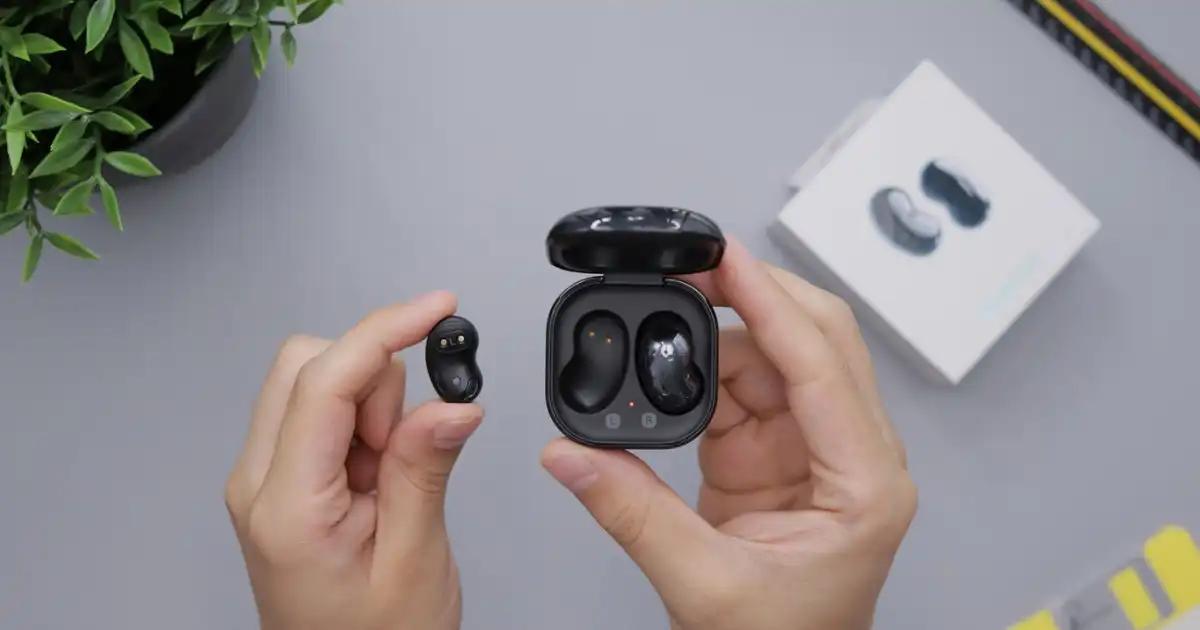
Wireless earbuds have become a normal part of everyday life. People use them while commuting, exercising, working, gaming, and relaxing at home. Many users simply open the charging case, tap the earbuds on their phone, and start listening without thinking about what is happening behind the scenes.
But there is a lot more going on than most people realize.
When you press “pair” on your phone, your earbuds are not magically receiving music through the air. They are creating a small wireless network using Bluetooth technology, negotiating a connection, identifying each other, securing the communication, and then transferring digital audio data in real time.
The answer to the question “How do wireless earbuds connect” comes down to a combination of Bluetooth technology, tiny computer chips, wireless communication, and carefully designed audio systems working together.
Modern wireless earbuds are basically small computers with speakers attached. Inside those tiny shells are processors, antennas, batteries, microphones, and software that manage everything from connection stability to noise cancellation.
In my experience, many people blame their earbuds when a connection problem happens, but the actual issue is often caused by Bluetooth interference, software settings, battery conditions, or device compatibility.
What Are Wireless Earbuds?
Wireless earbuds are small audio devices that use wireless communication instead of a physical cable to receive sound from another device, usually a smartphone, laptop, tablet, or smart TV.
Traditional wired earbuds work through a cable that carries electrical audio signals directly from the device to the speakers. Wireless earbuds remove that cable and replace it with Bluetooth communication.
The phone sends audio information through a Bluetooth signal, and the earbuds receive that information, process it, and convert it into sound that reaches your ears.
The process happens extremely quickly. A person hears music almost instantly because modern Bluetooth systems are designed to handle audio transmission with very low delays.
Wireless Earbuds vs Wired Earbuds
The biggest difference between wired and wireless earbuds is how the audio signal travels.
Wired earbuds receive an electrical signal directly through the cable. There is no wireless connection, no pairing process, and no battery requirement.
Wireless earbuds need several extra steps:
- The audio must be converted into digital data.
- The data must be compressed using a Bluetooth codec.
- The compressed data must be transmitted wirelessly.
- The earbuds must decode the information and convert it back into sound.
This extra technology gives wireless earbuds more freedom of movement, but it also introduces challenges such as battery management, connection stability, and possible audio delay.
What Are True Wireless Stereo Earbuds?
Most modern wireless earbuds are called TWS earbuds, which stands for True Wireless Stereo.
The word “true” is important because older wireless earbuds often still had a cable connecting the left and right sides together.
TWS earbuds remove that connection completely. The left and right earbuds operate independently, each with its own battery, Bluetooth connection system, and processor.
This creates the familiar experience where you can use both earbuds together, or sometimes use only one earbud while keeping the other in the charging case.
However, making two separate earbuds work together is technically challenging. The system must keep both sides synchronized so that the left speaker and right speaker play audio at exactly the correct time.
Even a small timing difference can make music sound strange or create an uncomfortable listening experience.
Main Components Inside Wireless Earbuds
Although wireless earbuds look simple from the outside, they contain several important components.
Bluetooth Chip
The Bluetooth chip is the brain of the wireless connection.
It handles communication between the earbuds and your device. It manages pairing, signal transmission, data processing, and connection stability.
When you see Bluetooth versions such as Bluetooth 5.0 or Bluetooth 5.3, they mainly refer to improvements in this chip technology.
Battery
Wireless earbuds need power because they contain electronic components that wired earbuds do not have.
The battery powers:
- Bluetooth communication
- Audio processing
- Microphones
- Noise cancellation systems
- Touch controls
The charging case contains a larger battery that recharges the earbuds when they are stored inside.
Antenna
The antenna allows earbuds to send and receive wireless signals.
Because earbuds are extremely small, designing an effective antenna is challenging. The antenna must fit inside a tiny space while maintaining a stable Bluetooth connection.
Poor antenna design can reduce Bluetooth range and increase connection problems.
Microphones
Most wireless earbuds contain multiple microphones.
They are used for:
- Phone calls
- Voice assistants
- Active noise cancellation
- Environmental sound detection
These microphones constantly collect sound information and help the earbuds adjust audio behavior.
Audio Processor
The audio processor manages the sound data.
It decodes Bluetooth audio information, applies sound adjustments, manages noise cancellation, and controls how audio reaches the speaker drivers.
Speaker Drivers
The speaker drivers are the parts that actually create sound.
They convert electrical signals into physical movement, which creates vibrations that travel through the air and reach your ears.
The quality of these drivers affects bass, clarity, volume, and overall listening experience.
How Do Wireless Earbuds Connect?
The connection process between a phone and wireless earbuds happens through several stages.
Many people imagine Bluetooth pairing as simply pressing a button and connecting instantly. In reality, the devices perform a series of small communication steps before music starts playing.
Earbuds Enter Pairing Mode
The first step happens when earbuds enter pairing mode.
Pairing mode means the earbuds are ready to be discovered by another Bluetooth device.
Usually, this happens automatically when:
- You open the charging case for the first time.
- You remove the earbuds from the case.
- You press and hold a pairing button.
- You reset the earbuds.
During this stage, the earbuds broadcast a small Bluetooth signal that announces their presence.
The earbuds are basically saying:
“Here I am. I am available for a Bluetooth connection.”
They do not send music yet. They are only making themselves visible to nearby devices.
Why Do Earbuds Become Discoverable?
Bluetooth devices are designed to save power, so earbuds are not constantly searching and broadcasting at maximum strength.
If they did, the battery would drain quickly.
Instead, pairing mode temporarily increases discoverability so a phone or computer can find them.
After the first successful connection, many earbuds remember the device and reconnect automatically in the future.
Your Phone Searches for Bluetooth Devices
The next step happens on your phone.
When you open Bluetooth settings and search for devices, your phone begins scanning the nearby area.
The phone listens for Bluetooth signals from available devices.
During this process, your phone detects information such as:
- Earbud name
- Device type
- Bluetooth capabilities
- Available connection options
For example, your phone may see:
“AirPods”
“Galaxy Buds”
“Wireless Earbuds”
The name shown is not the actual audio connection. It is simply an identification label that helps you recognize the device.
Bluetooth Discovery and Signal Exchange
The phone and earbuds exchange small pieces of information before connecting.
They compare their capabilities and prepare for communication.
This includes details such as:
- Supported Bluetooth version
- Supported audio codecs
- Connection features
- Battery information
This happens very quickly, usually within seconds.
Bluetooth Pairing Creates a Secure Connection
Once your phone finds the earbuds, Bluetooth pairing begins.
Pairing is the process where two devices agree to communicate with each other.
The devices create a trusted relationship so they can recognize each other later.
This involves authentication and security processes.
Device Recognition
Your phone saves information about the earbuds after pairing.
This is why your earbuds usually reconnect automatically when you open the case later.
Your phone already knows:
- The device identity
- Previous connection information
- Security details
It does not need to start from zero every time.
Encryption and Security
Bluetooth connections use encryption to protect communication between devices.
The audio data sent between your phone and earbuds is not simply broadcast openly for anyone nearby to listen to.
The connection uses security methods that help prevent unauthorized access.
While Bluetooth security is not perfect, modern Bluetooth systems are designed to provide strong protection for normal everyday use.
Audio Transmission Begins
After pairing is complete, the earbuds are ready to receive sound.
Your phone takes the audio from an application such as Spotify, YouTube, or a video player and converts it into Bluetooth-compatible data.
The audio is then compressed using a Bluetooth codec and transmitted through the air using radio signals.
The earbuds receive this signal, decode the information, process it, and send it to the speaker drivers.
For example:
You press play on a song.
Your phone converts the song into digital audio data.
The Bluetooth chip sends that data wirelessly.
The earbuds receive the information.
The internal processor converts the data back into an audio signal.
The speaker drivers create vibrations.
You hear music.
All of this happens in a fraction of a second.
The entire experience feels simple because the technology handles thousands of tiny operations automatically.
How Does Bluetooth Technology Work in Wireless Earbuds?
Bluetooth is a short-range wireless communication technology designed for connecting devices without cables.
Wireless earbuds mainly use Bluetooth because it provides a good balance between battery efficiency, reliability, size, and performance.
Unlike Wi-Fi, Bluetooth is designed for personal device connections rather than high-speed internet access.
It creates a small communication link between devices.
Bluetooth Uses Radio Frequency Communication
Bluetooth works by sending information through radio waves.
Most wireless earbuds operate in the 2.4 GHz frequency range, which is also used by many Wi-Fi networks, wireless keyboards, and other devices.
The earbuds and phone communicate by rapidly exchanging small packets of information through this wireless channel.
The process is carefully managed to reduce interference and maintain a stable Bluetooth connection.
Low Power Wireless Communication
One of Bluetooth’s biggest advantages is low power consumption.
Earbuds have very small batteries, so they cannot constantly use large amounts of energy.
Bluetooth allows them to maintain communication while using relatively little power.
This is why modern earbuds can provide many hours of listening on a single charge.
Bluetooth Versions and Real-World Improvements
Bluetooth technology has improved significantly over the years.
Bluetooth 4.2
Bluetooth 4.2 improved efficiency and security compared with older versions.
It provided better data transfer and improved compatibility with modern devices.
Bluetooth 5.0
Bluetooth 5.0 became widely used in wireless earbuds.
It introduced:
- Longer potential range
- Better connection stability
- Improved power efficiency
In real-world use, Bluetooth 5.0 earbuds usually handle distance and interference better than older models.
Bluetooth 5.2
Bluetooth 5.2 introduced important improvements related to audio technology, including support for newer features connected with Bluetooth LE Audio.
It improved efficiency and prepared Bluetooth for more advanced audio systems.
Bluetooth 5.3
Bluetooth 5.3 focuses on improving reliability, power management, and connection performance.
For everyday users, this can mean fewer connection drops and better battery efficiency.
However, the Bluetooth version alone does not guarantee better performance. Antenna design, software quality, chipset choice, and firmware updates often matter just as much.
How Do Left and Right Earbuds Stay Synchronized?
One of the most impressive parts of TWS earbuds is keeping both sides synchronized.
When you listen to a song, the left and right earbuds must play different audio channels at exactly the right moment.
The left ear handles one part of the stereo signal.
The right ear handles the other.
If one side plays even slightly late, your brain notices the delay.
True Wireless Stereo Communication
Early TWS earbuds often used a system where one earbud connected directly to the phone, and the second earbud connected through the first.
This could create reliability problems.
Newer systems allow both earbuds to communicate more efficiently and maintain better synchronization.
Modern earbud synchronization systems use improved Bluetooth communication methods to keep audio timing accurate.
Why Does One Earbud Sometimes Disconnect?
If one earbud loses connection, common causes include:
- Low battery
- Software glitches
- Signal interference
- Poor synchronization between earbuds
- Firmware problems
The issue is not always a hardware failure. Sometimes a simple reset or firmware update fixes the problem.
How Does Music Travel From Your Phone to Wireless Earbuds?
When people listen to music through wireless earbuds, it feels like the sound is traveling directly from the phone to their ears. The reality is more complicated.
The audio goes through several stages before reaching the speaker inside the earbud.
The complete process looks like this:
Phone → Bluetooth transmitter → Wireless signal → Earbud receiver → Audio processor → Speaker driver → Sound
Each step happens extremely quickly.
Digital Audio Processing
Music stored on your phone is already digital. Whether it comes from Spotify, YouTube, Apple Music, or a local file, the sound exists as digital data.
Your phone cannot simply send this raw audio directly through Bluetooth because wireless transmission requires efficient data handling.
The Bluetooth system prepares the audio by compressing it into a format that can travel efficiently.
This is where Bluetooth codecs become important.
A codec decides how audio data is compressed, transmitted, and decoded.
Think of it like sending a large package through a small delivery system. The package must be organized and reduced in size before transport, then rebuilt at the destination.
Bluetooth Profiles
Wireless earbuds use Bluetooth profiles that define how devices communicate.
The most important one for audio is the Advanced Audio Distribution Profile (A2DP).
A2DP allows your phone to send high-quality stereo audio to earbuds.
Other profiles handle different tasks.
For example:
- Hands-Free Profile (HFP) manages phone calls.
- Audio/Video Remote Control Profile (AVRCP) allows controls like play, pause, and volume adjustment.
This is why tapping your earbud can pause music or answer a call. The earbuds are not only receiving sound, they are communicating commands back to the phone.
Audio Decoding Inside Earbuds
After receiving the Bluetooth signal, the earbud’s internal processor decodes the compressed audio data.
The processor converts the information into an electrical audio signal.
The speaker driver then turns that electrical signal into physical movement.
That movement creates pressure changes in the air, which your ears recognize as sound.
The entire chain happens so quickly that a listener usually does not notice the individual steps.
What Are Bluetooth Audio Codecs and Why Do They Matter?
Bluetooth codecs are one of the most misunderstood parts of wireless audio.
Many people assume that all Bluetooth earbuds work the same way. They do not.
A codec controls how audio is compressed before transmission and how it is rebuilt inside the earbuds.
Different codecs affect:
- Sound quality
- Battery usage
- Audio latency
- Device compatibility
A better codec can improve audio quality, but only when both the phone and earbuds support it.
If your phone supports LDAC but your earbuds only support SBC, the connection will use SBC instead.
SBC
SBC, or Subband Codec, is the basic Bluetooth audio codec.
Almost every Bluetooth audio device supports it because it is part of the standard Bluetooth specification.
Its biggest advantage is compatibility.
The downside is that it provides only basic audio quality compared with newer codecs.
For casual listening, podcasts, and everyday use, SBC works perfectly fine.
However, listeners who care about detailed music quality may notice limitations compared with advanced codecs.
AAC
AAC, or Advanced Audio Codec, is commonly associated with Apple devices.
iPhones, iPads, and many Apple products use AAC because it provides efficient compression while maintaining good audio quality.
Many wireless earbuds designed for Apple users support AAC.
The important thing to understand is that codec performance depends on implementation. A well-designed AAC connection can sound better than a poorly optimized higher-end codec.
aptX
aptX is a codec developed by Qualcomm.
It is popular among Android devices and some premium wireless earbuds.
aptX focuses on improving sound quality and reducing delay compared with basic Bluetooth codecs.
Different versions exist, including aptX HD and aptX Adaptive.
aptX Adaptive can adjust performance depending on the situation, balancing audio quality and connection stability.
This is useful for gaming and video because lower audio latency creates better synchronization between what you see and what you hear.
LDAC
LDAC is a high-quality Bluetooth codec developed by Sony.
It can transmit more audio data compared with traditional codecs.
This makes it popular among users who want higher-resolution Bluetooth audio.
However, maximum LDAC performance depends on both devices supporting it and having a strong connection.
In crowded wireless environments, the system may reduce quality to maintain stability.
LC3
LC3 is part of newer Bluetooth LE Audio technology.
It is designed to provide efficient audio transmission while using less power.
The goal is not only better sound but also improved battery life and new features.
LC3 may become more common in future wireless earbuds as Bluetooth LE Audio adoption increases.
How Do Bluetooth Codecs Affect Real Usage?
A codec does not automatically make earbuds sound better.
The final experience depends on many factors:
- Earbud speaker quality
- Audio tuning
- Bluetooth chip
- Codec support
- Phone compatibility
- Listening environment
For most users, a stable Bluetooth connection matters more than chasing the highest codec specification.
A slightly lower-quality codec with a stable connection often feels better than a high-quality codec that constantly drops.
How Far Can Wireless Earbuds Stay Connected?
Bluetooth range is one of the most commonly misunderstood features of wireless earbuds.
Manufacturers often advertise impressive distances, but real-world performance is usually different.
Most modern wireless earbuds can work approximately 10 meters or more in open spaces.
However, your actual Bluetooth range depends on your environment.
Factors That Affect Bluetooth Range
Several things can weaken the Bluetooth connection.
Walls and Obstacles
Bluetooth signals can pass through some materials, but walls, furniture, and metal objects can reduce signal strength.
A phone left in one room while you walk into another may experience connection problems depending on the building structure.
Distance
The farther you move away from your phone, the weaker the signal becomes.
Wireless earbuds are designed for personal use, not for walking hundreds of meters away from your device.
Wireless Interference
Bluetooth uses the 2.4 GHz frequency range, which is shared by many wireless devices.
Crowded environments with many Bluetooth devices, Wi-Fi routers, and wireless accessories can create interference.
This is why earbuds may work perfectly at home but struggle in busy offices, gyms, or airports.
Why Do Wireless Earbuds Disconnect?
Connection problems are one of the biggest frustrations with wireless earbuds.
In many cases, the earbuds are not actually defective. The problem comes from the environment, software, or settings.
Low Battery
Low battery levels can affect connection stability.
When earbuds have very little power remaining, they may reduce performance to save energy.
Some earbuds may disconnect repeatedly before shutting down completely.
Keeping both earbuds and the charging case properly charged prevents many random connection issues.
Bluetooth Interference
Interference happens when other wireless signals compete with Bluetooth communication.
Common sources include:
- Crowded Wi-Fi networks
- Many Bluetooth devices nearby
- Wireless accessories
I have seen situations where earbuds work perfectly at home but constantly disconnect in a crowded workplace because the wireless environment is completely different.
Distance Issues
Moving too far away from your phone weakens the Bluetooth connection.
Keeping your phone in a pocket, bag, or another room can also affect performance.
The human body can block some radio signals, especially when the phone and earbuds are positioned poorly.
Software Problems
Sometimes the problem is not hardware.
Bluetooth software errors can happen because of:
- Phone updates
- Connection conflicts
- Corrupted pairing information
Restarting the Bluetooth connection often solves these issues.
Multiple Connected Devices
Many modern earbuds support multi-device connections.
However, older earbuds may struggle when they remember too many devices.
Your earbuds might try connecting to a laptop, tablet, or another phone instead of the device you actually want to use.
Removing unused Bluetooth connections can improve reliability.
Firmware Bugs
Earbud manufacturers release firmware updates to fix problems.
Firmware updates can improve:
- Connection stability
- Battery performance
- Audio latency
- Device compatibility
Many users ignore firmware updates, but they can make a noticeable difference.
How to Pair Wireless Earbuds With Different Devices
Wireless earbuds are designed to work with many devices.
The basic process is similar, but each platform has small differences.
Android Phones
For Android devices:
- Open Bluetooth settings.
- Turn Bluetooth on.
- Put earbuds into pairing mode.
- Select the earbuds from the device list.
- Confirm pairing.
Many Android phones automatically reconnect after the first successful pairing.
iPhones
The process is similar:
- Open Settings.
- Select Bluetooth.
- Enable Bluetooth.
- Put earbuds into pairing mode.
- Tap the earbud name.
Some earbuds designed specifically for Apple devices offer faster pairing and extra features.
Windows Computers
To connect earbuds to Windows:
- Open Bluetooth settings.
- Select Add Device.
- Choose Bluetooth.
- Select your earbuds.
Windows may show separate options for audio and microphone functions.
Mac Computers
On Mac:
- Open System Settings.
- Select Bluetooth.
- Find your earbuds.
- Click Connect.
Once paired, macOS usually remembers the device.
Smart TVs
Some smart TVs support Bluetooth audio.
You can usually find the option under:
Settings → Bluetooth → Audio Devices
However, TV compatibility varies, and some older models may not support Bluetooth earbuds.
How to Fix Wireless Earbuds That Are Not Connecting
When earbuds refuse to connect, random button pressing usually does not help. A systematic approach works better.
Restart Bluetooth
Turn Bluetooth off and back on.
This forces your phone to restart its wireless communication process.
Reset Earbuds
A factory reset clears old pairing information.
This is useful when earbuds are stuck trying to connect to an old device.
Remove Old Pairing
Delete the earbuds from your phone’s Bluetooth list and pair again.
This creates a fresh Bluetooth connection.
Update Firmware
Check the manufacturer’s app for firmware updates.
Updates can fix bugs and improve connection reliability.
Charge Everything
Make sure:
- Earbuds are charged.
- Charging case has power.
- Both earbuds are charging correctly.
Battery problems often appear as connection problems.
Reduce Interference
Move away from crowded wireless environments.
Testing earbuds in a different location can help determine whether the issue is interference.
Are Wireless Earbuds Secure?
Many people wonder if someone nearby can connect to their earbuds or listen to their conversations.
Modern Bluetooth connections use encryption and authentication to protect communication.
During Bluetooth pairing, devices exchange security information that helps prevent unauthorized connections.
Normal users generally do not need to worry about someone casually intercepting their music.
However, security depends on keeping devices updated and avoiding suspicious accessories or unknown Bluetooth connections.
Bluetooth is not completely risk-free, but modern systems are designed with privacy and security in mind.
The Future of Wireless Earbud Connectivity
Wireless earbud technology continues to improve.
Future systems will focus on better efficiency, lower delay, and smarter communication.
Bluetooth LE Audio
Bluetooth LE Audio is one of the biggest upcoming improvements.
It is designed to provide:
- Lower power consumption
- Better audio efficiency
- Improved battery life
- New sharing features
It may allow future earbuds to deliver better performance while using less energy.
Auracast
Auracast is a feature built around Bluetooth LE Audio.
It allows one audio source to broadcast to many compatible devices.
For example, airports, gyms, museums, and public spaces could provide Bluetooth audio streams that many users can access.
Lower Audio Latency
Future wireless earbuds will continue reducing delay.
This matters especially for:
- Gaming
- Video watching
- Live monitoring
Better synchronization between video and sound will make wireless earbuds feel even closer to wired connections.
Better Multi-Device Connections
Future earbuds will likely handle multiple devices more smoothly.
Switching between a laptop, phone, and tablet should become faster and more automatic.
You Might Be Interested In
- How Does Ai Improve Customer Service In Fintech And Digital Banking?
- What are the benefits of AI writing tools?
- AI in Fraud Detection: Enhancing Security and Efficiency
- How Does the NIST AI RMF Apply to Internal Copilots?
- Using Ai To Develop Critical Thinking Skills In Class
Conclusion
Wireless earbuds connect through a combination of Bluetooth communication, tiny processors, antennas, and advanced audio technology.
The connection process begins when earbuds enter pairing mode, communicate with your phone, create a secure Bluetooth connection, and start receiving digital audio data.
The sound you hear is the result of several steps: Bluetooth audio transmission, codec processing, decoding, and conversion through speaker drivers.
Understanding how wireless earbuds connect makes it easier to solve common problems, improve performance, and choose devices that match your needs.
Behind their simple design, wireless earbuds are surprisingly advanced pieces of technology. Every time you open a case and start listening, a complex wireless communication process happens almost instantly.
FAQs
How do wireless earbuds connect to a phone?
Wireless earbuds connect to a phone through Bluetooth wireless communication. When you first use a pair of earbuds, they enter pairing mode and start broadcasting a small Bluetooth signal. Your phone scans for nearby Bluetooth devices and detects the earbuds. Once you select the earbuds, both devices exchange information, confirm their compatibility, and create a secure Bluetooth pairing.
After the connection is established, your phone remembers the earbuds, which is why they usually reconnect automatically the next time you open the charging case. When you play music, your phone converts the audio into digital data, compresses it using a Bluetooth codec, and sends it wirelessly to the earbuds. The earbuds decode the information, process the audio, and convert it into sound through the speaker drivers.
Why won’t my wireless earbuds connect?
Wireless earbuds may fail to connect for several practical reasons. One of the most common causes is that the earbuds are still connected to another device, such as a laptop, tablet, or another phone. Bluetooth devices often remember previous connections, and sometimes they automatically reconnect to an old device instead of the one you want to use.
Other common causes include low battery, Bluetooth interference, outdated firmware, or corrupted pairing information. In many cases, the solution is simple: turn Bluetooth off and on, remove the earbuds from your phone’s Bluetooth list, reset the earbuds, and pair them again. Keeping the earbuds updated with the latest firmware can also improve connection stability and fix hidden software problems.
Can wireless earbuds connect to multiple devices?
Some modern wireless earbuds can connect to multiple devices using a feature called multipoint Bluetooth. This allows earbuds to stay connected to two devices at the same time, such as a smartphone and a laptop. For example, you can listen to music on your laptop and automatically switch to answering a phone call when your smartphone receives an incoming call.
However, not every pair of earbuds supports true multi-device connections. Some models can only remember several paired devices but actively connect to one device at a time. The actual experience depends on the Bluetooth hardware, firmware, and software features provided by the manufacturer.
Do wireless earbuds need Bluetooth to work?
Most wireless earbuds need Bluetooth because it is the standard technology used for sending audio from smartphones, tablets, computers, and other devices. Bluetooth provides a reliable connection while using very little battery power, which makes it ideal for small devices like earbuds.
Some specialized wireless earbuds, especially gaming models, may use alternative wireless technologies such as dedicated USB transmitters. However, for everyday products like TWS earbuds, Bluetooth remains the main method of wireless communication because it offers good compatibility, convenience, and efficient power usage.
How far can wireless earbuds work from a phone?
The distance wireless earbuds can work from a phone depends on several factors, including Bluetooth version, antenna quality, surrounding environment, and interference levels. Many modern earbuds can maintain a connection around 10 meters in normal conditions, while some may work at longer distances in open areas with fewer obstacles.
In real-world situations, the range is often shorter because walls, furniture, metal objects, and other wireless devices can weaken the signal. For example, earbuds may work perfectly when your phone is in your pocket but start disconnecting if you leave the phone in another room. Keeping your device nearby and reducing wireless interference usually provides the most stable Bluetooth connection.
