

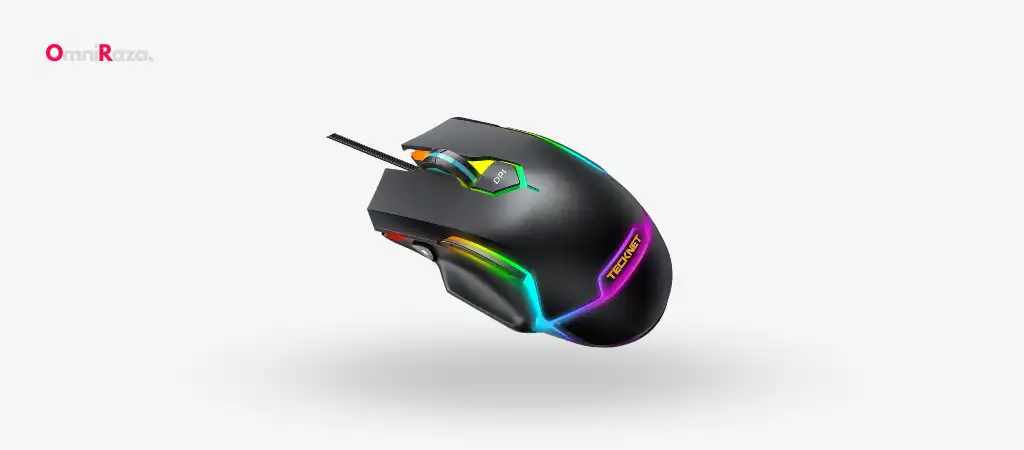
In the world of gaming, precision, comfort, and adaptability are critical components that define a top-notch gaming mouse. The TeckNet Pro Gaming Mouse has quickly established itself as a contender in the gaming peripherals market, offering a combination of ergonomic design, customizable DPI settings, and multi-device connectivity.
This review will dive deep into its features, specifications, pros and cons, and performance, helping you determine if this is the best budget gaming mouse for your gaming desk.

Key Features
The TeckNet Pro Gaming Mouse is packed with features that cater to both casual and competitive gamers.
Some of the standout features include:
-
Multi-Device Connectivity
Connect to up to three devices simultaneously using one USB-A port and two Bluetooth channels (5.0 and 3.0).
-
Quiet Click Technology
Enjoy a quieter gaming experience with silent clicking, perfect for shared spaces.
-
Ergonomic and Portable Design
Slim and comfortable design with a rubber scroll wheel, suitable for both left-handed and right-handed users.
-
Adjustable DPI Settings
Three DPI levels (1000/1600/2400) for precise control and smooth cursor movement.
-
Long Battery Life
Up to 18 months of battery life with a single AA battery, featuring an intelligent power-saving mode.
-
Wide Compatibility
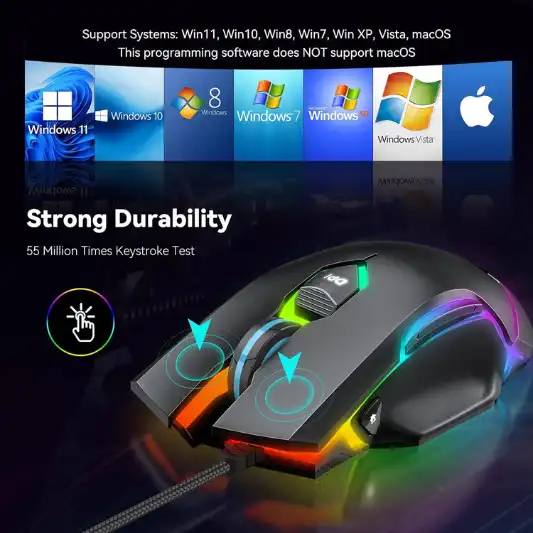
Supports various operating systems and devices, including Windows, macOS, Linux, Android, and iOS.
-
User-Friendly Operation
Easy setup with mode switch buttons and LED indicators.
Specifications
| Feature | Details |
|---|---|
| Brand | TECKNET |
| Color | Black |
| Connectivity Technology | Bluetooth 5.0/4.1/4.0/3.0/2.0 |
| Special Feature | Portable |
| Movement Detection | Optical |
| Product Dimensions | 4.92 x 2.76 x 1.5 inches |
| Item Weight | 5.1 ounces |
| DPI Levels | 1000/1600/2400 |
| Battery Life | 18 months (battery not included) |
| Compatibility | Windows (11/10/8/7/XP/Vista), macOS, Linux, Android, iOS (13 and later versions), Chromebooks |
| Warranty | 36 months (Registered Only) |
Pros and Cons
Pros:
- Multi-device connectivity
- Quiet click technology
- Ergonomic design
- Long battery life
- Wide compatibility
Cons:
- Non-rechargeable
- Medium size might not fit all users
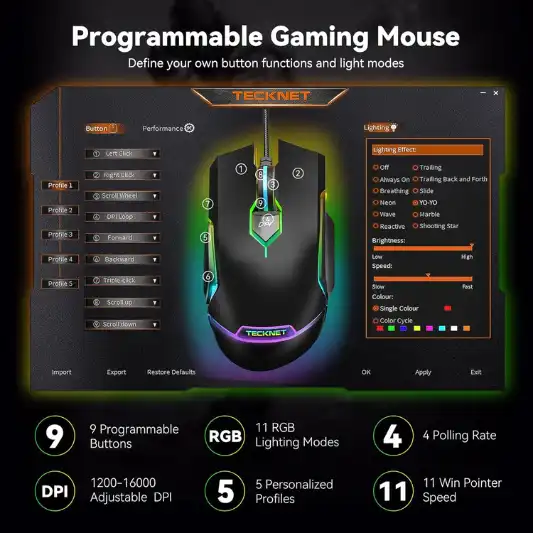
- No customizable buttons
Detailed Review
Design and Build Quality
The first impression of the TeckNet Pro Gaming Mouse is its sleek and ergonomic design. Crafted with comfort in mind, this mouse is designed to fit perfectly in the palm of your hand, making long gaming sessions less strenuous. The symmetrical design caters to both left and right-handed users, a feature that is often overlooked in gaming mice.
The mouse is compact and lightweight, weighing just 5.1 ounces, making it highly portable. Whether you’re gaming at home or on the go, the TeckNet Pro Gaming Mouse can easily slip into your bag without adding unnecessary bulk. The rubberized scroll wheel is a nice touch, providing a comfortable and non-slip grip during intense gaming sessions.
The build quality is solid, with a durable plastic body that feels sturdy enough to withstand regular use. However, it’s worth noting that the size of the mouse might be a bit too small for users with larger hands. The medium-sized design is perfect for those who prefer a smaller, more compact mouse, but it might not offer the same level of comfort for everyone.
Performance and DPI Settings
Performance is where the TeckNet Pro Gaming Mouse truly shines. Equipped with adjustable DPI settings ranging from 1000 to 2400, this mouse offers precise control over cursor movement, which is essential for both gaming and productivity tasks. The three DPI levels can be easily toggled using the button on top of the mouse, allowing you to switch between different sensitivities depending on your needs.
Whether you’re working on graphic design projects, browsing the web, or engaging in fast-paced gaming, the TruWave optical tracking technology ensures smooth and accurate cursor control. The optical sensor performs exceptionally well on most surfaces, although it struggles a bit on glass surfaces. For gamers who require pinpoint accuracy, this mouse delivers consistent performance that can keep up with your demands.
Connectivity and Compatibility
One of the standout features of the TeckNet Pro Gaming Mouse is its multi-device connectivity. The ability to connect to three devices simultaneously is a game-changer for users who frequently switch between different devices. Whether you’re using a laptop, desktop, tablet, or even a smartphone, you can easily switch between them with just a click of a button.
The mouse supports both USB and Bluetooth connections, with the USB receiver conveniently stored in the battery compartment. The two Bluetooth channels (5.0 and 3.0) ensure compatibility with a wide range of devices, making this mouse incredibly versatile. The Bluetooth connection is stable, with no noticeable lag during usage, making it a reliable option for both gaming and general use.
In terms of compatibility, the TeckNet Pro Gaming Mouse works seamlessly with various operating systems, including Windows, macOS, Linux, Android, and iOS. This wide compatibility ensures that the mouse can be used with almost any device, making it a great option for users who work across multiple platforms.
Quiet Click Technology
For gamers who value a quiet environment, the TeckNet Pro Gaming Mouse offers a silent clicking experience. The quiet click technology is a blessing for those who often find themselves gaming or working in shared spaces. Whether you’re in a library, office, or dorm room, the silent clicks reduce noise pollution and create a more peaceful environment.
The silent clicks are also beneficial for late-night gaming sessions when you don’t want to disturb others around you. Despite the quiet operation, the buttons are still responsive, providing a satisfying click feel without the accompanying noise. This feature is particularly appreciated by users who are sensitive to the loud clicking sounds of traditional mice.
Battery Life and Power Management
The TeckNet Pro Gaming Mouse is powered by a single AA battery, boasting an impressive battery life of up to 18 months. This extended battery life is a significant advantage, especially for users who prefer not to deal with the hassle of frequent battery replacements. The mouse also features an intelligent power-saving mode that automatically puts it to sleep after 30 minutes of inactivity, further conserving battery life.
While the long battery life is a major plus, it’s important to note that this mouse is not rechargeable. Users will need to replace the battery once it runs out, which might be a minor inconvenience for some. However, considering the extended battery life, this is a small trade-off for the convenience of not needing to recharge the mouse frequently.
The mouse also includes a red low battery indicator light, alerting you when it’s time to replace the battery. This feature ensures that you’re never caught off guard by a dead battery in the middle of an important task or gaming session.
User Experience and Ease of Use
Setting up the TeckNet Pro Gaming Mouse is straightforward and user-friendly. The mouse is ready to use right out of the box, with no complicated setup process required. Simply turn on the mouse, select your preferred connection method (USB or Bluetooth), and you’re ready to go. The mode switch button makes it easy to toggle between connected devices, and the LED indicator lights clearly show which mode is currently active.
The mouse’s medium size might be a perfect fit for users with smaller hands, but those with larger hands may find it a bit too compact for comfort. However, the ergonomic design does help alleviate some of the discomfort that might arise from extended use. The symmetrical shape is also a bonus, as it caters to both left-handed and right-handed users, making it a versatile option for a wide range of gamers.

Conclusion
The TeckNet Pro Gaming Mouse is a well-rounded peripheral that offers a great balance between performance, comfort, and versatility. Its multi-device connectivity, adjustable DPI settings, and quiet click technology make it an excellent choice for gamers who value convenience and quiet operation. The long battery life is a significant advantage, though the lack of rechargeable functionality might be a drawback for some users.
Despite its medium size, the ergonomic design ensures comfort during extended use, and its wide compatibility makes it suitable for use with various devices and operating systems. The mouse performs admirably on most surfaces, although it struggles on glass surfaces. Overall, the TeckNet Pro Gaming Mouse is a solid choice for gamers and professionals alike, providing reliable performance and value for money.
You Might Be Interested In
- What Is The Unit For GPU?
- Is The Motherboard A Software Or Hardware?
- Which Is Better Razer Or Cooler Master Mouse?
- How To Pair A Uhuru Mouse?
- What Is The Best Redragon Mouse For FPS Games?
Highly Recommended – ⭐⭐⭐⭐⭐
Ready to elevate your gaming experience? The TeckNet Pro Gaming Mouse is available now, offering exceptional performance and versatility at an affordable price. Whether you’re a casual gamer or a professional, this mouse is designed to meet your needs. Don’t miss out—upgrade your gaming setup today with the TeckNet Pro Gaming Mouse and experience the difference for yourself!
Comparison of the TeckNet Pro Gaming Mouse with Similar Products
When selecting a gaming mouse, it’s crucial to compare it with other options in the market to ensure you’re making the best choice for your needs. Below, we’ll compare the TeckNet Pro Gaming Mouse with two other popular gaming mice in a similar price range: the Logitech G203 LIGHTSYNC Gaming Mouse and the Razer DeathAdder Essential Gaming Mouse.
1. TeckNet Pro Gaming Mouse
- Price Range: Affordable
- DPI Levels: 1000/1600/2400
- Connectivity: USB, Bluetooth 5.0/3.0
- Battery Life: Up to 18 months (non-rechargeable)
- Weight: 5.1 ounces
- Quiet Click Technology: Yes
- Ergonomics: Symmetrical design, suitable for left and right-handed users
- Compatibility: Windows, macOS, Linux, Android, iOS
- Customization: No programmable buttons
- Special Features: Multi-device connectivity, silent clicks, wide OS compatibility
- Warranty: 36 months
2. Logitech G203 LIGHTSYNC Gaming Mouse
- Price Range: Affordable
- DPI Levels: 200 to 8000
- Connectivity: Wired (USB)
- Battery Life: N/A (Wired)
- Weight: 2.86 ounces
- Quiet Click Technology: No
- Ergonomics: Ambidextrous design, better suited for right-handed users
- Compatibility: Windows, macOS, Chrome OS
- Customization: Six programmable buttons
- Special Features: RGB lighting, customizable DPI, gaming-grade sensor
- Warranty: 24 months
3. Razer DeathAdder Essential Gaming Mouse
- Price Range: Mid-range
- DPI Levels: 6400
- Connectivity: Wired (USB)
- Battery Life: N/A (Wired)
- Weight: 3.71 ounces
- Quiet Click Technology: No
- Ergonomics: Ergonomic design, right-handed orientation
- Compatibility: Windows, macOS
- Customization: Five programmable buttons
- Special Features: Ergonomic design, high-precision 6400 DPI optical sensor
- Warranty: 24 months
Comparison Table
| Feature | TeckNet Pro Gaming Mouse | Logitech G203 LIGHTSYNC | Razer DeathAdder Essential |
|---|---|---|---|
| Price Range | Affordable | Affordable | Mid-range |
| DPI Levels | 1000/1600/2400 | 200 to 8000 | 6400 |
| Connectivity | USB, Bluetooth 5.0/3.0 | Wired (USB) | Wired (USB) |
| Battery Life | Up to 18 months (non-rechargeable) | N/A (Wired) | N/A (Wired) |
| Weight | 5.1 ounces | 2.86 ounces | 3.71 ounces |
| Quiet Click Technology | Yes | No | No |
| Ergonomics | Symmetrical design, ambidextrous | Ambidextrous design, better for right-handed | Ergonomic design, right-handed |
| Compatibility | Windows, macOS, Linux, Android, iOS | Windows, macOS, Chrome OS | Windows, macOS |
| Customization | No programmable buttons | Six programmable buttons | Five programmable buttons |
| Special Features | Multi-device connectivity, silent clicks, wide OS compatibility | RGB lighting, customizable DPI, gaming-grade sensor | Ergonomic design, high-precision sensor |
| Warranty | 36 months | 24 months | 24 months |
Detailed Comparison
1. Price and Value
- The TeckNet Pro Gaming Mouse and Logitech G203 LIGHTSYNC both fall into the affordable category, making them great options for budget-conscious users. The Razer DeathAdder Essential, while slightly more expensive, offers higher DPI levels and a more specialized design aimed at gamers.
2. DPI and Performance
- The Logitech G203 LIGHTSYNC stands out with its highly customizable DPI range of 200 to 8000, catering to users who need a wide range of sensitivity settings. The Razer DeathAdder Essential offers a fixed high DPI of 6400, which is suitable for most gaming scenarios. The TeckNet Pro Gaming Mouse offers a more basic DPI range, which should be sufficient for casual gaming and general use but might not satisfy users looking for extreme precision.
3. Connectivity
- The TeckNet Pro Gaming Mouse excels in connectivity with both USB and Bluetooth options, allowing it to connect to multiple devices simultaneously. This feature is absent in both the Logitech and Razer mice, which are wired-only, limiting their use to single-device setups.
4. Ergonomics and Comfort
- The TeckNet Pro Gaming Mouse offers a symmetrical design, making it a versatile choice for both left and right-handed users. The Logitech G203 LIGHTSYNC also has an ambidextrous design but is better suited for right-handed users. The Razer DeathAdder Essential is specifically designed for right-handed users, with an ergonomic shape that is more comfortable for extended gaming sessions.
5. Customization and Features
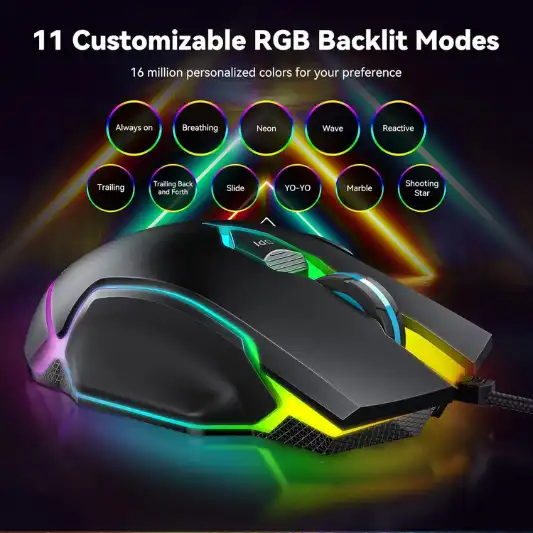
- The Logitech G203 LIGHTSYNC offers six programmable buttons and RGB lighting, which is appealing to gamers who like to customize their setup. The Razer DeathAdder Essential has five programmable buttons but lacks RGB lighting. The TeckNet Pro Gaming Mouse is more basic in this regard, with no programmable buttons or lighting, focusing instead on its multi-device connectivity and quiet click features.
6. Battery Life
- The TeckNet Pro Gaming Mouse offers up to 18 months of battery life on a single AA battery, which is a significant advantage over the wired options. However, the lack of rechargeable functionality might be a downside for some users.
FAQs
How do I switch between devices connected to the TeckNet Pro Gaming Mouse?
Switching between devices is simple and convenient. The TeckNet Pro Gaming Mouse has a mode switch button located on the bottom of the mouse. To switch between connected devices, press the button, and the corresponding LED indicator will light up, showing which device is currently active. This allows you to seamlessly transition between different devices without needing to reconnect the mouse each time.
Is the TeckNet Pro Gaming Mouse compatible with gaming consoles like PlayStation or Xbox?
The TeckNet Pro Gaming Mouse is primarily designed for use with computers, laptops, and tablets. While it may work with some gaming consoles that support USB or Bluetooth mice, it’s not specifically optimized for gaming consoles like PlayStation or Xbox. For console gaming, it’s recommended to use a mouse that is specifically designed to be compatible with those platforms.
Can I customize the buttons on the TeckNet Pro Gaming Mouse?
Unfortunately, the TeckNet Pro Gaming Mouse does not offer customizable buttons. The mouse is designed with simplicity in mind, featuring standard left and right-click buttons, a scroll wheel, and a DPI switch button. If you’re looking for a mouse with programmable buttons, you may need to consider other options that offer more advanced customization features.
How does the TeckNet Pro Gaming Mouse perform on different surfaces?
The TeckNet Pro Gaming Mouse performs well on most surfaces, thanks to its TruWave optical tracking technology. It offers smooth and accurate cursor control on surfaces like wood, fabric, and plastic. However, the mouse does struggle a bit on glass surfaces, where the optical sensor may have difficulty tracking accurately. For optimal performance, it’s recommended to use the mouse on a mouse pad or a non-reflective surface.
What should I do if the mouse stops working or doesn’t connect to my device?
If the TeckNet Pro Gaming Mouse stops working or fails to connect to your device, there are a few troubleshooting steps you can try. First, ensure that the mouse has a working battery and that it’s properly installed. If you’re using a Bluetooth connection, make sure that the device you’re trying to connect to supports Bluetooth mice and that it’s within range. You can also try resetting the mouse by turning it off and on again. If the issue persists, you may need to contact TeckNet’s customer support for further assistance.
