

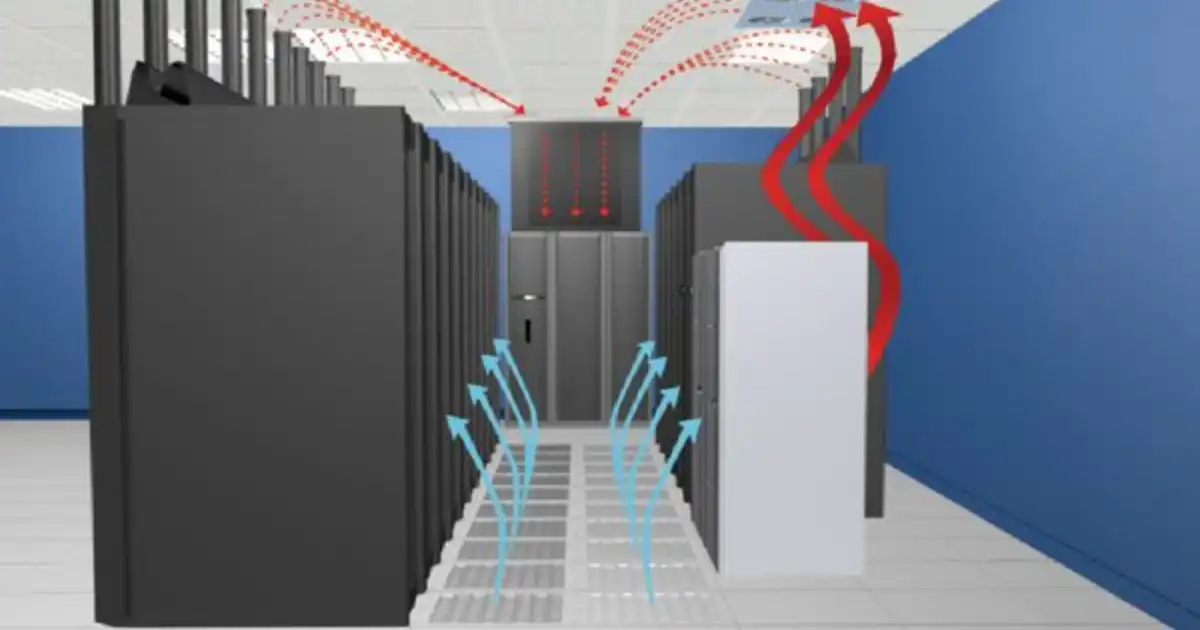
If you’ve ever walked into a data center especially during a hot summer power outage you know cooling isn’t an academic exercise. It keeps servers alive. It keeps performance steady. And when it fails? You’re scrambling with alarms, throttled racks, and potentially a service outage. Cooling is the silent backbone of reliability.
Most folks talk about heat removal like it’s a neat physics problem. In practice? It’s about unpredictable rack density, messy cabling that blocks airflow, CRAC units that don’t respond how the manual says they should, and a facilities budget that never covers “best practice.” I’ve seen airflow patterns so bad that air basically loops around in circles doing nothing useful. I’ve watched expensive blade servers thermally throttle because hot and cold aisles weren’t isolated. And I’ve seen a judicious splash of liquid cooling save a rack that otherwise would’ve roasted its CPUs.
This post isn’t theory. It’s a practical comparison of data center cooling methods what works, where it trips people up, and how to choose and apply the right approach for your facility. We’ll talk about air systems you’re used to, liquid cooling that feels intimidating at first, hybrid setups that actually make sense, and how to decide what’s right for your workloads without drinking vendor Kool‑Aid.
Table of Contents
ToggleHow Data Center Cooling Works
At a basic level, cooling is about pulling heat away from electronics and dumping it somewhere that won’t hurt anything else. You generate heat at the servers; you remove it with a medium (air or liquid); and you reject it to the outside world (often via chillers or dry coolers).
In real facilities, the trick isn’t just “cold in, hot out.” It’s controlling airflow and temperature boundaries. Cool air has to reach the server inlets without mixing with hot exhaust air otherwise you’re delivering warm air to CPUs and hoping for the best. That’s why we use concepts like hot and cold aisles, containment, and directed fans.
Liquid cooling… well, it just loves heat and carries it away much more efficiently than air. But liquid brings complexity: pumps, piping, connectors, and leak mitigation. And the more efficient your cooling, the lower your energy bills but only if you implement it smartly. In practice, the biggest gains come from good airflow management more than fancy equipment alone.
Main Cooling Methods
Air‑Based Cooling
Air cooling is the traditional workhorse. Most data centers still use it because it’s familiar, generally inexpensive to install, and doesn’t raise the fear of wet servers.
Core components you’ll see:
-
CRAC/CRAH units
(Computer Room Air Conditioning/Handling): These are big boxes that cool and circulate air.
-
Raised floors
with perforated tiles: The classic “cold air from below, return air above.”
-
Hot/Cold aisle arrangements
Racks face each other cold‑aisle to cold‑aisle, hot aisles on the opposite side, to reduce mixing.
Here’s the practical takeaway: airflow matters more than the size of your CRAC unit. I’ve seen massive units struggling because cables under the floor blocked the path, so cold air never got where it was supposed to. A simple cleanup and installing blanking panels in racks yielded better temperatures than expensive upgrades.
Hot & Cold Aisle Containment
Containment either by enclosing the cold aisle or hot aisle is where air cooling starts to really shine. Without containment, cold and hot air mix, and the cooling units work harder to maintain setpoints. With containment, you create a controlled tunnel of cold air feeding server intakes, and return hot air directly to the cooling unit. The result? Lower energy usage and more predictable temperatures.
Pros (in practice)
-
Familiar to operations teams.
-
Relatively straightforward to install and maintain.
-
Works well with moderate densities
Cons (in practice)
-
Becomes inefficient with high‑density racks more about moving more air rather than cooling efficiently.
-
Raised floors can be a nightmare to manage (cables, blocked tiles, poor sealing often ruin airflow).
-
It’s easy to waste huge amounts of energy with poorly designed or sealed aisles.
Common real world mistakes
-
Leaving open perforated tiles in cold aisles with no real plan for where the air should go.
-
Blocking return vents with cable trays or overhead chaos.
-
Ignoring the basics high static pressure under floors due to obstacles kills airflow.
Liquid Cooling
Liquid cooling gets talked up like the future and in many cases, it is. But it’s not magic; it’s just very efficient heat transport.
There are a few flavors:
In‑row / In‑rack Liquid Cooling:
You put liquid cooling units right next to or inside the rack. They grab heat at the source and transport it out via piping to a heat exchanger.
I once inherited a cluster with densities north of 20 kW per rack. Air cooling was simply not handling it CRAC fans were screaming 100% and still struggling. We deployed in‑row liquid coolers, tied into a chilled water loop, and server inlet temps dropped like a stone. Suddenly the compute was stable, fans quieter, and energy bills lower.
Direct Liquid Cooling (DLC)
Here, cold plates or heat exchangers touch the CPU/GPU directly. The thermal transfer is orders of magnitude better than air. Think of it as “air cooling on steroids.”
Immersion Cooling
This is where you actually immerse the server boards into dielectric fluid. No fans, no ducts, just fluid around every component.
Pros
-
Thermal performance
Liquid floats past hot components and actually takes heat away air just tries to shove heat around.
-
Handles high‑density racks (20 kW+).
-
Often reduces fan power dramatically, since liquids move more heat with less volume.
Cons (in practice)
-
Complexity
Pumps, plumbing, leak detection, maintenance liquid means a different operations mindset.
-
Cost
Upfront is higher. You’re buying specialty plates, hoses, and sometimes adapters.
-
Risk Aversion
Operations teams often freak out about liquid near electronics (understandably, but leaks are rare with good design).
Secret practical insights
-
Don’t underestimate piping layout. You can design the best cooling system on paper, but poorly routed pipes that make 90° bends everywhere will eat your pump head pressure and make the whole system inefficient.
-
Leak detection sensors everywhere matter not because leaks are expected, but because early detection prevents disaster.
-
Choose quick‑disconnects that are actually easy to disconnect and don’t leak when hot I’ve seen teams buy the cheapest connectors and regret it.
Immersion cooling caveat
It looks futuristic and it works amazingly well. But you have to adapt everything: boards, maintenance practices, spare parts, even how you think about air filters (because fans are mostly out of the picture). You also need a plan for dielectric fluid handling and disposal.
Hybrid & Advanced Methods
The future and even the present in many practical facilities is hybrid cooling.
Air + Liquid combos
You might still use air for low‑density racks and liquid for hot racks. Or high‑speed fans for general cooling and liquid chillers for peak loads. In a facility I helped retrofit, we used CRAH units for general hall cooling and directed liquid coolers for GPU clusters. That balanced the budget and gave us predictable temperatures across the floor.
Free Cooling / Economization
When the outside temperature is cold enough, you don’t need chillers. You directly bring in or circulate cool air/liquid from outside. It’s an energy jackpot in colder climates. But you need air quality management outside air can carry dust, moisture, bugs, etc., and trust me, that’s a maintenance headache if not planned.
AI and advanced controls
Modern DCIM and BMS systems can adjust cooling setpoints, fan speeds, and fluid temperatures automatically. I’ve rolled these out and the efficiency gains are real but so is the need for oversight. Automation without guardrails can push components beyond safe limits if a sensor goes haywire.
Takeaway
Hybrid is not a buzzword it’s pragmatic. Use the right tool for the job, and don’t fight yourself by forcing everything into one cooling paradigm.
Comparison: Pros & Cons Table
Here’s a real‑world comparison you can actually use when discussing with your team:
| Method | Pros (Practical) | Cons (Practical) |
|---|---|---|
| Air Cooling | Familiar operations; low up‑front; easy service | Struggles with high density; airflow nightmares; energy waste if mismanaged |
| Liquid Cooling | Great for high density; energy efficient; constant temps | Higher up‑front; ops complexity; leak mitigation needed |
| Immersion | Excellent thermal control; low fan use | Specialty parts; fluid handling; maintenance shift |
| Hybrid | Best of multiple worlds; flexible | System complexity; needs good controls |
In practice, air cooling still dominates ambient workloads because it’s cheap and predictable. But once you hit sustained high densities especially GPUs or ASICs liquid or hybrid starts to look obvious. And immersion? It’s perfect for extreme density but requires a shift in mindset.
Key Factors in Choosing a Cooling Method
When you’re choosing a cooling approach, don’t fall for shiny specs think about your actual constraints and patterns.
Rack Density
If most of your racks are under 10 kW, well‑managed air cooling with good containment works fine. If you start regularly pushing 15–20 kW and above, liquid cooling becomes far more efficient and stable.
Budget & ROI
Air cooling saves on upfront costs but can cost you on energy long term. Liquid cooling costs more initially (pipes, pumps, expertise) but often pays back via lower energy use and less fan power.
Operations Skillset
If your team literally hasn’t touched pumps or fluid systems before, plan for training. Avoid vendors that sell “plug‑and‑play” like it’s easy real facilities are messier.
Space & Infrastructure
Raised floors might not even be available in retrofit spaces. Liquid systems can fit tighter spaces but need drainage, isolation valves, and thoughtful piping.
Mistakes I see all the time
-
Choosing a cooling system before measuring airflow and thermal loads properly.
-
Ignoring maintenance access (hard to service units = neglected maintenance = failures).
-
Assuming vendor performance numbers will match your specific load profile.
Make a list of real load patterns, peak demands, serviceability requirements, and then shortlist methods.
Future Trends in Data Center Cooling
AI‑Driven Optimization
Smart cooling controls that learn patterns can adjust fans, pumps, and setpoints dynamically. These systems work well, but treat them as assistants I always pair them with human oversight.
Microfluidic Cooling
Cooling at the component level (even inside chips) shows promise, especially for specialized high‑performance computing. Right now it’s niche, but it’s coming.
Sustainability Focus
Data centers are big energy users, and cooling is a huge chunk of that. You’ll see more free cooling, heat reuse (e.g., diverting waste heat to buildings or district heating), and renewable integrations.
Fluids & Materials
New dielectric fluids and phase‑change materials are emerging. They sound cool (pun intended), but in practice you’ve got to weigh cost, handling safety, and supply chain availability.
Reality Check
Future tech is exciting, but proven fundamentals good airflow management, sensible containment, and cooling matched to workload remain the backbone of reliable cooling.
You Might Be Interested In
- Data Center Compliance: Soc 2 Vs Iso 27001
- Edge Data Centers Explained And When They Matter?
- Physical Security For Data Centers: Threats + Controls
- Green Data Centers: Practical Sustainability Checklist
- Data Center Networking Basics: Spine-leaf Explained
Conclusion
Cooling isn’t just HVAC it’s a critical part of making sure your data center stays alive, efficient, and predictable. Traditional air cooling still works well when you do it right, but liquid cooling and hybrid approaches unlock efficiency and density that air alone can’t manage.
The real winners are teams that combine practical measurements with sensible design, and who don’t ignore the basics like airflow and containment while chasing shiny tech.
Choose what fits your workloads, your space, and your people. And remember: a cooler server is a happier serve.
FAQs about Data Center Cooling Methods Compared
What’s the simplest way to improve cooling if my data center struggles with hotspots?
Hotspots usually aren’t about the CRAC unit failing; they’re about air not getting where it needs to go. The first step is always airflow management. Check for cable cutouts, gaps in raised floors, and open rack spaces where air bypasses the servers. Installing blanking panels and sealing unused openings in racks often does more than cranking up the AC. Containment whether cold or hot aisle can create a focused airflow path, ensuring cool air hits the server intakes instead of mixing with hot exhaust.
I’ve walked into data centers where simply rearranging perforated tiles and adding a few panels dropped rack inlet temps by 5–7°C, without touching a single CRAC fan. It’s low cost, immediate, and usually the fastest way to reduce hotspots. Before investing in expensive upgrades, measure airflow with handheld anemometers or thermal cameras to see where the air actually goes you’d be surprised how often it loops in circles.
Is liquid cooling worth the cost?
Liquid cooling shines in high-density scenarios. If you’re consistently pushing 15 kW per rack or more, liquid systems can stabilize server temps and save on fan energy, which can offset higher upfront costs over time. In my experience, once you exceed that density, air simply can’t move enough heat efficiently without screaming fans and enormous energy bills. The more compact or power-dense your workload, the more liquid cooling makes practical sense, especially for GPU-heavy clusters or HPC systems.
For smaller or moderate-density racks, however, the cost and complexity might not be worth it. You need pumps, piping, monitoring, and trained staff to handle maintenance if your workload is only occasionally hot, air cooling is often simpler and cheaper. Think of it like a spectrum: liquid cooling is an investment that pays off when air alone struggles to keep up with heat loads.
How risky is liquid cooling for leaks?
Leaks are the biggest fear people have when liquid enters the equation, and understandably so. But modern systems use high-quality fittings, quick disconnects, and drip trays that make catastrophic leaks extremely rare. In the facilities I’ve managed, leak sensors caught tiny drips before they reached electronics, and preventative maintenance protocols prevented most failures from ever happening.
The real risk comes when teams try to save money by skipping sensors or using substandard connectors. Pumps can also cavitate if piping isn’t correctly installed, creating localized heat issues. With proper installation, monitoring, and routine checks, liquid cooling is no more dangerous than air cooling just different, and requiring a slightly different mindset and discipline.
Can I retrofit liquid cooling into an existing air‑cooled facility?
Yes, retrofits are common, but they need planning. You can often add in-row or in-rack liquid units to existing hot spots without redesigning the entire floor. Key considerations include routing piping without blocking walkways, providing proper drainage, and installing isolation valves for maintenance. Pumps need to be sized correctly for the loop, or you risk underperforming cooling.
I’ve helped retrofit mid-sized data centers where liquid cooling was added to high-density racks while the rest of the hall remained air-cooled. The main challenge is commissioning: carefully balancing flow, temperature, and monitoring before production goes live. If done correctly, retrofitted liquid cooling dramatically stabilizes server temperatures without a full rebuild.
What’s immersion cooling best for?
Immersion cooling is perfect for extremely dense workloads where air or traditional liquid cooling would struggle. Systems like HPC clusters, crypto mining rigs, or GPU farms benefit most because the heat is extracted directly from components into dielectric fluid, bypassing fans entirely. The thermal control is precise and can handle racks that would otherwise throttle under air or in-rack liquid systems.
That said, immersion changes maintenance practices completely. Teams need training in fluid handling, component swaps, and safe storage of dielectric liquids. Spare parts logistics are different, and you need a fluid management plan for cleaning, top-offs, and eventual disposal. If your facility can handle that, immersion cooling offers unmatched efficiency and density management. For most general-purpose data centers, it’s overkill, but for extreme workloads, it’s a game changer.
