

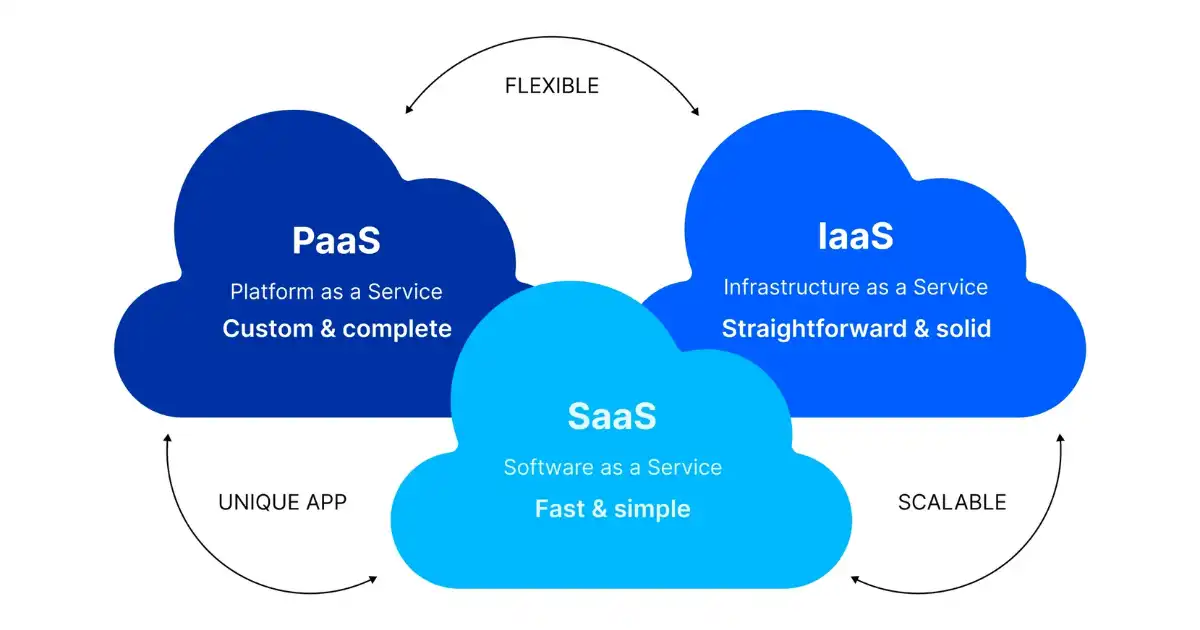
Understanding Iaas Vs Paas Vs Saas is essential for anyone learning about cloud computing today. These three cloud service models define how businesses, developers, and individuals use technology over the internet instead of owning physical hardware or software. While all three belong to cloud computing, they serve very different purposes and users.
In simple terms, Iaas Vs Paas Vs Saas represents different levels of control and responsibility. IaaS focuses on infrastructure, PaaS focuses on platforms for development, and SaaS focuses on ready-to-use software. Knowing the difference helps you choose the right cloud service for your needs, whether you are a student, developer, startup, or large enterprise.
This comprehensive guide explains Iaas Vs Paas Vs Saas in easy language, with clear examples, short paragraphs, and practical comparisons. By the end, you will fully understand the difference between IaaS PaaS and SaaS and know when to use each model.
Cloud Service Models Explained
Before comparing Iaas Vs Paas Vs Saas, it is important to understand cloud service models explained in simple words. Cloud computing allows users to access computing resources like servers, storage, applications, and tools over the internet.
Instead of buying expensive hardware or installing software on personal computers, cloud providers host everything in secure data centers. Users pay only for what they use. This flexibility, scalability, and cost efficiency are the main reasons cloud services are so popular today.
The three main cloud service models are Infrastructure as a Service, Platform as a Service, and Software as a Service. Each model builds on the one below it, offering different levels of control and convenience.
Infrastructure as a Service Definition
Infrastructure as a Service definition refers to the cloud model that provides basic computing resources over the internet. With IaaS, users get access to virtual servers, storage, networking, and operating systems.
In the Iaas Vs Paas Vs Saas comparison, IaaS offers the most control. Users manage operating systems, applications, and data, while the cloud provider manages physical hardware, data centers, and networking.
IaaS is ideal for businesses that want flexibility without owning physical servers. It allows companies to scale resources up or down based on demand. This makes IaaS popular for startups, IT teams, and organizations with changing workloads.
How IaaS Works in Practice
In IaaS, the cloud provider supplies virtual machines and infrastructure. Users install their own operating systems, applications, and security tools. This setup is similar to owning physical servers, but without the maintenance hassle.
For example, a company hosting its website on virtual servers instead of buying physical servers is using IaaS. They control how the server is configured and what software runs on it.
In the Difference between IaaS PaaS and SaaS, IaaS gives the most freedom but also the most responsibility.
Common IaaS Examples
Popular Software as a Service examples are easy to recognize, but IaaS examples are more technical. Common IaaS providers include virtual computing services that allow users to create and manage servers online.
These services are widely used for website hosting, data backups, application testing, and disaster recovery. Many businesses rely on IaaS for running enterprise systems without owning data centers.
IaaS is especially useful for companies with skilled IT teams that want full control over their systems.
Platform as a Service Meaning
Platform as a Service meaning focuses on providing a complete development environment in the cloud. PaaS allows developers to build, test, and deploy applications without worrying about servers, storage, or operating systems.
In the Iaas Vs Paas Vs Saas structure, PaaS sits in the middle. It removes infrastructure management while still giving developers control over applications and data.
PaaS is ideal for developers who want to focus on coding instead of managing hardware. It simplifies application development and speeds up deployment.
How PaaS Simplifies Development
With PaaS, the cloud provider manages servers, operating systems, runtime environments, and middleware. Developers simply upload their code and manage the application logic.
This approach reduces complexity and allows teams to collaborate more easily. Developers can focus on innovation rather than setup and maintenance.
When comparing IaaS vs PaaS vs SaaS comparison, PaaS offers a balance between control and simplicity.
Common PaaS Examples
PaaS is commonly used for web applications, mobile app backends, and API development. Many development teams choose PaaS because it supports faster development cycles.
Examples include platforms that offer built-in databases, development frameworks, and deployment tools. These services help developers bring applications to market quickly.
PaaS is especially useful for startups and software teams with limited infrastructure resources.
Software as a Service Examples
Software as a Service examples are the most familiar to everyday users. SaaS provides ready-to-use software applications over the internet. Users simply log in and start using the software.
In the Iaas Vs Paas Vs Saas comparison, SaaS offers the least control but the highest convenience. Everything is managed by the cloud provider, including updates, security, and maintenance.
SaaS is perfect for users who want simple solutions without technical complexity.
How SaaS Works for Users
With SaaS, there is no installation or setup required. The application runs entirely in the cloud and is accessed through a web browser.
Users pay a subscription fee and can access the software from any device with an internet connection. This makes SaaS highly flexible and user-friendly.
In the Difference between IaaS PaaS and SaaS, SaaS focuses on usability and accessibility rather than customization.
Popular SaaS Applications
Examples of SaaS include email services, online document editors, customer relationship management tools, and project management software.
These applications are widely used by students, businesses, and organizations of all sizes. SaaS is ideal for collaboration, productivity, and daily business operations.
Because everything is handled by the provider, SaaS requires minimal technical knowledge.
IaaS vs PaaS vs SaaS Comparison
Understanding IaaS vs PaaS vs SaaS comparison becomes easier when you look at responsibility levels. In IaaS, users manage most components. In PaaS, users manage applications and data. In SaaS, users only manage how they use the software.
IaaS provides flexibility and control, PaaS provides efficiency for developers, and SaaS provides simplicity for end users. Each model serves a different purpose.
Choosing the right model depends on technical skills, business needs, and budget.
Difference Between IaaS PaaS and SaaS by Use Case
IaaS is best for companies that need custom infrastructure and have IT expertise. It supports complex workloads and system configurations.
PaaS is best for developers who want to build applications quickly without managing servers. It supports innovation and rapid deployment.
SaaS is best for users who want ready-made software without maintenance responsibilities. It supports productivity and collaboration.
This clear difference between IaaS PaaS and SaaS helps organizations make informed decisions.
Advantages and Limitations of Each Model
IaaS offers flexibility and scalability but requires technical expertise. Users must manage security, updates, and applications.
PaaS reduces development effort but limits control over the underlying platform. It may also cause vendor dependency.
SaaS is easy to use but offers limited customization. Users depend entirely on the provider for features and availability.
Understanding these trade-offs is key when comparing Iaas Vs Paas Vs Saas.
How to Choose Between IaaS, PaaS, and SaaS
Choosing the right cloud model depends on your goals. If you need full control, choose IaaS. If you want to build apps faster, choose PaaS. If you want simplicity, choose SaaS.
Budget, technical skills, and scalability needs also play an important role. Many organizations use a combination of all three models.
A clear understanding of Cloud service models explained helps you align technology with business goals.
Future of Cloud Service Models
Cloud computing continues to evolve. Hybrid and multi-cloud strategies are becoming more common.
As technology advances, IaaS, PaaS, and SaaS will become more integrated and intelligent. Automation and artificial intelligence will further simplify cloud usage.
Understanding Iaas Vs Paas Vs Saas today prepares you for future technology trends.
You Might Be Interested In
- How AI transform the future of healthcare industry?
- What Is Server Infrastructure Management?
- How Does Masdar City Use Ai For Sustainability And solar output?
- 7 Ethical Dilemmas In Ai-generated Content You Can’t Ignore
- How Does Humain Support Ai Startups And Innovation In Saudi Arabia?
- How Does Cloud Cost Optimization Work finops In 2025?
- How Is Ai Used In Cybersecurity Threat Detection And Response?
- What Is Data Centre Cooling And Which Method Is Most Efficient?
- What Is Saudi Arabia’s Humain Ai Venture And What Does It Do?
- How To Use Wombo Ai?
Conclusion
The difference between Iaas Vs Paas Vs Saas lies in control, responsibility, and ease of use. IaaS focuses on infrastructure, PaaS focuses on development platforms, and SaaS focuses on ready-made software.
Each model plays a critical role in modern cloud computing. Businesses and individuals can choose one or combine them based on their needs. Understanding these models helps reduce costs, improve efficiency, and support growth.
By learning the Difference between IaaS PaaS and SaaS, you gain clarity on how cloud technology powers the digital world.
FAQs about IaaS PaaS and SaaS
What is the main difference between IaaS and SaaS?
The main difference between IaaS and SaaS lies in the level of control and responsibility given to the user. In IaaS, users rent virtual infrastructure such as servers, storage, and networks, but they are still responsible for managing the operating system, applications, security patches, and configurations. This makes IaaS suitable for organizations that want flexibility and customization but also have technical expertise to manage systems.
In contrast, SaaS delivers fully functional software applications over the internet. The cloud provider manages everything, including infrastructure, updates, maintenance, and security. Users simply log in and use the software. This makes SaaS ideal for individuals and businesses that want convenience, quick access, and minimal technical involvement.
Is PaaS better than IaaS for developers?
PaaS is often better than IaaS for developers because it removes the need to manage infrastructure and system-level tasks. With PaaS, developers can focus entirely on writing code, testing applications, and deploying updates. The platform already includes development tools, runtime environments, and databases, which speeds up the development process.
However, IaaS may still be preferred by developers who need full control over the environment or are working on highly customized or legacy systems. The choice depends on the project’s complexity, required flexibility, and the team’s technical skills.
Can a business use IaaS, PaaS, and SaaS together?
Yes, many businesses use IaaS, PaaS, and SaaS together as part of a hybrid cloud strategy. Each model serves a different purpose, and combining them allows organizations to get the best of all worlds. For example, a company might use SaaS for email and collaboration tools, PaaS for developing customer-facing applications, and IaaS for hosting core business systems.
Using multiple cloud service models helps businesses optimize costs, improve efficiency, and remain flexible. It also allows teams with different needs, such as developers, IT administrators, and end users, to work effectively using the tools best suited to them.
Which cloud model is best for beginners?
SaaS is generally the best cloud model for beginners because it is simple and requires no technical setup. Users do not need to understand servers, operating systems, or application deployment. They can access software directly through a web browser and start using it immediately.
For students and non-technical users, SaaS provides an easy introduction to cloud computing concepts. As users gain more experience and technical knowledge, they can then explore PaaS or IaaS if they want to build or manage applications and infrastructure.
Why is IaaS important for large enterprises?
IaaS is important for large enterprises because it offers scalability, flexibility, and control over computing resources. Enterprises often run complex applications that require custom configurations, high performance, and strict security controls. IaaS allows them to design infrastructure that meets these specific needs without investing in physical data centers.
Additionally, IaaS supports disaster recovery, global expansion, and handling peak workloads. Enterprises can quickly scale resources up or down based on demand, which helps reduce costs while maintaining performance and reliability.
