

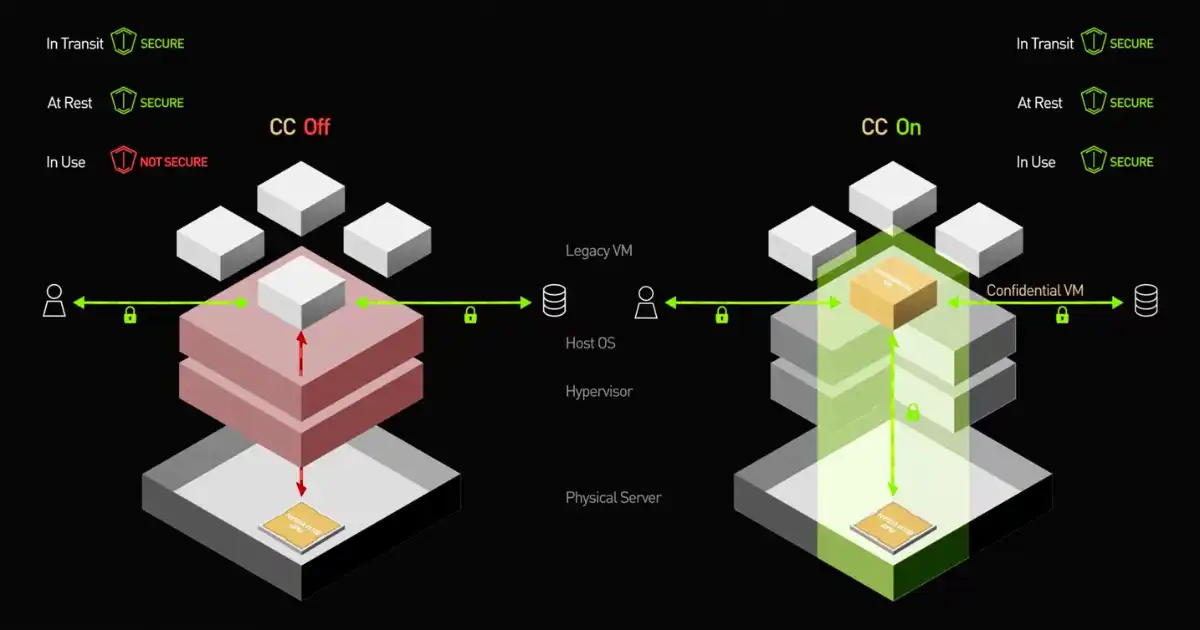
Imagine you’re sending your most sensitive documents through a tunnel—one that promises total privacy and trust. Now imagine harbouring anxiety that someone, somewhere might be peering in, snooping. That’s how many businesses feel when using cloud services today. Fortunately, there’s a powerful new shield rising: Confidential Computing. This next-level technology ensures your data remains protected even while it’s being used in the cloud.
We’ve long relied on encryption methods to protect data while it rests (at‐rest) or while it travels (in‐transit). Yet when data is “in-use,” inside memory or processor, the risk remains. This is where Confidential Computing comes into play—enabling processing of sensitive data with guarantees that even cloud operators or malicious insiders cannot view or tamper with it. This article dives deep into what Confidential Computing means, how it works in a cloud context, why it matters, and how you can put it to use.
Whether you’re managing customer records, financial assets, health care data, or intellectual property, you want assurance that your information stays safe—not just when idle or moving—but right when it’s being processed in the cloud. The promise of Confidential Computing gives you that boost of confidence. You’ll learn about real-world use cases, architecture, benefits, challenges, and action steps to adopt it. By the end of this guide, you’ll feel empowered, informed, and ready to take action.
Keep reading—this is your complete guide to mastering Confidential Computing in the cloud. After this, you’ll know how to select a platform, evaluate design choices, integrate it into your workflow, and speak confidently about it with executives or technical teams. Let’s begin.
What Is Confidential Computing?
Definition
At its core, Confidential Computing is the protection of data while it is being processed—in other words, while it is “in use.” Unlike traditional encryption which safeguards data at rest and in transit, Confidential Computing extends protection into the runtime environment. It leverages hardware-based secure enclaves or trusted execution environments (TEEs) to prevent unauthorized access by the host system, cloud provider, or malicious actors.
Why Does It Matter?
Think of a locked box (data at rest) or a sealed envelope on a courier (data in transit). Now consider that box being opened to process the contents—who ensures the insiders aren’t watching? In many cloud contexts, even if the service provider vows privacy, the hardware or firmware could leak information or be tampered with. Confidential Computing addresses this blind spot.
-
It reduces the trusted computing base (TCB) by isolating workloads inside hardware-backed enclaves.
-
It mitigates risk from malicious or compromised cloud operators, rogue administrators, or untrusted environments.
-
It enables secure multi-party collaboration, confidential AI/ML workloads, and stronger compliance postures.
Why the Cloud and Confidential Computing Are a Perfect Fit
The Cloud’s Value and Its Risk
Cloud computing offers agility, scalability, elasticity—and cost savings. Yet as enterprises migrate sensitive workloads to the cloud, they often stumble on the trust barrier: “What if the cloud provider or underlying infrastructure sees my data?” This is especially true for regulated industries (finance, healthcare) or multi-jurisdictional environments with stringent data sovereignty rules.
How Confidential Computing Boosts Cloud Trust
In a cloud setting, Confidential Computing delivers:
-
Isolation
Your workload runs inside a tamper-resistant enclave, externally invisible.
-
Attestation
The system can prove the hardware is genuine and the code hasn’t been tampered with, offering verifiable trust.
-
Encryption in use
Memory and CPU registers are protected; even if someone captures the cloud server’s memory, it remains encrypted.
Thus, the cloud provider may host your workload, but cannot view or manipulate the actual data or application logic—dramatically increasing trust.
How Confidential Computing Works: Technical Deep Dive
Trusted Execution Environments (TEEs)
A TEE (Trusted Execution Environment) is a secure area of the main processor. It ensures the code and data loaded inside are protected with respect to confidentiality and integrity. Major implementations include:
-
Intel® SGX (Software Guard Extensions)
-
AMD SEV (Secure Encrypted Virtualization)
-
ARM TrustZone
-
And custom designs from cloud vendors
Inside the enclave:
-
The hypervisor/OS cannot inspect the enclave memory.
-
The hardware ensures that memory pages used by the enclave are encrypted and isolated.
-
Attestation mechanisms allow remote parties to verify the enclave identity and code.
Workflow of Confidential Computing in the Cloud
Let’s walk through a typical sequence:
-
Client requests enclave creation.
-
Cloud hardware provisions TEE, isolating it from host OS / hypervisor.
-
Client loads the application code and data into the enclave.
-
The enclave performs remote attestation—verifying it runs on genuine hardware and hasn’t been tampered with.
-
The data is decrypted inside the enclave, processed, and results are returned—data remains protected throughout.
Attestation & Encryption
Remote attestation is crucial: it offers a cryptographic proof to a remote client that the enclave is authentic and secure. Once attested, the client can safely send sensitive data, often encrypted with a public key tied to the enclave. Only the enclave key can decrypt it—so the host cannot see it.
Inside the enclave, the data lives in encrypted memory. Even a snapshot of server memory or malicious hypervisor cannot access clear data. That’s the power of Confidential Computing.
Key Management & Secrets
In a Confidential Computing scenario, secrets (keys, certificates, models) stay secured inside enclaves or hardware modules. Keys are never exposed outside the secure boundary. This helps prevent leakage via memory dumps, swap, or host OS access.
Integration into Cloud Infrastructure
Cloud providers are offering Confidential Computing-enabled VM types or services. These backends often include features like:
-
Encrypted cores
-
Attestation APIs
-
Key management integrated with TEEs
Applications must be architected to load sensitive modules inside enclaves, handle attestation, and trust the remote platform.
Use Cases for Confidential Computing in the Cloud
1. Multi-Party Data Collaboration
Often multiple organizations need to share data and compute jointly—without revealing raw data to each other or to the cloud host. With Confidential Computing, each party can encrypt their data and load into enclaves, compute a joint result, and only share the aggregated output—keeping raw inputs private.
2. Financial Services & Regulatory Compliance
Banks and insurers process highly sensitive data: transactions, customer identities, risk models. They face strict compliance (e.g., GDPR, PSD2). Using Confidential Computing in the cloud allows them to move workloads off-premises while maintaining required confidentiality and integrity assurances.
3. Healthcare and Genomics
Patient records, genomic sequences, health analytics—all require extreme data protection. Confidential Computing lets healthcare providers outsource compute-intensive tasks (AI/ML, genomics) to the cloud while ensuring the actual patient data cannot be accessed by the cloud provider or unauthorized insiders.
4. Intellectual Property (IP) Protection
Companies working on new designs, prototypes, research models want to keep their IP safe while leveraging cloud elasticity. Deploying workloads under Confidential Computing ensures that models, design files, algorithms remain shielded from exposure—even the cloud host cannot view them.
5. Machine Learning on Sensitive Data
Training and inference on sensitive datasets (financial, medical, personal) requires secure environments. By combining ML frameworks with Confidential Computing enclaves, organizations can protect training data and models during runtime. This opens up “AI as a Service” models for highly regulated domains.
Benefits of Confidential Computing
Enhanced Security at Runtime
Traditional encryption leaves a gap: data when it’s actively being processed. Confidential Computing fills that gap by protecting data in use with hardware-based isolation. The result: stronger end-to-end security.
Stronger Trust in Cloud Environments
Since the host cannot inspect enclave memory or logic, you no longer must fully trust the cloud provider. Instead, you trust the hardware and cryptographic attestation—this changes the trust model significantly.
Reduced Attack Surface
By isolating sensitive parts of the application inside a secure enclave, you minimize the attack surface exposed to the host OS, hypervisor, or side-channel attacks. This containment leads to fewer vulnerabilities.
Regulatory and Compliance Advantages
Regulators increasingly expect organizations to protect data using state-of-the-art controls. Confidential Computing can help meet or exceed requirements for data privacy, confidentiality, and integrity—especially when outsourcing to the cloud.
Competitive Advantage and Secure Innovation
Businesses using Confidential Computing can safely adopt cloud-native architectures for sensitive workloads, enabling speed and innovation without compromising on security. They can eliminate the hesitation of “not trusting the cloud” and move faster.
Architecture and Deployment Models
Single Tenant vs Multi-Tenant
In a single-tenant model, the enclave runs exclusively for one customer, reducing risk of cross-tenant leaks. In a multi-tenant model, the hardware supports multiple enclaves for different clients—each isolated—but higher complexity exists. Many cloud providers now support both.
Hybrid and Multi-Cloud
Enterprises often adopt hybrid environments—some workloads on-premises, others in public cloud. Confidential Computing can extend into hybrid models: secure enclaves can be deployed in the cloud while connecting securely to on-premises systems. Multi-cloud strategies also benefit: you can choose different cloud providers offering Confidential Computing and avoid vendor lock-in.
Zero-Trust Architecture
Confidential Computing aligns well with zero-trust principles: assume no inherently trusted component, isolate workloads, secure data everywhere—including in use. Application architectures may split functionality: sensitive parts run inside enclaves, less-sensitive parts run outside.
Workflow Integration
To deploy a Confidential Computing solution:
-
Identify sensitive workloads.
-
Refactor application so that confidential logic runs inside enclave(s).
-
Use attestation APIs to verify the enclave at runtime.
-
Use strong key management: data encrypted, decrypted only inside enclave.
-
Monitor and audit enclave execution and access.
-
Integrate with cloud vendor’s Confidential Computing-enabled offerings.
Challenges and Limitations
Complexity and Development Effort
Building for Confidential Computing is more complex. You need to refactor applications to isolate code/data inside enclaves, integrate attestation, and handle enclave lifecycle. Not all libraries or frameworks support TEEs easily.
Limited Hardware and Vendor Support
While major cloud providers support Confidential Computing, the hardware types (SGX, SEV, etc) differ in capabilities. Some legacy applications may not be compatible. You must choose the right instance types and regional availability.
Performance Overhead
Secure enclaves often incur overhead due to memory encryption, context switching, and limited resource access. For high-performance workloads, testing is necessary to understand performance impacts.
Side-Channel Attacks and Emerging Threats
Although TEEs protect data in use, they are not immune to side-channel attacks (timing, power, cache-based). Implementers must follow best practices and update to mitigate such risks.
Cost Considerations
Enclave-enabled resources might come at a premium. In addition, the development and refactoring effort adds cost. Organizations must evaluate ROI and whether Confidential Computing is justified for their specific risk profile.
Interoperability and Standardization
Standards for Confidential Computing and attestation remain evolving. Cross-platform interoperability may be limited; vendor-lock-in risks exist. Enterprises must assess vendor roadmaps carefully.
Key Features to Look for When Choosing a Solution
Hardware-Backed Enclaves
Ensure the cloud provider offers genuine TEEs (Intel SGX, AMD SEV, or equivalent) with transparent documentation of hardware trust roots. Without hardware-backed enclaves, you don’t get full runtime protection.
Attestation Services
The provider should offer remote attestation APIs so clients can verify the integrity of the enclave before supplying data. Without attestation, you lack cryptographic proof of trust.
Key Management and Secure Key Storage
Look for integrated key management systems (KMS) that can securely handle keys inside enclave boundaries. Keys should never be exposed outside the secure boundary.
Ecosystem and Developer Support
Check for libraries, SDKs, tooling, and community support to develop applications for Confidential Computing. The easier it is to adopt, the faster you’ll realize value.
Multi-Region and Compliance Certifications
Ensure your provider offers the technology in the regions you operate and holds relevant compliance certifications (ISO 27001, SOC2, etc). This will help meet regulatory demands.
Transparent Security Model and Documentation
The provider must clearly document how their hardware, firmware, attestation, and isolation works. Transparency boosts trust and helps you make informed decisions.
Pricing Model and Performance Benchmarks
Request performance numbers for workloads inside enclaves, compare cost overhead, and test with your specific workload. This helps avoid surprises down the line.
Step-by-Step Guide to Implementing Confidential Computing in the Cloud
Step 1: Identify Your Sensitive Workloads
Begin by listing all workloads in your organization and profiling them based on risk: Which ones process the most sensitive data? Which can’t tolerate exposure during runtime? Those are prime candidates for Confidential Computing.
Step 2: Choose the Right Cloud Provider and Enclave Type
Evaluate cloud offerings from providers (e.g., Microsoft Azure Confidential Computing, Google Confidential VMs, Amazon Web Services Nitro Enclaves). Also evaluate specific hardware: Intel SGX vs AMD SEV vs others. Understand region availability, cost, and vendor lock-in risks.
Step 3: Refactor and Architect Your Application
Insider protection often requires redesign. Decide which components must run inside the enclave and which can remain outside. Segregate the code path:
-
Enclave handles sensitive data (decryption, processing).
-
Outside components handle UI, orchestration, logging (non-sensitive).
Make sure communication between enclave and outside world is secured and minimal.
Step 4: Develop and Integrate Attestation
Use attestation APIs to verify enclave identity. Only after successful attestation should you provision secrets/data to the enclave. Integrate remote attestation into your authentication or provisioning workflow.
Step 5: Manage Keys and Secrets Securely
Leverage hardware-rooted key storage inside the enclave. Use a KMS to manage encryption keys. Ensure that the keys never leave the enclave or untrusted memory. Consider key lifecycles, rotation, and revocation mechanisms.
Step 6: Deploy and Test Performance & Security
Launch test instances of your enclave workloads. Measure performance overhead, latency, throughput. Simulate attack scenarios (e.g., hostile hypervisor, memory dump) and verify your data remains protected. Conduct penetration and side-channel testing.
Step 7: Monitor, Audit and Log Appropriately
Although enclaves are isolated, you still need audit logs and monitoring for compliance. Design logging frameworks that record actions outside the enclave while preserving the confidentiality of inside data. Also monitor enclave health, attestation status, and security updates.
Step 8: Inform Stakeholders and Train Teams
Change in architecture demands coordination across development, security, operations, and compliance teams. Provide training so teams understand enclave lifecycles, attestation, and how to handle failure or update scenarios.
Step 9: Roll Out to Production and Scale
Once tested and validated, roll out to production environment. Monitor cost, performance, incident reports. Adjust architecture iteratively as you scale—keep refining sensitive workload isolation boundaries.
Step 10: Review & Evolve
Threats evolve. Side-channel attacks, hardware vulnerabilities, supply-chain issues may impact your Confidential Computing setup. Stay informed about vendor patches, industry standards (such as those from Confidential Computing Consortium), and update your architecture accordingly.
Real-World Examples
Banking Platform in the Cloud
Imagine a large bank processing customer transaction data and risk models in the cloud. They use Confidential Computing to isolate the model training environment so that even the cloud provider cannot view raw transaction data or sensitive attributes. The bank can collaborate with partners and outsource compute without fear of data leakage.
Healthcare Genomic Analysis
A biomedical research institution uses cloud HPC to analyze genomic sequences. They load the sequence data into enclaves, run sequence alignment and AI models within the enclave, and then extract only aggregated, anonymized results. Throughout the process, raw genomic data stays confidential.
Multi-Party Advertising Analytics
Several advertising companies collaborate to compute aggregated user behaviour insights without revealing individual datasets to each other or to the cloud service. They implement Confidential Computing to load each dataset into an enclave, compute joint analytics, and share only non-identifiable aggregated results.
Best Practices and Tips
-
Minimize code inside the enclave
Keep the enclave boundary small—only include sensitive logic. This reduces attack surface and simplifies audits.
-
Validate third-party libraries
using libraries inside enclaves means trusting them. Vet them carefully for side-channel vulnerabilities.
-
Use versioning and patch management
Enclave hardware/firmware have lifecycles—stay up-to-date.
-
Encrypt all data flows
Even though enclave memory is protected, ensure that data entering/exiting the enclave uses secure channels and encryption.
-
Plan for failure and recovery
What if enclave attestation fails or hardware is compromised? Build fallback workflows.
-
Monitor costs and performance
Enclave workloads may cost more or perform slower—model your budgets carefully.
-
Document the trust model
Clearly outline which elements you trust (hardware vendor, cloud provider) and which you don’t. This helps auditors and stakeholders.
-
Stay abreast of standards
Organizations like the Confidential Computing Consortium are driving standards—keep aligned.
-
Cross-check compliance implications
Ensure Confidential Computing plays into your regulatory frameworks (GDPR, HIPAA, etc.).
-
Educate teams
Don’t assume your engineering, security or legal teams fully understand enclave architecture—provide training.
Future Trends and Outlook
Wider Adoption Across Industries
As cloud native architectures grow, more organizations will adopt Confidential Computing to manage risk. Regulators may eventually require runtime protections for particular data classes.
Advances in Hardware and Standardization
We expect more widespread hardware support, improved performance, and better standardization. With vendor-agnostic TEEs and open source tooling, adoption will accelerate.
Integration with AI & Big Data
The combination of Confidential Computing + AI offers new possibilities: secure training of models on sensitive data, federated learning across organizations, and confidential inference in cloud services.
Zero-Trust Everywhere
Confidential Computing fits squarely into the broader shift toward zero-trust architectures. As enterprises shift to zero trust, isolating runtime workloads becomes a key pillar.
Ecosystem Growth
Open frameworks, certifications, tooling, and governance models will emerge. The role of industry bodies (like the Confidential Computing Consortium) will strengthen, making it easier to adopt.
You Might Be Interested In
- How Ai Accountability Laws Protect Users?
- What Industries Will Benefit Most From The Uae Stargate Project?
- What Does Inference Confidence Drift Mean in Production?
- How IOT And Ai Manage Smart City Resources?
- What Are Managed Cloud Services?
- Top 5 Ways Ai In Health Improves Patient Care
- How Stargate Fosters Public-private Partnerships?
- What Is The Difference Between Humain And Other Saudi Ai Initiatives?
- Military Operations Redefined: The Dynamic Impact of Artificial Intelligence
- Which Of The Following is A Subset Of Artificial Intelligence?
Conclusion
In the world of cloud computing, protecting data at rest and in transit is no longer enough. Sensitive information must remain safeguarded while it is being processed. That is precisely what Confidential Computing enables: hardware-based isolation, attestation, and protection of data in use—bringing a profound leap in cloud trust and security.
By implementing Confidential Computing, you lower your risk profile, satisfy regulatory demands, and leverage the cloud for even your most sensitive workloads. The path to adoption involves identifying workloads, selecting the right provider and enclave type, refactoring your application architecture, integrating attestation and key management, and operationalising monitoring and performance testing.
Ultimately, Confidential Computing empowers organizations to embrace the cloud with confidence—running sensitive data in outsourced environments without sacrificing control. Whether you are a developer, architect, security leader, or decision-maker, now is the time to become familiar with this paradigm, assess how it fits your strategy, and begin the journey.
FAQs about Confidential Computing
What is confidential computing?
Confidential computing is a powerful technology that helps protect sensitive information while it’s being processed by a computer. Normally, data can be protected when it’s stored or being sent over the internet, but it becomes more vulnerable when it’s being used.
Confidential computing fixes that by creating a secure area inside the computer’s processor called a “trusted execution environment” or TEE. This area acts like a digital vault, keeping data hidden from hackers, software bugs, and even cloud providers. It ensures that information stays private, even when it’s being actively used for analysis or operations. Businesses, governments, and researchers use confidential computing to safely handle private data such as financial transactions, medical records, or personal identities.
What is confidence computing?
“Confidence computing” is often a misunderstanding or misspelling of confidential computing. However, if we think about it literally, confidence computing could refer to building trust and reliability into computer systems — ensuring users have confidence that their data, operations, and results are safe and accurate.
In modern technology, this concept ties closely with secure computing environments, encryption, and privacy-preserving methods that help users trust digital platforms. Essentially, confidence in computing grows when systems are transparent, protected from breaches, and designed to safeguard sensitive information at every stage of use.
What is data confidentiality in cloud computing?
Data confidentiality in cloud computing means keeping user data private and protected from unauthorized access while it’s stored, transmitted, or processed in the cloud. When you upload files, photos, or information to a cloud service, that data is often stored on remote servers managed by another company.
To ensure confidentiality, strong encryption techniques are used so that only authorized users or systems can read the data. This prevents hackers, system administrators, or other outsiders from viewing private information. Maintaining data confidentiality is essential for protecting personal details, company secrets, and sensitive documents, especially in industries like finance, healthcare, and law.
What are some examples of confidential data?
Confidential data includes any information that should not be publicly accessible because it could harm an individual or organization if exposed. This can include things like personal identification numbers, medical histories, financial records, business plans, or intellectual property.
For example, a hospital’s patient records, a company’s trade secrets, or a bank’s customer details are all forms of confidential data. Protecting such information is critical to prevent identity theft, financial fraud, and privacy violations. Organizations often use secure storage, encryption, and strict access controls to make sure this data remains private and protected.
What are 5 examples of confidentiality?
Five examples of confidentiality include:
Medical confidentiality – Doctors keeping a patient’s medical history private.F inancial confidentiality – Banks protecting customer account details and transactions.
Legal confidentiality – Lawyers keeping client discussions and case files secure. Workplace confidentiality – Employers safeguarding employee data and company strategies. Educational confidentiality – Schools protecting student grades, records, and personal information.
Each of these examples shows how confidentiality is about trust — ensuring that private information stays between the right people and is never shared or exposed without permission.
