Close Menu
    What's Hot

    How Bluetooth Earbuds Stay Connected?

    September 30, 2026

    How Fitness Trackers Measure Health?

    September 29, 2026

    How a Smart Watch Tracks Daily Activity?

    September 28, 2026
    Facebook X (Twitter) Instagram
    OmniRaza Tuesday, October 6
    • Home
    • About Us
    • Privacy Policy
    • Terms
    • Contact
    Facebook X (Twitter) Instagram
    Subscribe
    • Home
    • Artificial Intelligence
    • Development
    • Digitization
    • Innovations
    • Technology
    OmniRaza
    Home»Artificial Intelligence»Why Do Gpu Data Centres Need Cooling?
    Artificial Intelligence

    Why Do Gpu Data Centres Need Cooling?

    omnirazaBy omnirazaMay 30, 2026No Comments10 Mins Read3 Views
    Facebook Twitter Pinterest Telegram LinkedIn Tumblr Copy Link Email
    Follow Us
    Google News Flipboard
    Why Do Gpu Data Centres Need Cooling?
    Share
    Facebook Twitter LinkedIn Pinterest Email Copy Link

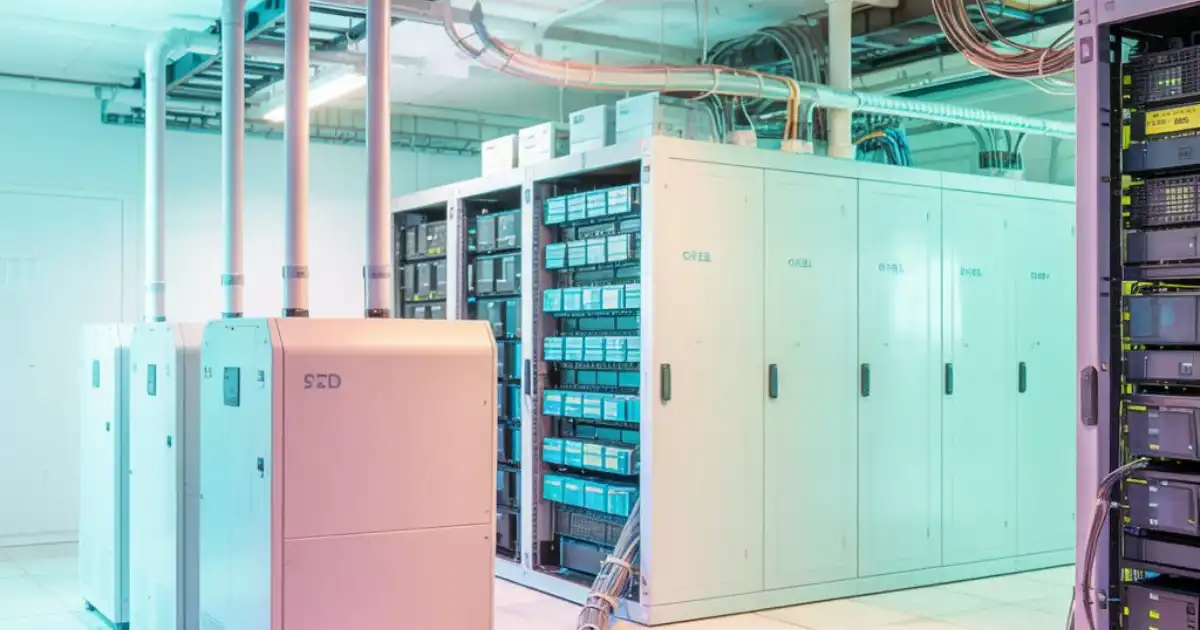
    If you spend enough time around GPU data centres, you stop thinking about “compute” as the main challenge. Heat becomes the real story.

    I’ve seen racks where everything looks fine on the dashboard, but the room tells a different story. Hot aisles turning into warm wind tunnels, fans screaming at full speed, and GPUs quietly backing off performance just to stay alive. That’s the part people don’t fully appreciate until they’re dealing with it in production.

    Cooling is no longer optional. In modern AI infrastructure, it is part of performance itself. If you can’t remove heat fast enough, you don’t get the compute you paid for.

    Table of Contents

    Toggle
    • What Is a GPU Data Centre?
    • Why GPUs Produce So Much Heat in Real Systems
      • Continuous compute load
      • Dense GPU racks
      • Power draw under AI training
      • Why modern GPUs run hotter than older systems
    • What Actually Happens When Cooling Is Not Enough
      • Thermal throttling in real workloads
      • System crashes and instability
      • AI training failures and cost loss
    • How Cooling Systems Work in GPU Data Centres
      • Air cooling
      • Liquid cooling
      • Immersion cooling
    • Why Cooling Is Critical for AI Training Workloads
    • Energy Cost and Efficiency Reality
      • Cooling as a major power consumer
      • PUE explained in practical terms
      • Why efficiency matters more in AI clusters
    • What Modern GPU Data Centres Are Doing Differently
      • Rack-level cooling design
      • Direct-to-chip cooling systems
      • AI-driven thermal monitoring
      • Why old data centre designs are struggling
    • Future of GPU Cooling
    • Conclusion
    • FAQs

    What Is a GPU Data Centre?

    A GPU data centre is basically a facility built to run dense clusters of graphics processing units, not general-purpose CPUs.

    In real workloads, CPUs handle coordination, storage, networking, and orchestration. GPUs do the heavy lifting: AI training, inference at scale, large matrix operations, and anything involving massive parallel computation.

    When you’re training large AI models, you’re not using a few GPUs. You’re using hundreds or thousands, all working together, often at near 100% utilization for days or weeks.

    That changes everything about power, heat, and design.

    Why GPUs Produce So Much Heat in Real Systems

    Continuous compute load

    Unlike typical servers that spike and idle, AI workloads keep GPUs under sustained load. No breathing room. No downtime. Just constant computation.

    That alone creates steady, high thermal output.

    Dense GPU racks

    Modern GPU servers are tightly packed. You’ll see 4, 8, sometimes 16 high-end GPUs in a single node, and dozens of those nodes per rack.

    It’s not just heat from one GPU. It’s cumulative heat density that becomes hard to move.

    Power draw under AI training

    A single modern GPU can pull 300W to 700W. Multiply that across a rack and you’re easily in the tens of kilowatts per rack range.

    That power doesn’t disappear. It turns into heat almost one-to-one.

    Why modern GPUs run hotter than older systems

    Older systems were more balanced. CPUs, disks, and network cards shared the load.

    Now we have accelerators designed for maximum parallel throughput. That efficiency comes with brutal thermal density. More performance per square inch also means more heat per square inch.

    What Actually Happens When Cooling Is Not Enough

    This is where theory ends and operational pain begins.

    Thermal throttling in real workloads

    GPUs don’t just fail when they get hot. They slow down first.

    I’ve seen training jobs that looked healthy on paper but were silently losing performance because GPUs were throttling frequency to stay under thermal limits. That means longer training times and higher cost for the same result.

    System crashes and instability

    If cooling continues to fall behind, you start seeing node instability. Memory errors, driver resets, and sudden worker failures.

    In distributed training, one unstable node can disrupt an entire job.

    AI training failures and cost loss

    This is the part that hurts the most. Long training runs don’t just slow down, they fail.

    Imagine running a multi-day training job and losing progress because a subset of GPUs overheated and dropped out. You don’t just lose time, you burn cloud budget with nothing to show for it.

    How Cooling Systems Work in GPU Data Centres

    Cooling in GPU environments is not one system. It’s layers of engineering.

    Air cooling

    Air cooling is still widely used, especially in older or mid-density setups.

    It works by pushing large volumes of chilled air through hot aisles. The problem is simple: air is a poor heat carrier. Once GPU density crosses a certain threshold, air cooling hits a wall.

    You can hear it before you see it. Fans maxed out, airflow turbulence, and uneven cooling across racks.

    Liquid cooling

    Liquid cooling is now the default direction for serious AI infrastructure.

    Instead of cooling air, you cool directly at the chip or node level using liquid loops. Water or specialized fluids carry heat away far more efficiently than air ever could.

    In real deployments, this is what keeps high-density GPU clusters stable under sustained load.

    Immersion cooling

    Immersion cooling means submerging hardware in thermally conductive fluid.

    It sounds extreme, but it works well in ultra-dense environments. I’ve seen it used where rack density makes air cooling impossible and even liquid plates become complex.

    It’s not everywhere yet, but it’s not experimental anymore either.

    Why Cooling Is Critical for AI Training Workloads

    AI training is not bursty. It is long, synchronized, and sensitive.

    If one GPU slows down due to heat, it affects the whole cluster. Distributed training depends on timing consistency. Thermal variation introduces imbalance.

    When clusters desynchronize, you don’t just lose performance, you lose efficiency across the entire job.

    That’s why thermal management is not a hardware concern anymore. It’s a training stability issue.

    Energy Cost and Efficiency Reality

    Cooling is one of the biggest hidden costs in AI infrastructure.

    Cooling as a major power consumer

    People often focus on GPU power draw, but cooling systems can consume a significant portion of total facility power.

    PUE explained in practical terms

    Power Usage Effectiveness (PUE) is basically:

    How much total energy the data centre uses vs how much actually goes to compute.

    If your PUE is 1.5, it means for every 1 unit of compute power, you’re using 0.5 extra just to keep things cool and running.

    In GPU-heavy environments, this number matters a lot more than people expect.

    Why efficiency matters more in AI clusters

    At scale, small inefficiencies multiply. A slightly worse cooling design can mean millions in extra electricity cost per year.

    What Modern GPU Data Centres Are Doing Differently

    The old data centre model is struggling with AI workloads.

    Rack-level cooling design

    Instead of cooling the whole room, modern designs focus on racks as individual thermal units.

    Direct-to-chip cooling systems

    This is becoming standard in high-density clusters. Heat is removed directly at the GPU surface instead of relying on ambient airflow.

    AI-driven thermal monitoring

    Ironically, AI is now used to manage AI infrastructure. Thermal systems are increasingly predictive, adjusting cooling before hotspots form.

    Why old data centre designs are struggling

    Traditional data centres were built for predictable, moderate loads. AI clusters are the opposite: constant, dense, and heat-heavy.

    That mismatch is where failures start.

    Future of GPU Cooling

    The direction is pretty clear if you’ve been around these systems long enough.

    Liquid cooling is becoming default, not optional.

    GPU racks are getting denser, not lighter. That forces tighter integration between hardware and cooling systems.

    We’re also seeing co-designed systems where GPU manufacturers assume liquid cooling from day one, not as an add-on.

    And finally, sustainability pressure is real. Energy efficiency is not just a cost issue anymore, it’s a deployment constraint.


    You Might Be Interested In

    • What Are The Two Types Of Expert Systems?
    • How Does Ai Optimize Traffic Signals And Reduce Congestion?
    • How Law Enforcement Uses Ai Facial Recognition?
    • How Bing AI Image Creator is Changing the Game?
    • What Does Unbounded Consumption Mean in LLM Applications?

    Conclusion

    When you spend time around real GPU data centres, one thing becomes obvious pretty quickly: heat is not a side problem, it is the main constraint shaping everything else.

    It doesn’t matter how powerful your GPUs are or how well your AI model is designed. If you cannot move heat out of the system fast enough, performance drops, stability suffers, and costs start climbing in ways that are hard to ignore. I’ve seen setups where everything looked fine on paper, but cooling limitations quietly turned a high-end cluster into an underperforming one.

    That’s why GPU data centre cooling sits at the centre of modern AI infrastructure. It is not just about keeping hardware safe. It directly controls how fast you can train models, how much energy you spend doing it, and whether large-scale workloads actually finish without interruption.

    FAQs

    What are AI accelerator learning systems in simple terms?

    AI accelerator learning systems are specialized computing setups designed to train machine learning models faster than normal computers. At a surface level, that’s true, but in real systems it’s more accurate to think of them as tightly coordinated pipelines where hardware, software, and data movement are all engineered together for one job: sustained large-scale matrix computation.

    In practice, these systems include GPUs or TPUs, high-speed memory, fast interconnects, and carefully tuned data pipelines that keep everything busy. The real goal is not just “speeding things up” but preventing expensive compute units from sitting idle while waiting for data, which is what happens constantly in poorly designed setups.

    Why are GPUs better than CPUs for AI training?

    GPUs outperform CPUs in AI training because they are built for massive parallelism rather than general-purpose execution. A CPU is designed to handle a wide variety of tasks quickly one after another, while a GPU is designed to perform thousands of simple mathematical operations simultaneously, which is exactly what neural networks require.

    In real-world neural network training systems, most operations are matrix multiplications repeated billions of times. GPUs handle this efficiently because their architecture is optimized for throughput, not complex branching or logic. This is why AI training hardware shifted so heavily toward GPUs once deep learning workloads started scaling.

    What is the biggest bottleneck in AI training hardware?

    The biggest bottleneck in AI training hardware is almost never raw compute power. In most real deployments, the limiting factor is memory bandwidth and data movement across the system. GPUs can process data extremely fast, but they often spend a surprising amount of time waiting for data to arrive from memory or other devices.

    In large AI compute systems, this problem becomes even more visible. Data must flow from storage to CPU preprocessing, then into GPU memory, then across multiple GPUs for synchronization. If any part of this chain slows down, the entire training process stalls. I’ve seen clusters where upgrading GPUs alone barely improved performance because the real issue was the data pipeline, not the compute units.

    How is training different from inference in AI systems?

    Training and inference are fundamentally different workloads, even though they use the same underlying model. Training is the process of teaching the model by adjusting its internal weights using massive datasets, which requires forward passes, backward passes, and continuous gradient updates. This makes it extremely compute-heavy and memory-intensive.

    Inference, on the other hand, is just using the trained model to make predictions. It only requires a forward pass, which is significantly lighter. In real systems, training usually happens on large distributed GPU or TPU clusters, while inference is deployed on optimized servers or even edge devices depending on latency and cost requirements.

    Why is parallel processing important in AI compute systems?

    Parallel processing is essential because modern neural networks involve an enormous number of independent mathematical operations that can be executed simultaneously. Instead of processing calculations one by one like a CPU, GPUs and TPUs break the work into thousands of smaller tasks and run them at the same time.

    However, in real AI compute systems, parallelism is not just about compute speed. It also introduces challenges like synchronization, communication overhead, and load balancing. If not managed properly, adding more parallel hardware can actually reduce efficiency due to coordination delays, which is why scaling AI training is much harder than it first appears.

    Follow on Google News Follow on Flipboard
    Share. Facebook Twitter Pinterest LinkedIn Telegram Email Copy Link
    Avatar Of Omniraza
    omniraza
    • Website
    • Facebook
    • Pinterest

    At OmniRaza, we are dedicated to exploring and uncovering the vast landscape of emerging technological prospects that shape the world around us. Our mission is to provide our readers with comprehensive insights into the ever-evolving realm of technology, from cutting-edge innovations to the latest trends that are reshaping industries and influencing our daily lives.

    Related Posts

    Why Do People Use A Mechanical Keyboard?

    July 30, 2026

    What Is Full Stack Development?

    July 29, 2026

    Why Is Saas Security Important?

    July 28, 2026
    Leave A Reply Cancel Reply

    Subscribe to News

    Subscribe my Newsletter for new blog posts, tips & new photos. Let's stay updated!

    Latest Posts

    How Bluetooth Earbuds Stay Connected?

    September 30, 2026

    How Fitness Trackers Measure Health?

    September 29, 2026

    How a Smart Watch Tracks Daily Activity?

    September 28, 2026
    Editors Picks

    How to Change Polling Rate on Keyboard?

    November 19, 2025

    How Much DPI Is Glorious Model O?

    August 12, 2024

    What Are The 4 Applications of Artificial Intelligence?

    May 30, 2024

    How Ai In Finance Detects Fraudulent Activity?

    September 21, 2025

    At OmniRaza, we are dedicated to exploring and uncovering the vast landscape of emerging technological prospects that shape the world around us.

    Our mission is to provide our readers with comprehensive insights into the ever-evolving realm of technology, from cutting-edge innovations to the latest trends that are reshaping industries and influencing our daily lives.

    Facebook X (Twitter) Instagram Pinterest YouTube
    Recent Posts

    How Bluetooth Earbuds Stay Connected?

    September 30, 2026

    How Fitness Trackers Measure Health?

    September 29, 2026

    How a Smart Watch Tracks Daily Activity?

    September 28, 2026

    What a Cloud Server Actually Does?

    September 27, 2026
    Trending

    How to Change Polling Rate on Keyboard?

    November 19, 2025

    How Much DPI Is Glorious Model O?

    August 12, 2024

    What Are The 4 Applications of Artificial Intelligence?

    May 30, 2024

    How Ai In Finance Detects Fraudulent Activity?

    September 21, 2025
    • Home
    • About Us
    • Privacy Policy
    • Terms
    • Contact
    © 2026 OmniRaza. Managed by My Rank Partner.

    Type above and press Enter to search. Press Esc to cancel.