


The Logitech G613 is an advanced wireless mechanical gaming keyboard designed for gamers seeking the reliability of a wired connection and the freedom of wireless gaming. This keyboard promises to deliver exceptional performance with its cutting-edge features, including LIGHTSPEED wireless technology, Romer G mechanical switches, and extensive battery life.
This review will delve into the key features, specifications, pros and cons, a detailed conclusion, FAQs, grading, and a call to action for one of the best Logitech gaming keyboards, the Logitech G613.
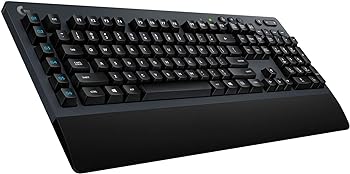
Key Features
-
LIGHTSPEED Wireless Technology
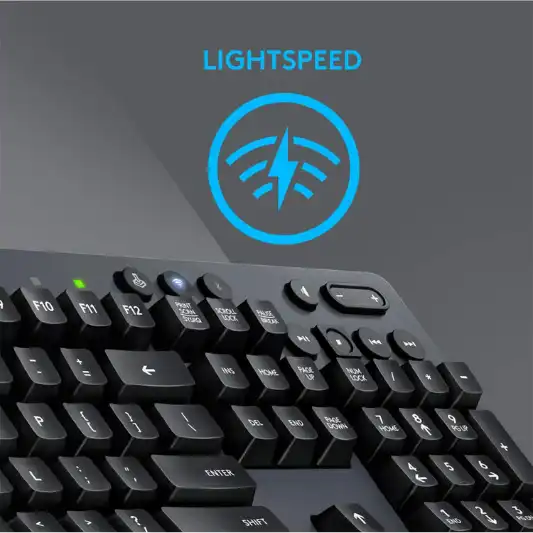
The G613 utilizes LIGHTSPEED wireless technology, providing a super-fast 1 ms report rate, ensuring seamless and lag-free gameplay.
-
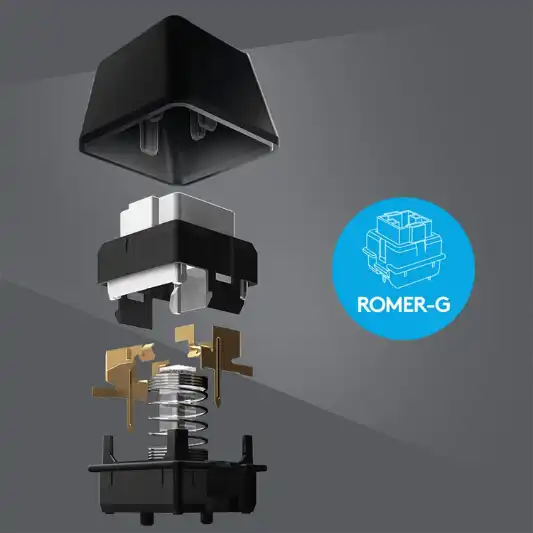
Romer G Mechanical Switches
These switches offer quiet, precise mechanical performance with a lifespan of 70 million clicks, delivering incredible feel and durability.
-
Programmable G Keys
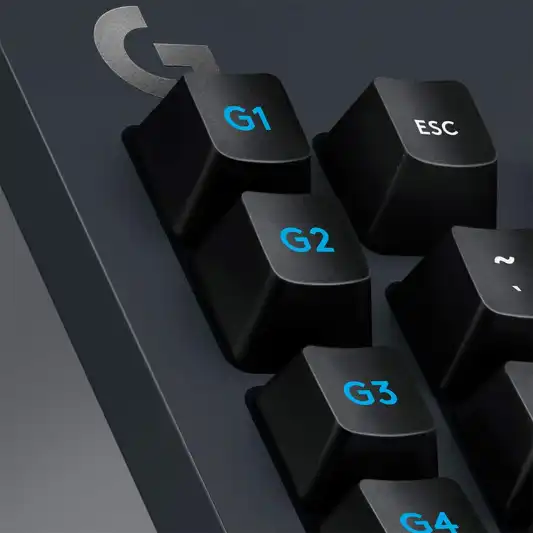
Six programmable G keys allow for custom macro sequences and in-app commands, enhancing gaming efficiency and personalization.
-
Dual Connectivity
The G613 supports both 2.4 GHz wireless and Bluetooth connectivity, making it versatile and compatible with multiple devices.
-
Extended Battery Life
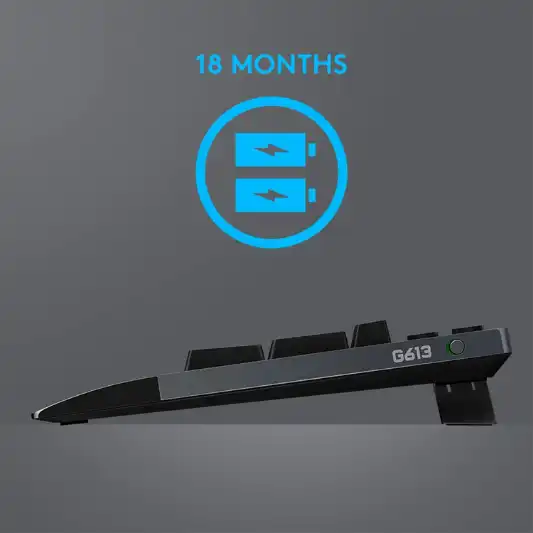
With up to 18 months of gaming on just two AA batteries, the G613 offers unmatched endurance for prolonged gaming sessions.
Specifications
| Specification | Details |
|---|---|
| Brand | Logitech G |
| Model | G613 |
| Item Model Number | 920-008386 |
| Compatible Devices | Gaming Console |
| Connectivity Technology | Bluetooth, 2.4 GHz Wireless |
| Keyboard Description | Gaming |
| Recommended Uses | Gaming |
| Special Features | Wireless, Bluetooth |
| Color | Black |
| Number of Keys | 104 |
| Backlighting Color Support | Single Color |
| Style | Keyboard Only |
| Hardware Platform | Laptop, Smartphone |
| Operating System | Windows 8, Chrome OS, Windows 7 |
| Item Weight | 3.1 pounds |
| Product Dimensions | 18.82 x 8.5 x 1.33 inches |
| Item Dimensions (LxWxH) | 18.82 x 8.5 x 1.33 inches |
| Power Source | Battery Powered |
| Battery Requirements | 1 Lithium Polymer battery required (included) |
| Manufacturer | Logitech |
| Language | English |
| Date First Available | November 9, 2017 |
Pros and Cons
Pros:
- Reliable Wireless Performance: LIGHTSPEED technology ensures a fast and stable connection.
- Durable Mechanical Switches: Romer G switches offer longevity and excellent tactile feedback.
- Versatile Connectivity: Dual connectivity options with 2.4 GHz and Bluetooth.
- Long Battery Life: Up to 18 months of usage on two AA batteries.
- Customizable Keys: Six programmable G keys for macros and commands.
Cons:
- No Backlighting: Limited to single color backlighting.
- Bulkier Design: Slightly larger and heavier compared to some competitors.
- No USB Passthrough: Missing convenience for additional peripherals.
Conclusion
The Logitech G613 is a robust and versatile wireless mechanical gaming keyboard that excels in delivering top-notch performance for serious gamers. Its LIGHTSPEED wireless technology ensures minimal latency, making it almost indistinguishable from a wired connection. The Romer G mechanical switches provide a satisfying tactile response and are built to last, with a 70 million click lifespan.
One of the standout features of the Logitech G613 is its dual connectivity. The ability to switch between LIGHTSPEED wireless and Bluetooth makes this keyboard extremely versatile. You can seamlessly switch from gaming on your PC to typing on your smartphone or tablet, all without the hassle of cables.
Battery life is another area where the G613 shines. With up to 18 months of use from two AA batteries, it offers unparalleled endurance. This extended battery life is particularly advantageous for gamers who prefer to avoid frequent battery replacements.
The inclusion of six programmable G keys allows for a high level of customization, enabling gamers to assign complex macros and commands to these keys. This can provide a significant advantage in games that require quick and precise inputs.
However, the G613 is not without its drawbacks. The lack of RGB backlighting may be a dealbreaker for some, as it limits customization and aesthetic appeal. Additionally, the keyboard’s bulkier design and heavier weight may not be ideal for gamers who prefer a more compact and lightweight setup. The absence of USB passthrough is another minor inconvenience, as it would have been a useful feature for connecting additional peripherals.
Overall, the Logitech G613 is a powerful and reliable gaming keyboard that offers excellent wireless performance, durability, and customization options. While it may not have all the bells and whistles of some high-end gaming keyboards, its combination of features, battery life, and build quality make it a solid choice for gamers seeking a dependable wireless mechanical keyboard.
You Might Be Interested In
- Logitech G513 Review
- Logitech G910 Orion Spark Review
- How to Choose the Right Micro USB Cord for Your Devices
- 10 Best Logitech Gaming Keyboards
- Logitech G203 Prodigy Mouse Review
Highly Recommended – ⭐⭐⭐⭐⭐
If you are in the market for a reliable and high-performance wireless mechanical keyboard, the Logitech G613 is an excellent choice. Its combination of LIGHTSPEED wireless technology, durable Romer G mechanical switches, and extensive battery life make it ideal for both casual and competitive gamers. The added versatility of dual connectivity and programmable G keys further enhance its value. Don’t miss out on the Logitech G613 for a seamless and immersive gaming experience.
Logitech G613 Comparison with Similar Products
When considering the Logitech G613, it’s essential to compare it with other popular wireless mechanical gaming keyboards on the market. This comparison will help you understand how the G613 stacks up against its competitors in terms of features, performance, and value for money.
Here, we will compare the Logitech G613 with the following keyboards:
- Corsair K63 Wireless Mechanical Gaming Keyboard
- Razer BlackWidow V3 Pro
- SteelSeries Apex Pro Wireless
Comparison Table
| Feature/Specification | Logitech G613 | Corsair K63 Wireless | Razer BlackWidow V3 Pro | SteelSeries Apex Pro Wireless |
|---|---|---|---|---|
| Wireless Technology | LIGHTSPEED, Bluetooth | 2.4 GHz, Bluetooth | Razer HyperSpeed, Bluetooth | Quantum 2.0 Dual Wireless, Bluetooth |
| Switch Type | Romer G Mechanical | Cherry MX Red | Razer Green/Yellow | OmniPoint Adjustable |
| Battery Life | Up to 18 months (2 AA) | Up to 75 hours (Rechargeable) | Up to 200 hours (Rechargeable) | Up to 40 hours (Rechargeable) |
| Programmable Keys | 6 G keys | Dedicated Media Controls | 5 Dedicated Macro Keys | No dedicated macro keys |
| Backlighting | Single Color | Blue LED | RGB | RGB |
| Connectivity | 2.4 GHz, Bluetooth | 2.4 GHz, Bluetooth | Razer HyperSpeed, Bluetooth | Quantum 2.0 Dual Wireless, Bluetooth |
| Weight | 3.1 pounds | 2.4 pounds | 3.1 pounds | 2.4 pounds |
| Dimensions | 18.82 x 8.5 x 1.33 inches | 14.4 x 6.7 x 1.6 inches | 17.7 x 9.8 x 1.7 inches | 17.2 x 5.5 x 1.6 inches |
| Price | Moderate | Moderate | High | High |
Logitech G613 vs. Corsair K63 Wireless
Corsair K63 Wireless
-
Wireless Technology
The K63 uses 2.4 GHz wireless technology with a 1 ms report rate and also supports Bluetooth connectivity.
-
Switches
Equipped with Cherry MX Red mechanical switches, which are known for their smooth and linear actuation.
-
Battery Life
Offers up to 75 hours of battery life with a rechargeable battery.
-
Backlighting
Features blue LED backlighting, which provides better aesthetics compared to the single-color backlighting of the G613.
-
Size and Weight
The K63 is more compact and lighter than the G613, making it more portable.
-
Additional Features
Includes dedicated media controls, which the G613 lacks.
The Corsair K63 Wireless is a strong competitor with its compact design, Cherry MX switches, and backlighting. However, the Logitech G613 excels in battery life and offers programmable G keys, making it a better choice for those prioritizing endurance and customization.
Logitech G613 vs. Razer BlackWidow V3 Pro
Razer BlackWidow V3 Pro
-
Wireless Technology
Utilizes Razer HyperSpeed wireless technology and Bluetooth.
-
Switches
Offers a choice between Razer Green (tactile and clicky) and Razer Yellow (linear and silent) switches.
-
Battery Life
Impressive battery life of up to 200 hours on a single charge.
-
Backlighting
Features full RGB backlighting, providing extensive customization options.
-
Programmable Keys
Includes 5 dedicated macro keys.
-
Additional Features
Comes with a plush wrist rest for added comfort during long gaming sessions.
The Razer BlackWidow V3 Pro stands out with its RGB backlighting, switch options, and exceptional battery life. It is more feature-rich and customizable than the Logitech G613, but it also comes at a higher price. If budget is not a constraint and you value RGB and switch variety, the BlackWidow V3 Pro is a top choice.
Logitech G613 vs. SteelSeries Apex Pro Wireless
SteelSeries Apex Pro Wireless
-
Wireless Technology
Uses Quantum 2.0 Dual Wireless technology and Bluetooth.
-
Switches
Features OmniPoint adjustable mechanical switches, allowing users to customize actuation points.
-
Battery Life
Offers up to 40 hours of battery life on a single charge.
-
Backlighting
Equipped with RGB backlighting.
-
Additional Features
Includes an OLED Smart Display for quick access to settings and information.
The SteelSeries Apex Pro Wireless is notable for its adjustable mechanical switches and OLED Smart Display, making it a highly customizable option. However, it has a shorter battery life compared to the G613. For those who prioritize switch customization and display features, the Apex Pro Wireless is an excellent choice, albeit at a premium price.
FAQs
How does the LIGHTSPEED wireless technology in the Logitech G613 compare to wired connections in terms of latency?
LIGHTSPEED wireless technology is designed to deliver a 1 ms report rate, making it virtually as fast as a wired connection. This technology ensures minimal latency and lag, providing a seamless gaming experience that rivals the responsiveness of traditional wired keyboards. For competitive gaming, this performance is crucial as it ensures that every keystroke is registered almost instantaneously.
What is the lifespan of the Romer G mechanical switches, and how do they feel compared to other switches?
The Romer G mechanical switches in the Logitech G613 are rated for 70 million clicks, making them highly durable. These switches are known for their quiet and precise actuation, providing a smooth and tactile feel that is different from the more common Cherry MX switches. The Romer G switches have a shorter travel distance and actuation point, which can result in faster and more responsive typing and gaming performance.
Can the Logitech G613 be used with devices other than a PC, such as smartphones or tablets?
Yes, the Logitech G613 can be used with a variety of devices thanks to its dual connectivity options. It supports Bluetooth connectivity, allowing it to pair with smartphones, tablets, and other Bluetooth-enabled devices. This makes it a versatile keyboard for both gaming and general use across multiple platforms.
How do you customize the programmable G keys on the Logitech G613?
The six programmable G keys on the Logitech G613 can be customized using the Logitech G HUB software. This software allows you to create and assign macros or in-app commands to each G key. You can customize profiles for different games or applications, providing quick access to complex actions and enhancing your gaming efficiency.
Is the Logitech G613 suitable for competitive gaming, and what features make it ideal for such use?
The Logitech G613 is well-suited for competitive gaming due to its LIGHTSPEED wireless technology, which offers a 1 ms report rate and ensures minimal latency. The Romer G mechanical switches provide precise and responsive keystrokes, essential for fast-paced gaming. Additionally, the programmable G keys offer customization options that can give competitive gamers an edge by allowing them to execute complex commands with a single press.
